Interface function introduction
A
F
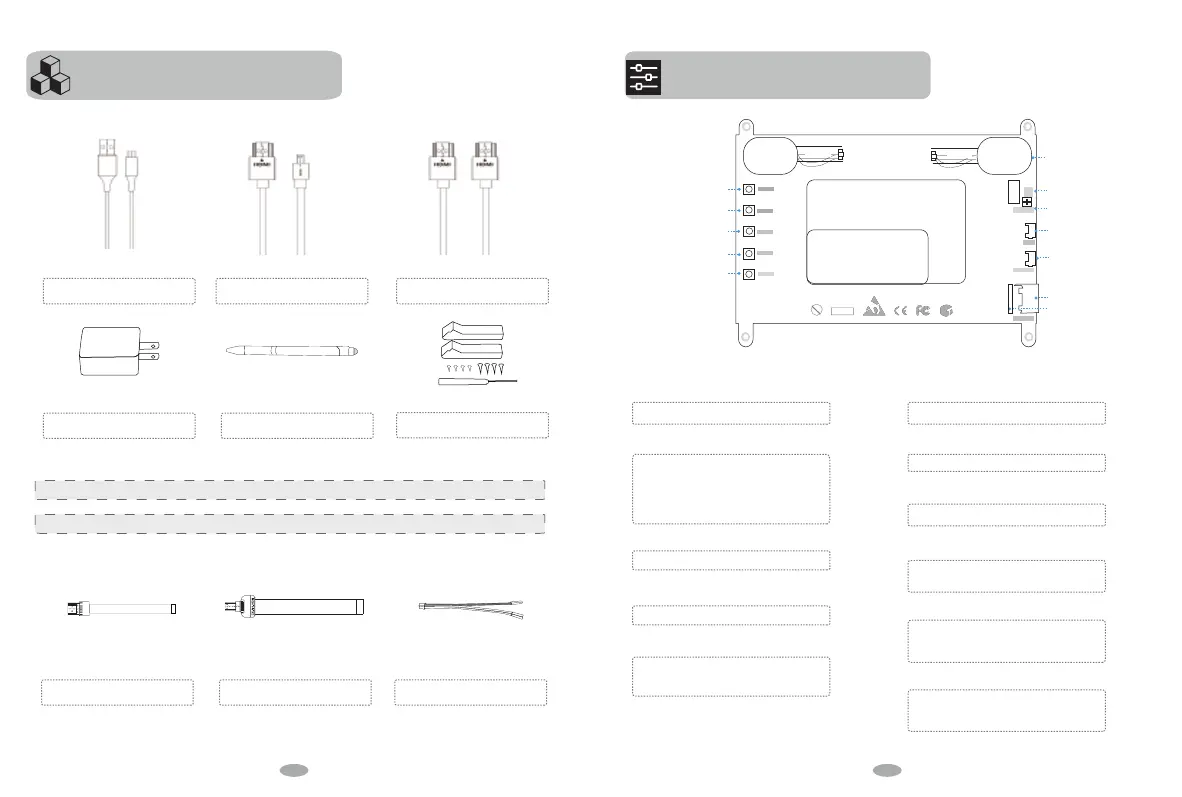
For power
5V/2A Adapter
For Touch
Stylus Pen
For Power( 5V/IN)
For Touch( 5V/Touch)
Micro USB Cables x 2
Transmit Signal for Pi 4
Micro HDMI to Standard HDMI Cable
Transmit Signal for Pi 3B+/PC
Standard HDMI Cabl
POWER
MENU
UP
DOWN
EXIT
GND
5V
5V
Power led
5V IN
5V+ Touch
HDMI IN
B
C
D
E
G
H
I
J
K
L
Speaker-R
Portable Dispiay
1042X600@60Hz
7”-IPS
Speaker-L
ROHS
Pb
A Power
Power On/O
B Menu
After entering the menu Option, Press the
Menu button,then enter the lower menu or
confirm command function.
It includes menu items such as brightness
contrast, image adjustment, color
temperature, location, setting, etc.
C UP Button
Volume Up/Former Setting
D
DOWN Button
Volume Down/Next Setting
E
EXIT button
The EXIT button is the return button. When
you need to return the previous setting
operation, please press the button.
F
Speakers
Speakers
G
Power LED
Power LED
H
5V/IN Port
Port for power supply.
J
5V+TOUCH Port
The touch function is available when the
5V+Touch port is connected.
K
HDMI Port
for the Raspberry Pi board and the
monitor's connection by a ribbon HDMI
cable, is used to transmit signal
L
Buit-in HDMI Port
for the Raspberry Pi board and the
monitor's connection by a ribbon HDMI
cable, is used to transmit signal
Function of main accessories
Monitor Stand
Prop stand
Instead of Standard HDMI cable
for signal transmission
FPC Cable-Standard HDMI
Instead of Micro HDMI to HDMI cable
for signal transmission
FPC Cable-Micro HDMI
Instead of the Micro USB Cable to power
PH 2.0mm-3pin connector
We oer lifetime replacementon Accessories Part listedabove.
The following accessories part are provided as gifts, are not covered by warranty.
4 5


 To Next Page