9
Propane (LP) Models Only
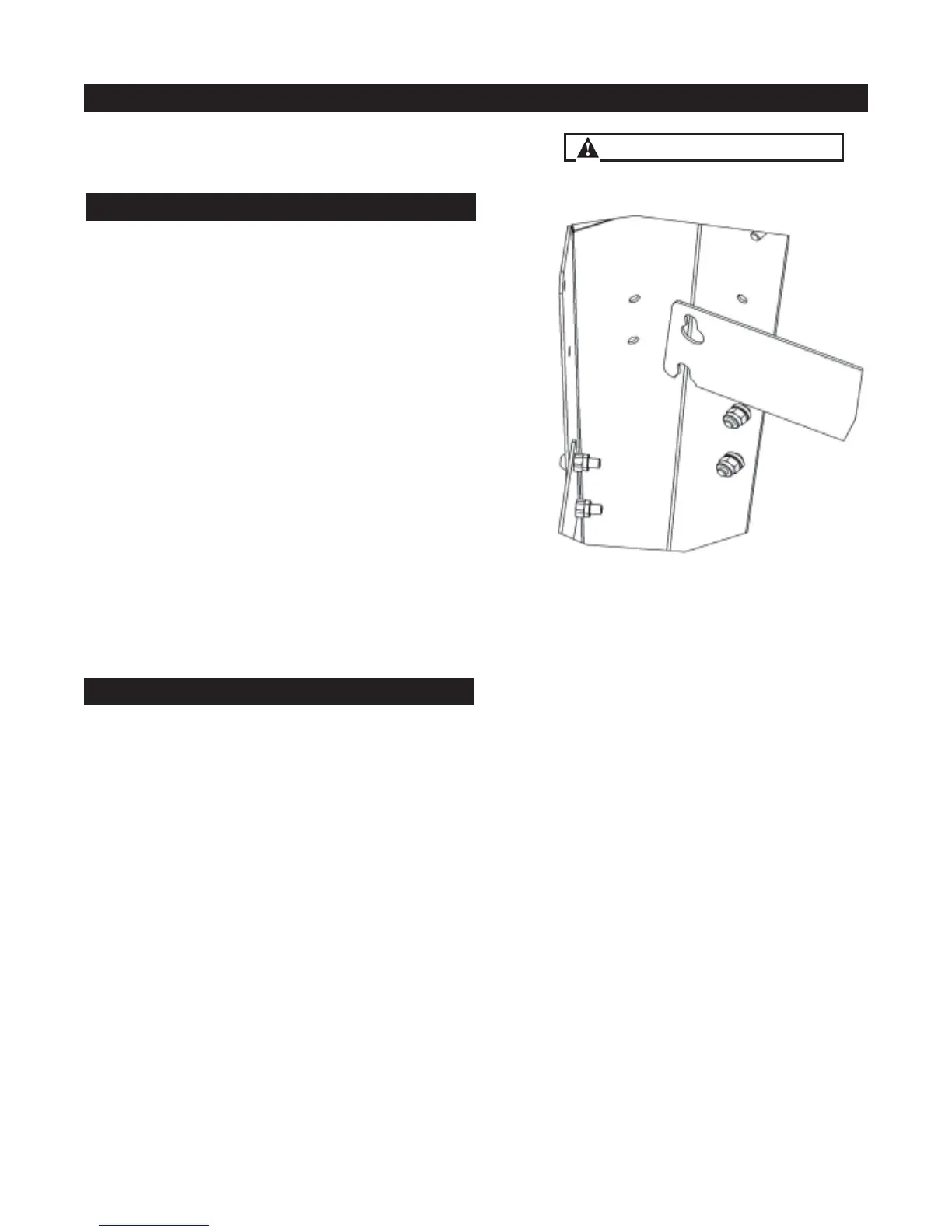
1. From right side of grill, grasp removable leg support
at each end and lift upward. Once the leg support is
disengaged from the keyway fasteners, lift leg support
outward.
The keyway fasteners are tensioned with a spring
that secures the removable leg support to the right
and rear legs.
2. Tilt removable leg support to one side and remove from
leg frame.
3. Reverse the removal process to install the keyway leg
support for exchanging LP tanks.
Removing Leg Support
Installing Vinyl Tank Sleeve
Propane (LP) Models Only
Use Standard 20lb LP Tank
1. Fit vinyl tank cover over LP tank and place tank inside
wheeled cart, fi tting LP tank ring inside ring of Evo lower
rack.
LP tanks have a circular ring welded to the bottom of the
tank. In some instances, this ring can become bent and
not uniformly round. Because this circular ring of the LP
tank fi ts into the corresponding ring of the Evo lower rack,
it may be necessary to bend the LP ring back to its original
position.
Installation and Storage of LP Tank
Some parts may contain sharp edges.
Wear protective gloves as necessary.


 To Next Page