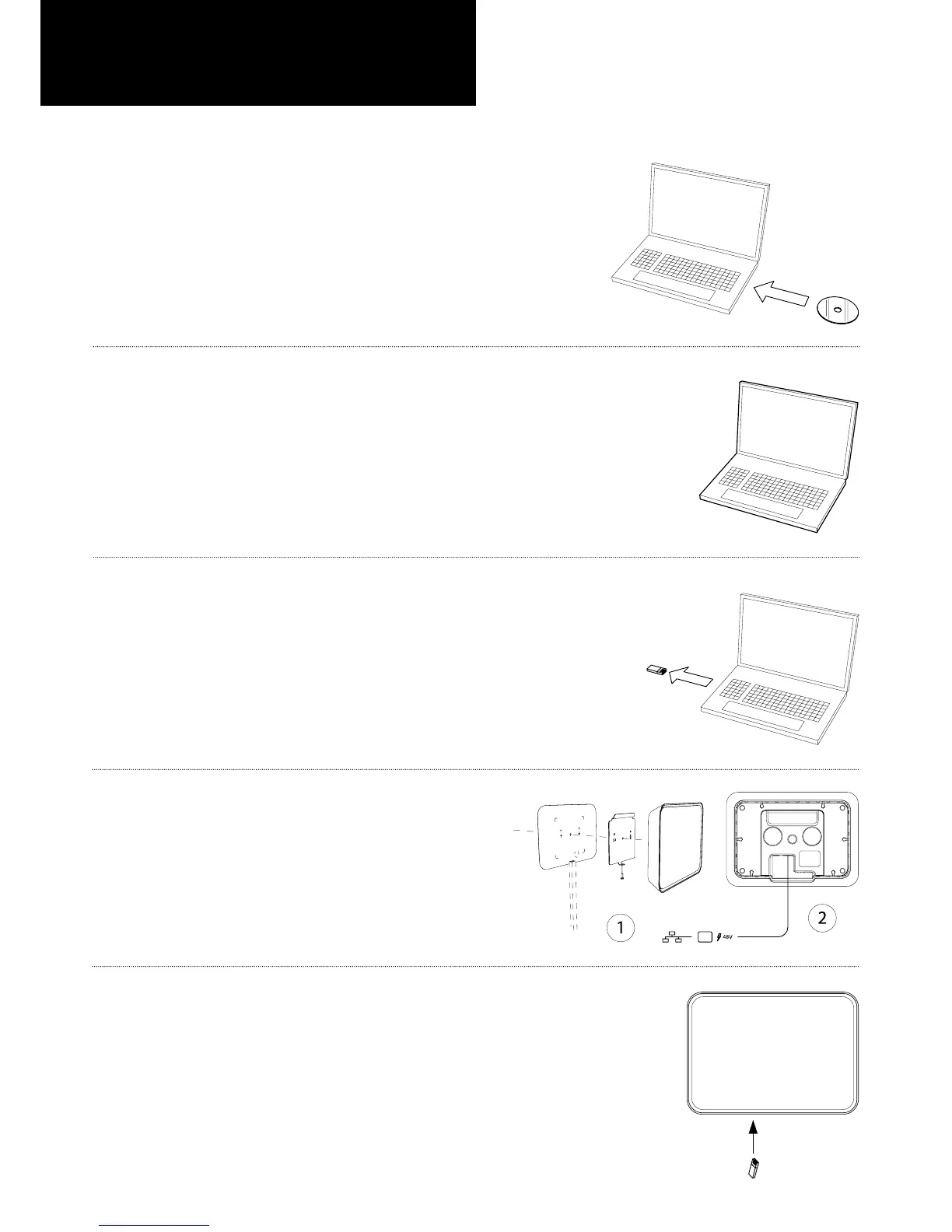
EN Unpack box, run the Evoko CD and follow the detailed instructions.
DE Packen Sie die Box aus, starten Sie die Evoko CD und folgen Sie den detaillierten Anweisungen.
ES Desempaque la caja, inserte el CD Evoko y siga las instrucciones detalladamente.
FR Ouvrir la boîte, insérer le CD Evoko et suivre les instructions détaillées.
IT Aprire la confezione, inserire il CD Evoko e seguire dettagliatamente le istruzioni.
PT Abra a caixa, rode o CD do Evoko e siga as instruções detalhadas.
RU Откройте упаковку, вставьте компактный диск Evoko в компьютер и следуйте подробным
инструкциям на экране.
EN Create room accounts in Microsoft Exchange, then run Evoko PC application.
DE Erstellen Sie Raumkonten in Microsoft Exchange und starten Sie anschließend die Evoko PC-Applikation.
ES Cree las salas de conferencias en Microsoft Exchange y corra la aplicación Evoko PC.
FR Créer des comptes de salles dans Microsoft Exchange, puis exécuter l’application Evoko PC.
IT Creare degli accounts per le sale usando Microsoft Exchange, quindi lanciare l’applicazione Evoko PC.
PT Crie contas de sala no Microsoft Exchange e então rode o aplicativo Evoko no PC.
RU Создайте конто конференц-залов в Microsoft Exchange, и запустите программу Evoko для PC.
EN Use PC application to export room settings to a USB stick.
DE Verwenden Sie die PC-Applikation für den Export von Raumeinstellungen auf einen USB-Stick.
ES Use la aplicación PC para exportar la conguración de las salas de conferencias a una memoria USB.
FR Utiliser l’application PC pour exporter les paramètres de salles sur une clé USB.
IT Usare l’applicazione PC per esportare i settings delle sale su una chiavetta USB.
PT Use o aplicativo do PC para exportar as congurações da sala para um pen drive.
RU Используйте программу PC для копирования настроек залов на флэш-память USB.
EN Mount the device, connect and power-up.
DE Montieren Sie das Gerät, schließen Sie es an und schalten Sie es ein.
ES Monte, conecte y encienda el dispositivo.
FR Installer le périphérique, le connecter et le mettre en marche.
IT Montare l’apparecchio, connetterlo ed accenderlo.
PT Monte o dispositivo, conecte e ligue.
RU Монтируйте аппарат, соедините провода и включите в сеть.
EN Connect the USB stick and assign the correct room to each device.
DE Schließen Sie den USB-Stick an und weisen Sie dem Gerät die richtige Raumbezeichnung zu.
ES Conecte la memoria USB y asigne la sala correcta a cada dispositivo.
FR Brancher la clé USB et attribuer la bonne salle à chaque appareil.
IT Connettere la chiavetta USB ed assegnare la giusta sala ad ogni dispositivo.
PT Conecte o pen drive e atribua a sala correta a cada dispositivo.
RU Вставьте память USB и присвойте каждому аппарату правильный зал.
A
1
B
C
D
E
DE Konguration und Installation
ES Conguración e instalación
FR Conguration et installation
IT Congurazione ed installazione
PT Conguração e instalação
RU Конфигурация и инсталляция
Congurationandinstallation


 To Next Page
 Loading...