12 13
Now & Next Feature
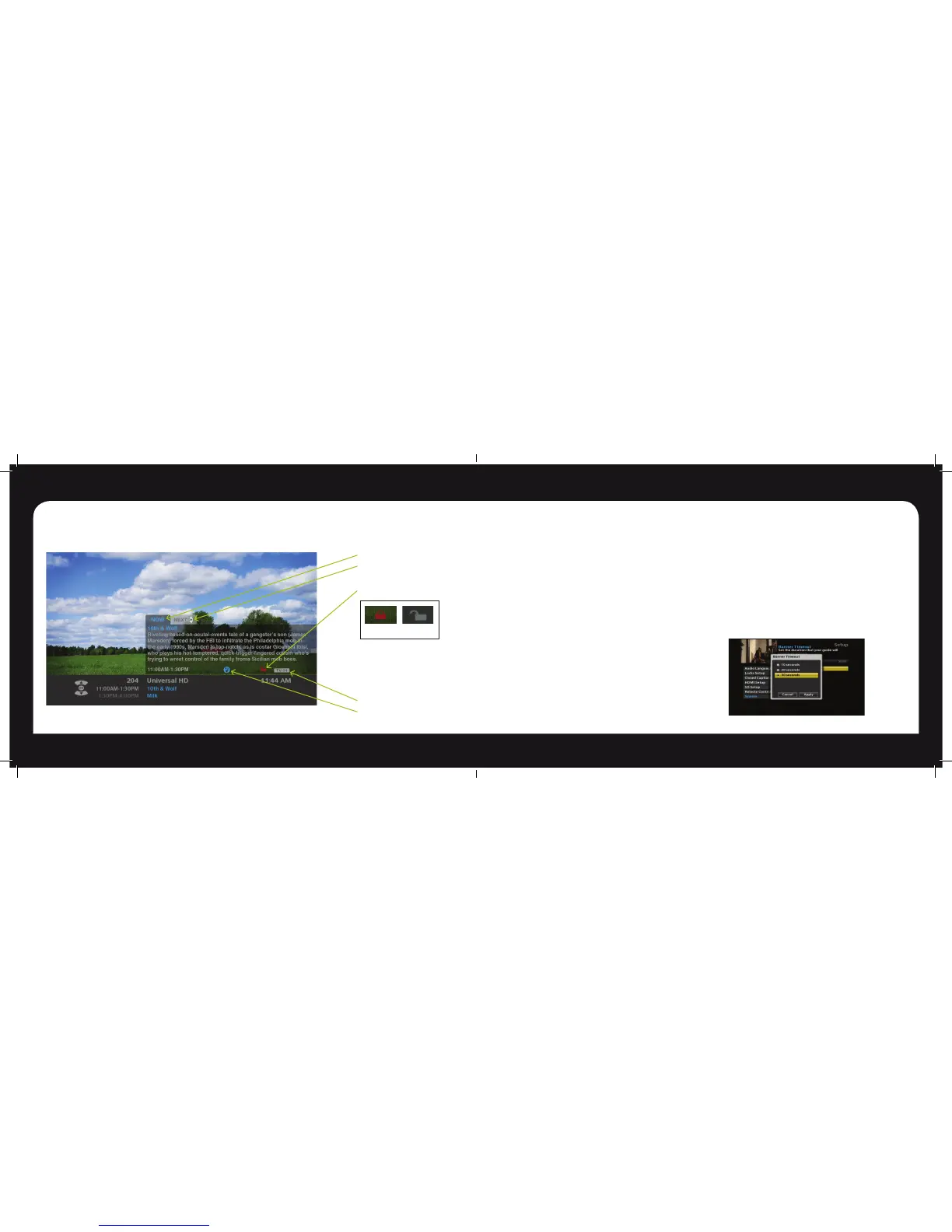
Your HD STB will display a banner that shows what’s on now and what’s on next.
ç Now/Next Banner
ç Extended View
What’s on Now
What’s on Next
Lock/Unlock Icon
TV Rating Icon
Pg Up/Pg Down Icon
Locked Unlocked
Now & Next Banner and Extended View ç
Press the Info button on your remote to display the Now/Next banner. You can now use the Arrow (▲/▼) buttons to browse
channel programs without changing the current channel. Press OK to select and change the channel.
Press the Info button a second time and the extended view will show program information. Use the Arrow (◄/►) buttons
to toggle between what’s on now and what’s on next.
If the information doesn’t fit on one screen you will see a Pg Down icon. Use the Pg Up/Pg Down buttons on your remote to
view the additional information.
NOTE: Press the Guide button to immediately display the banner and extended view.
Set Banner Timeout è
You can choose the duration the Now/Next
banner will display. Press the Menu button and select System.
Choose between 10, 20 and 30 seconds. Select Apply.
Now & Next Now & Next


 To Next Page