Need help?
Do you have a question about the Evolution Digital EVO PRO and is the answer not in the manual?
Guides the initial boot sequence and pairing of the remote control.
Covers welcome, language selection, and Wi-Fi credential entry.
Sign-in, terms acceptance, location services, and app installation options.
System loads configuration, updates apps, and initiates Smart RCU setup.
Verifies the Smart Remote Control Unit setup and functionality.
Scans for devices, verifies TV brand, and tests remote control functions.
Completes remote pairing and transitions to the main user interface.
Instructions for pairing a replacement remote by pressing Home and Back buttons.
Using the 'My TV' button to access the Google Play Store for MergeTV.
Steps to select and install the MergeTV application from the Play Store.
Opening the installed MergeTV app and entering credentials.
Defines 'My TV' button behavior post-install and for installed app.
Specifies the Guide button's role in accessing the Application Grid.
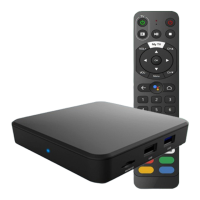
Details functions of Red, Green, Yellow, and Blue buttons for MergeTV.
 General
| Model | EVO PRO |
|---|---|
| Manufacturer | Evolution Digital |
| Category | Set-top box |
| Connectivity | Ethernet |
| Operating System | Linux |
| HDMI Output | 1 |
| USB Port | 1 |
| Ethernet Port | 1 |
| RF Input | 1 |
| Composite Video Output | 1 |
| Analog Audio Output | RCA Stereo |

 To Next Page