Prioritisation of the maintenance tasks is saved per AriKey system / client and also applies to
the smartphone app with installed AirKey app and activated maintenance authorisation.
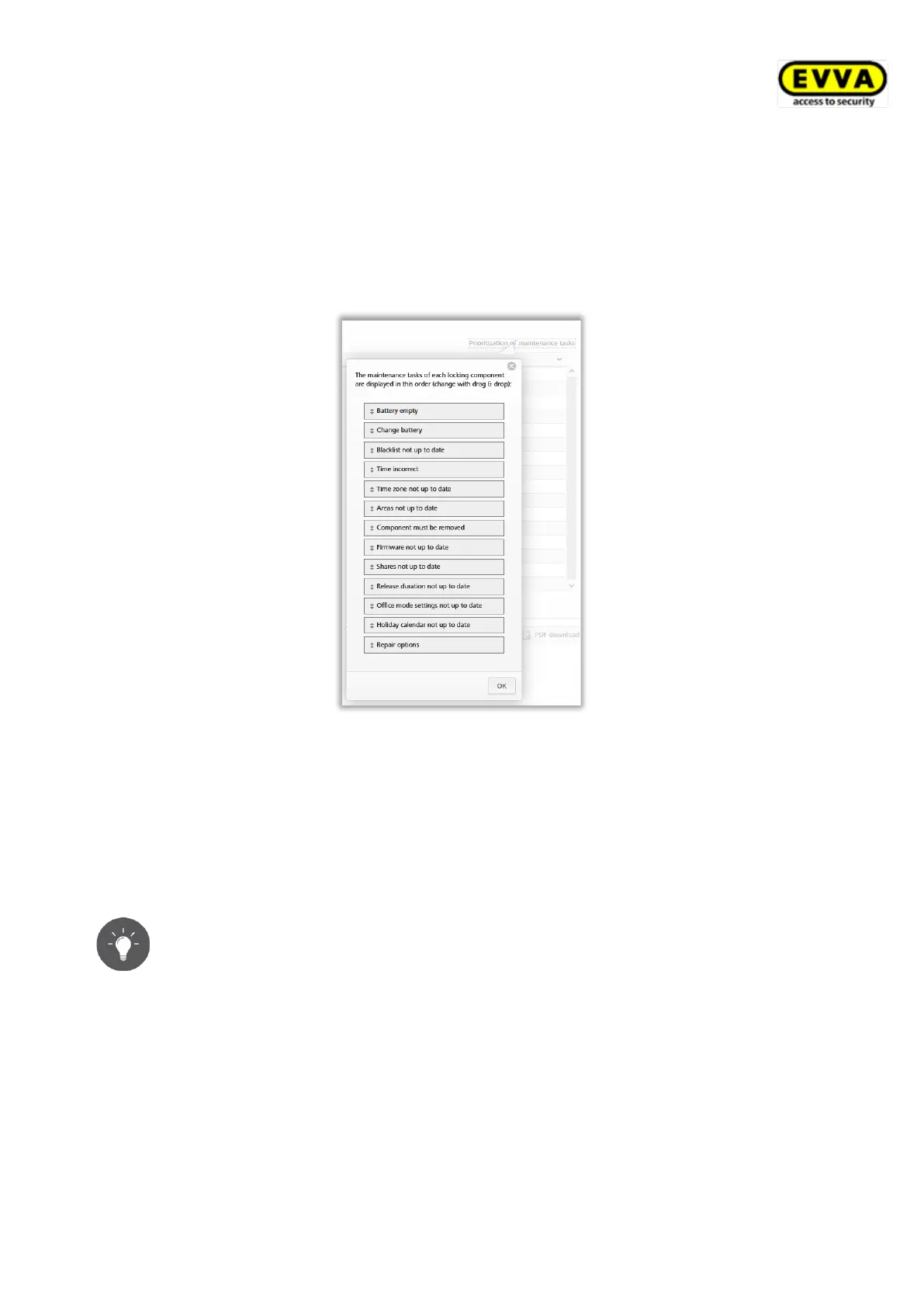
> Click Prioritisation of maintenance tasks.
> Customers have different demands – depending on the applications, drag and drop
the items into the desired order.
> Click OK to save the changed prioritisation.
Figure 160: Prioritisation of maintenance tasks
The list of maintenance tasks is now shown with changed priorities. Individual items on the
list with maintenance tasks have been linked to the detailed pages of the corresponding
locking components.
Once a maintenance task has been completed by updating the locking component, the item
is automatically removed from the list of maintenance tasks.
You can create the list of all due maintenance tasks as a PDF file and print
it. For this purpose, click the PDF download button.
5.5.12 Customer data – locking chart
As described before, open the Customer data menu to retrospectively change information
entered upon registration, e.g. the name of the access control system, company name or
also the contacts.
The "Edit customer data" page features a button at the top right to export a locking chart for
the entire access control system. The locking chart is an overview of all locking components
within an access control system as well as its assigned smartphones and access media.


 To Next Page
 Loading...