AirKey system manual version 2.7 |
06/03/2024 | Subject to technical changes and misprints
Removing deactivated media is exclusively possible if the medium has been
fully deactivated. Consequently, the medium has either been updated or an
updated blacklist has been loaded to all locking components to which the
medium had been authorised. It is not possible to remove media until the
aforementioned conditions have been met.
> On the Home screen, select the Smartphones or Cards tile.
> Alternatively select Media & persons → Media in the main menu.
> In the overview list, click the deactivated medium you would like to remove.
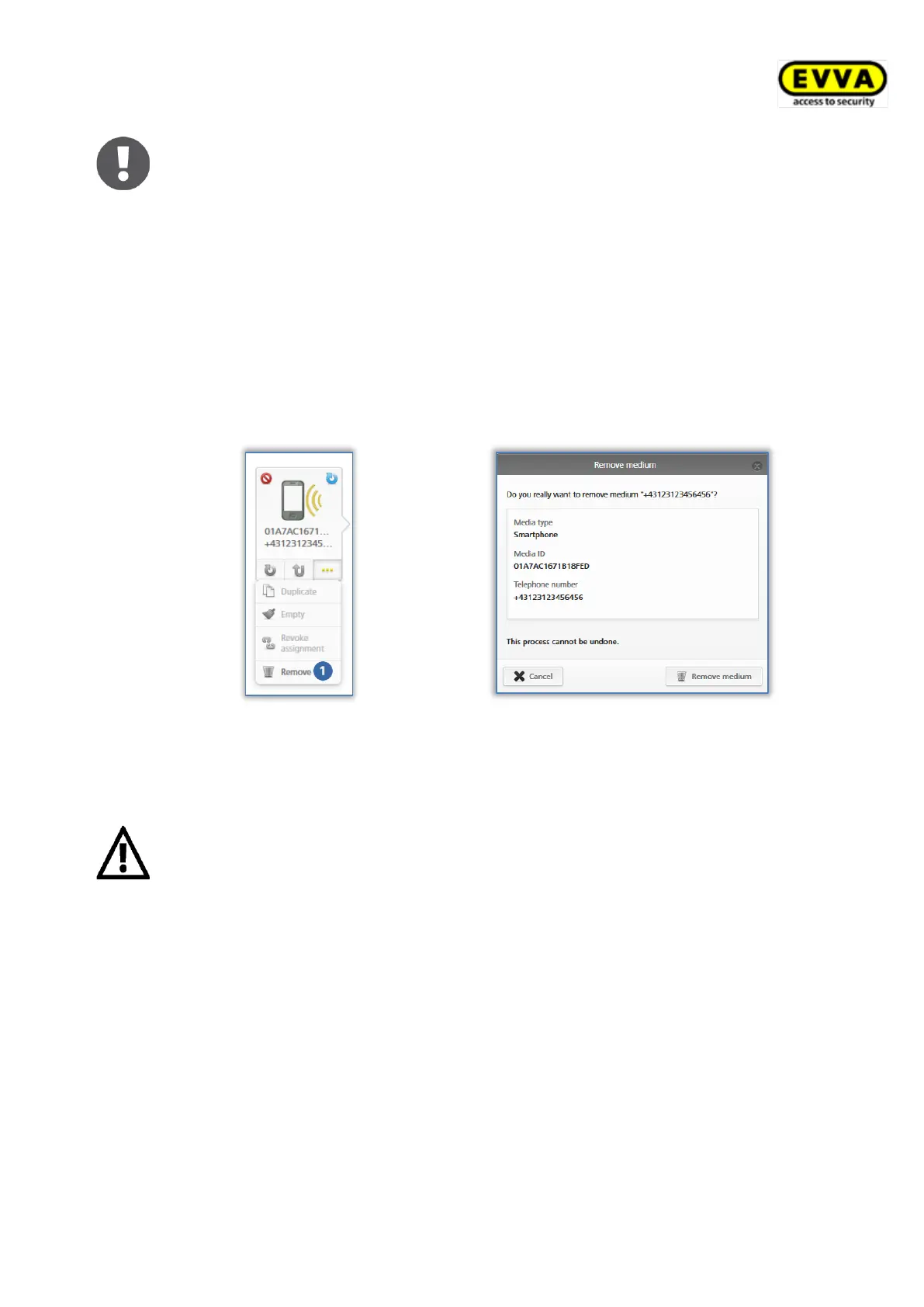
> Click More... below the media icon and select Remove .
> Then confirm the security prompt with Remove medium to remove the deactivated,
currently highlighted medium from the access control system.
Figure 184: Removing deactivated media
Figure 185: Removing media – security prompt
> A message appears notifying of successful deletion and the medium is then no longer
shown in the access control system.
This process is irrevocable. Media removed using this process are no longer
listed in the access control system and they can consequently no longer be
used.
This process does not automatically reset media to factory state.
5.6.19 Reactivating media
Deactivated media (highlighted by a red circle ) can be reactivated if they have once again
become available.


 To Next Page
 Loading...