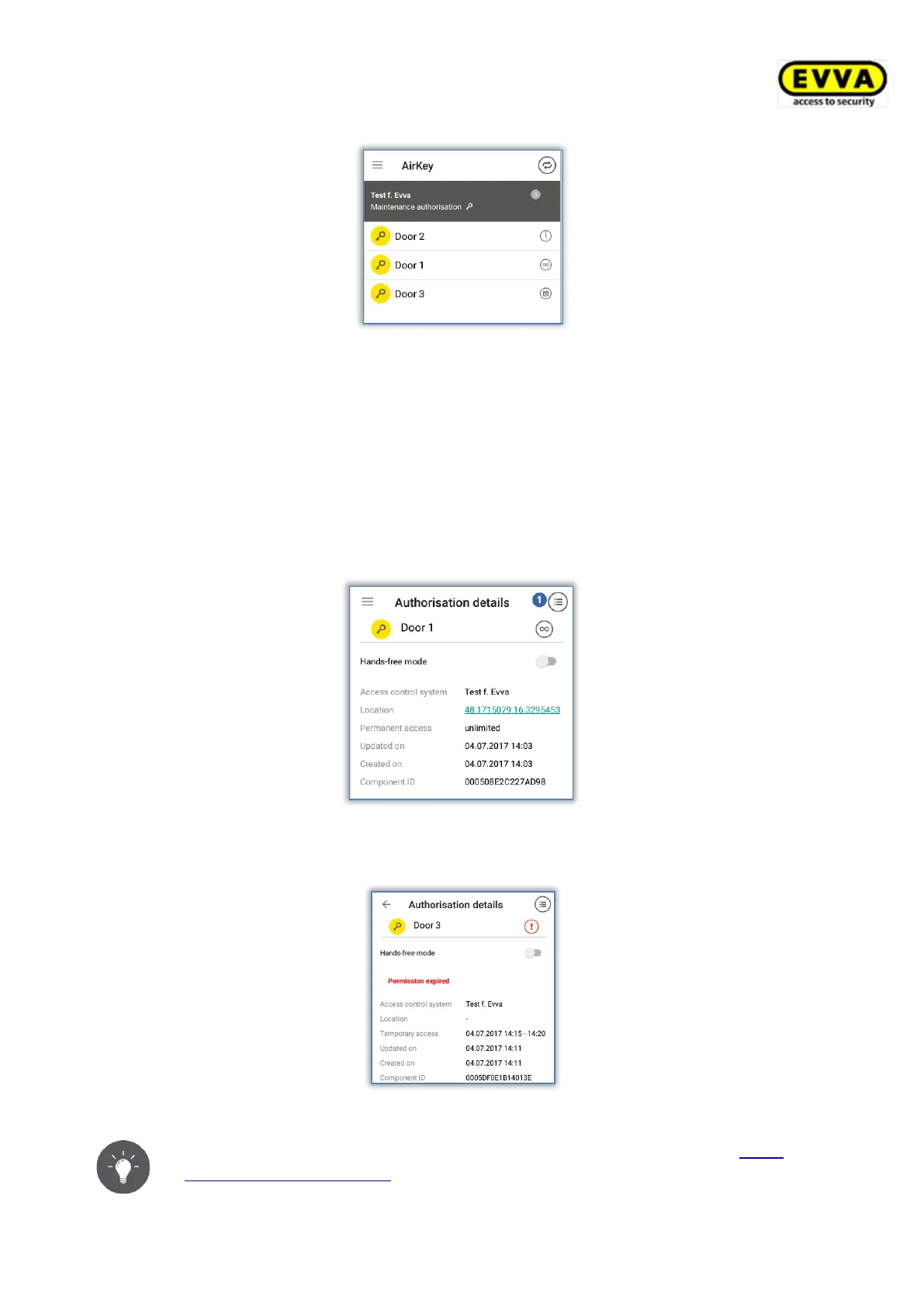
Figure 218: AirKey app – authorisation overview
> Select one of the authorisations to view the details of the corresponding autho-
risation. This section shows the location data (GPS coordinates or address) as a link.
Tap the link to be automatically forwarded to the map provider you set on your
smartphone by default.
> You can also activate Hands-free mode individually for each authorisation in the
authorisation details. The precondition for this is that the administrator has allowed
the Hands-free mode for the locking components, for the AirKey app has not been
defined a PIN code, and the Hands-free mode has been activated in the app settings.
Figure 219: AirKey app – authorisation details
The system indicates if the access authorisation has expired.
Figure 220: Authorisation expired
If your smartphone has been authorised to view event log data (see Event
log data in the AirKey app), you can view the key event log for the selected
authorisations in the authorisation details .


 To Next Page
 Loading...