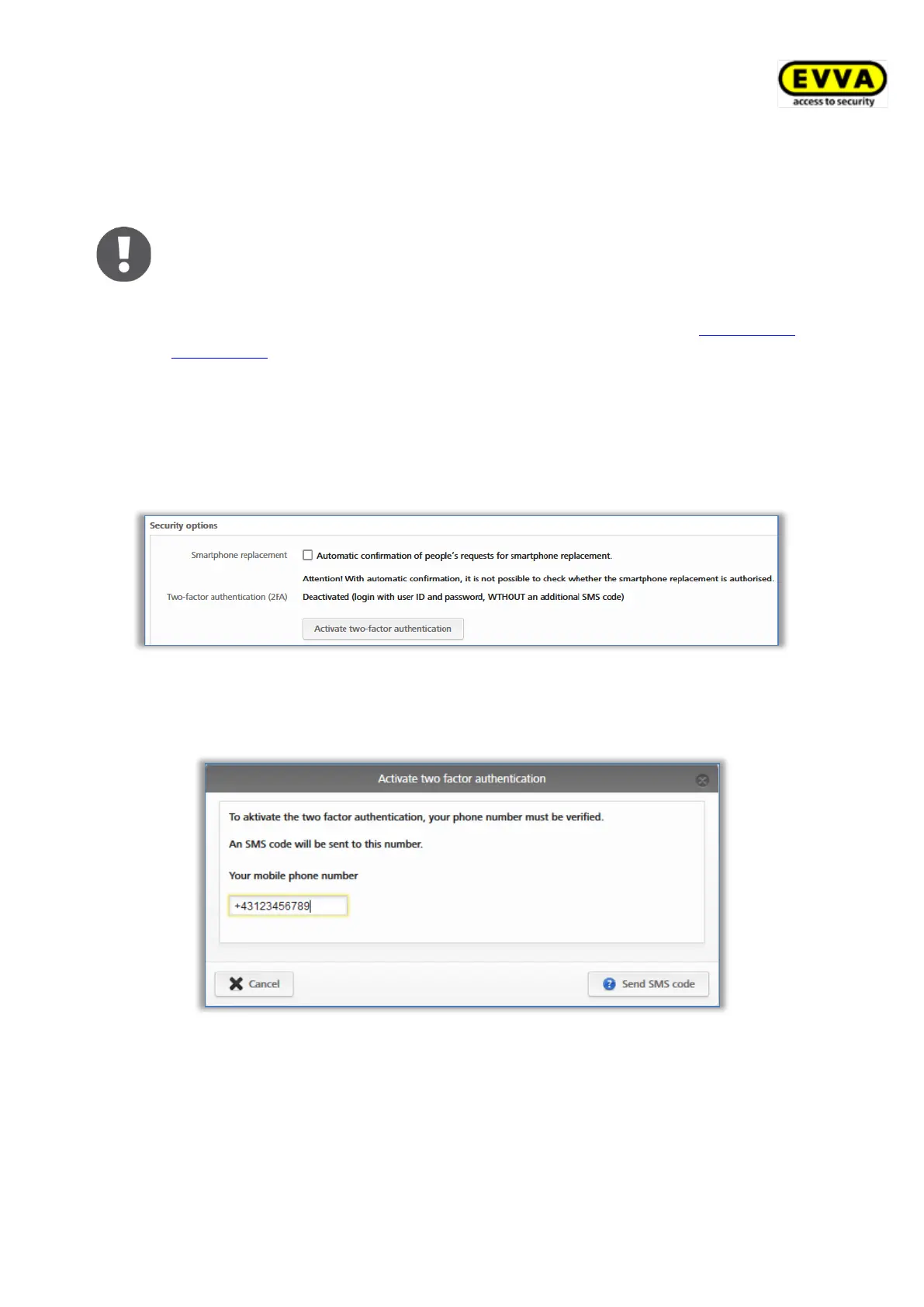
The checkbox Automatic confirmation of people´s request for smartphone
replacement can be used to automatically confirm replacement operations that have been
started via a smartphone.
This means that every smartphone replacement that is started via the
smartphone is automatically confirmed immediately, provided that sufficient
credit is available. Please note that a KeyCredit will be deducted for each
smartphone replacement in which authorisations are transferred. Details about
the smartphone replacement can be found in the chapter Smartphone
replacement.
The two-factor authentication, or 2FA, is used as an additional security level when
logging in to the AirKey Online Administration. In addition to the user ID and password, an
additional SMS code is requested as a second factor. If two-factor authentication is activated
in the settings, it is applied to all administrators of this access control system.
> To activate it, click the Activate two-factor authentication button.
Figure 116: General settings – two-factor authentication (2FA)
> Enter the mobile phone number to be used for two-factor authentication for the
currently logged on administrator and click Send SMS code.
Figure 117: Verify mobile phone number settings
> An SMS code is sent to the previously specified telephone number. This SMS code
must be entered in the dialogue within the AirKey Online Administration and
confirmed with Save.


 To Next Page
 Loading...