Chapter 3
Hardware Description
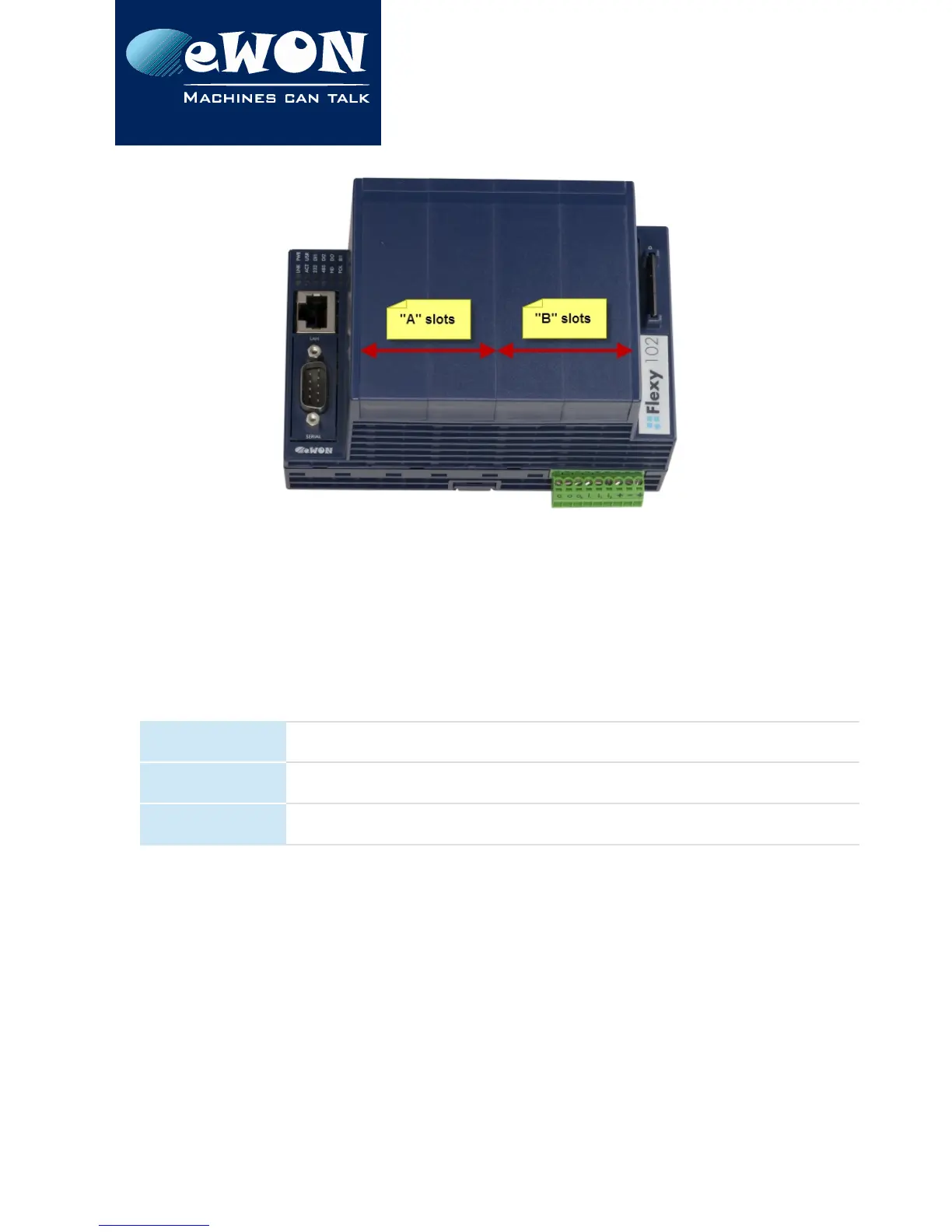
The reference code of the Extension Cards includes a letter that defines their compatibility
either with “A” slots, “B” slots or both:
• FLA xxxx - designates cards that fit into “A” slots
• FLB xxxx - designates cards that fit into “B” slots
• FLX xxxx - designates cards that fit into both “A” and “B” slots
In addition to the card reference, each type of extension card bears a visual compatibility
symbol on its front panel. The visual symbols are shown in the table below:
●●○○
2 first slots only (A)
●●●●
In any slot (X)
○○●●
2 last slots only (B)
3.6.2. Extension Card Insertion
Please wait 30 seconds after powering off the equipment before inserting (or removing) an
extension card. This is to avoid possible damage to the Base Unit and Extension Card.
Remove the slot filler of the location where you want to insert the new card. To do this, press
on both ends of the cover, note that the hooks (1) are out-centered like shown on the
pictures.
Page 10 / 15 eWON Flexy Single Ethernet Ext. Card FLX3101 | IG 017


 To Next Page