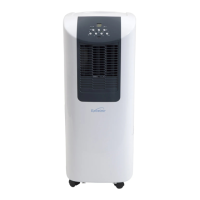
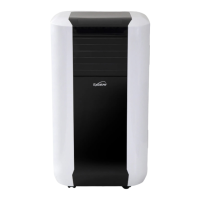
This document describes the Excelair Portable Air Conditioner & Dehumidifier, models EPA14A and EPA16A. It functions as a portable air conditioner and dehumidifier, designed for indoor use.
Technical Specifications
| Feature |
EPA14A |
EPA16A |
| Power supply |
220-240V~, 50Hz |
220-240V~, 50Hz |
| Cooling capacity |
3.6kW |
4.0kW |
| Power/Ampere consumption |
1350W/5.9A |
1580W/7.0A |
| Compressor |
rotary |
rotary |
| Refrigerant |
R-410A |
R-410A |
| Fan speed |
3 |
3 |
| Timer |
1~24 hours |
1~24 hours |
| Working temperature |
18~32°C |
18~32°C |
| Exhaust pipe |
Ø 150 x 1500 mm |
Ø 150 x 1500 mm |
| Net Weight |
33.5 kg |
34 kg |
| Dimension (WxDxH) |
415 x 418 x 790 mm |
415 x 418 x 790 mm |
Remarks:
- Measuring conditions are as per EN 14511: DB=35°C, WB=24°C, where DB is dry bulb temperature (room temperature) and WB is wet bulb temperature (relative humidity).
- Test conditions for rating label data are as per safety regulation: EN 60335-2-40.
- Current & Fuse: F2L250V or T2L250V.
Before Use Guidelines
- For indoor use only.
- Do not use in cabinets, closets, boats, caravans, or similar locations.
- Allow the unit to stand for 12 hours before connecting to the mains supply after transport or if it has been tilted (e.g., during cleaning).
- Use only in the upright position on a flat, level surface, at least 50cm from any objects.
- Do not use in potentially explosive environments containing combustible liquids, gases, or dusts.
- Avoid use near swimming pools, washrooms, or similar wet areas.
- Do not place objects on the unit or restrict air inlet/outlet.
- Ensure at least 50cm clearance between the appliance sides and any flammable, heating materials.
- Avoid contact with water.
- Closely supervise children and pets when the unit is in use.
- This appliance is not intended for use by persons (including children) with reduced physical, sensory, or mental capabilities, or lack of experience and knowledge, unless supervised or instructed by a person responsible for their safety. Children should be supervised to ensure they do not play with the appliance.
- Switch off and unplug when not in use.
- Do not pull the unit by the cord.
- Avoid over-twisting, coiling, or pulling the power cord; never use nylon or iron wire to tie it.
- Never retrieve the unit if it has fallen in water; immediately pull the plug and have it checked before reuse.
- Do not use extension cords.
- If the supply cord is damaged, it must be replaced by an electrician or similarly qualified person.
- The mains supply must conform to the specification on the rating plate.
- Install in accordance with national wiring regulations.
- Do not exceed the recommended room size for maximum efficiency.
- Close doors and windows.
- Keep curtains or blinds closed during the sunniest part of the day.
- Keep filters clean.
- Once the room reaches desired conditions, reduce temperature and ventilation settings.
- Only a licensed professional is allowed to dismantle or modify the appliance.
- The machine is for its prescribed purpose only; any other use is deemed misuse, and the user/operator is liable for any resulting damage or injuries.
- Never store the unit on its side or upside down.
Parts Description
Front View (FIG.5):
- Control Panel
- Remote control receiver
- Air vent
- Carrying handle
- Water gate (for energy saving)
- See-through window for water level inside the unit
Back View (FIG.6):
7. Air filter (air inlet)
8. Cord compartment
9. Exhaust air outlet
10. Drainage knob / drainage point
11. Air filter (air inlet)
12. Air filter (air inlet)
Accessories (FIG.7):
13. Exhaust hose
14. Flat Type Adaptor - for inserting over a house and into a window spacer
15. Inward adaptor (connecting unit & exhaust hose)
16. PVC strip - for filling the open window space
17. PVC strip - for filling the open window space
18. PVC strip (with hole) - for filling the open window space and with a hole for connection to a flat type adapter
19. Drain tube for continuous drainage
20. Active carbon filter
21. Remote control
Installation
The unit is portable and can be moved from room to room.
Using the extendable slide (FIG.8):
- Offer the window spacer to the window gap and adjust its length as needed.
- Feed the exhaust hose through the window spacer and slide the window across so the spacer is held securely. This method can also be used for sash windows. Ensure protection against intruders.
Exhaust Hose Connection (FIG.11, FIG.12, FIG.13, FIG.14):
- Use only the provided hose and clip the exhaust hose and unit adaptor to the back of the air conditioner.
- Avoid kinks and bends in the exhaust hose, as this will cause expelled moist air to build up, leading to overheating and shutdown.
- The hose can be extended from 300mm to 1500mm, but for maximum efficiency, use the shortest possible length.
- WARNING! The exhaust pipe length is specifically designed for this product. Do not replace or prolong it with a private hose, as this could cause malfunction.
Installation of the carbon filter (FIG.15, FIG.16):
- Remove the filter frame from the unit.
- Separate the filter fixer from the filter frame.
- Remove the active carbon filter from its plastic bag.
- Insert the active carbon filter into the filter frame.
- Fix the filter by reassembling the fixer onto the filter frame.
- Re-fit the filter frame inside the unit.
Operation
Control Panel (FIG.17):
- A. TIMER button: Sets operating hours (1-24 hours).
- B. SPEED (ventilation) button: Selects ventilation speed (High, Medium, Low).
- C. MODE button: Selects working mode (Cooling, Fan, Dehumidify (Dry)).
- D. ON/OFF (POWER) button: Turns the unit on/off.
- E. IONIZER / TiO2 button: Activates ionizer/TiO2 function (model-specific).
- F. SLEEP button: Activates sleep mode.
- G. DISPLAY window: Shows temperature or timer settings.
- H. TEMPERATURE UP button: Increases set temperature.
- I. TEMPERATURE DOWN button: Decreases set temperature.
Indicators:
- Timer indicator
- High fan speed indicator
- Medium fan speed indicator
- Low fan speed indicator
- AUTO mode indicator
- COOL mode indicator
- FAN mode indicator
- DEHUMIDIFY (DRY) mode indicator
- Water full indicator
- Compressor operation indicator
- Ionizer/TiO2 mode indicator (model-specific)
- Sleep mode indicator
Adjusting the air vent (FIG.18, FIG.19):
- Before use, open the horizontal louver.
- Adjust the louvers to your desired direction.
Turning ON/OFF:
- Press the ON/OFF button to start the unit in AUTO (automatic) mode.
Automatic mode:
- The unit cools or ventilates based on ambient temperature and setpoint.
- Default in automatic mode: If ambient temperature > 25°C, the unit enters automatic cooling mode (default setpoint 24°C). Green LEDs for cooling and fan speed light up.
- If ambient temperature ≤ 25°C, the unit enters automatic ventilation mode. Green LEDs for ventilation light up.
- Setpoint setting in automatic cooling mode (18-32°C): If setpoint is 24°C, the unit cools at 27°C (Setpoint + 3°C), cools down to 25°C (Setpoint +1°C), then switches back to ventilation.
Setting mode/function:
- Press the MODE button to select cooling, fan, or dehumidify (dry). The corresponding mode sign will illuminate.
Setting temperature:
- Press 'Temperature up' or 'Temperature down' to regulate the desired temperature.
- The display window shows the set temperature when adjusted; otherwise, it shows ambient temperature.
- Pre-setting temperature for cooling is 24°C.
Setting ventilation speed:
- Press the SPEED button to choose high, medium, or low ventilation speed. The corresponding indicator will light up.
Setting timer:
- Press the TIMER button to set operating hours (1 to 24 hours). The timer sign will light up. The machine will turn off automatically after the set time. The display window shows the set hours. If the timer is not pressed, the unit works continuously.
- To pre-set the time for the machine to work without turning on other functions, press the timer button. For example, pressing '2' will make the unit work automatically after 2 hours.
Sleep function:
- In cooling mode: Pressing the SLEEP button increases the set temperature by 1°C at the 1st hour, another 1°C at the 2nd hour, then maintains that temperature.
- In heat mode: Pressing the SLEEP button decreases the set temperature by 1°C at the 1st hour, another 1°C at the 2nd hour, then maintains that temperature.
- In sleep mode, ventilation remains at low speed. Re-pressing SLEEP returns to the pre-selected temperature and ventilation speed.
- The unit shuts down automatically after 12 hours of SLEEP function.
- Note: Sleep function is not available in ventilation, dehumidification, or auto mode; only in Cooling or Heating mode.
- When in Sleep function, Fan Speed will be LOW.
Dehumidify (DRY) mode:
- Temperature cannot be adjusted, and ventilation is fixed at low speed.
- Humidity is collected in an internal tank. When full, the compressor and motor cut out, the "Water Full" indicator illuminates, and an alarm sounds.
- Drain the water as per "DRAINAGE" instructions.
- Continuous drainage can be used to avoid frequent tank emptying.
Ionizer/TiO2 function (model-specific):
- Ionizer pushes away dust and large particles. TiO2 (photocatalyst) inhibits bacterial growth. Both improve air quality.
- Press ION-/TiO2 button to activate; press again to turn off.
Self-diagnosis:
- The machine has a self-diagnosis function. If "E1" or "E2" appears in the display window, return the unit to the place of purchase with the receipt for replacement under warranty.
Remote control (FIG.20):
- All functions can be performed with the supplied remote control.
- Requires 2 AAA batteries (not supplied).
Efficiency Boosting:
- The unit has an "energy efficiency boosting" function.
- Add up to 2.5L of water to the water gate on the side of the unit.
- Principle: After the unit has worked for over an hour, the condenser gets hot. Adding water cools the condenser, reducing power consumption and saving energy.
- Note: This feature should be used after one hour of operation. Do not exceed 2.5L, or the "water full" indicator will light red, and the unit will stop. This action should only be performed while the power is on for the "water full" alarm to work. Pay attention to the water level in the see-through window.
- If the "water full" indicator is red, drain water from the drain point at the back until the red light goes out; the unit should then resume operation.
Important Notes
- To prolong compressor life, wait at least 3 minutes after switching off before re-switching on.
- The cooling system switches off if ambient temperature is lower than the set temperature. Ventilation continues at the set level. Cooling resumes if ambient temperature rises above the set level.
- The machine has an ANTI-FROST function. During heating in low temperatures, heating may temporarily stop to melt frost. Wait for heating to resume.
Drainage
When operating in Cooling or Dehumidify (DRY) mode, humidity collects in an internal tank. When full, the compressor and motor cut out, the "Water Full" indicator illuminates, and an alarm sounds.
Instructions for draining (FIG.22):
- Turn off the air conditioner and avoid moving it when full.
- Position a container (e.g., a water tray) underneath the drain hole.
- Remove the drain knob and rubber plug from the drain hole, allowing water to drain.
- When the container is almost full, replace the rubber plug and empty the water tray.
- Repeat until the unit is empty.
- Replace the rubber plug and tighten the drain knob firmly.
- Switch on the unit; the "water full" or compressor operating indicator should not be flashing.
Continuous drainage:
- Remove the drain knob and rubber plug and retain for future use.
- Connect the supplied drain tube to the water outlet and place the other end into a drain.
- The drain tube can be extended with an extension tube and a suitable connector.
- Please note:
- The drain must be at a lower level than the drain hole on the unit.
- The "Water Full" indicator will not function in continuous drainage mode.
- To extend the water tube, connect it with another tube (OD: 18mm). The extended tube is NOT supplied.
Maintenance
Always unplug the air conditioner from the mains before cleaning. Regular cleaning maximizes efficiency.
Cleaning the housing:
- Use a soft, damp cloth to wipe the body clean.
- Never use aggressive chemicals, gasoline, detergents, chemically treated cloths, or other cleansing solutions, as they may damage the cabinet.
Cleaning the filter:
- Use a vacuum cleaner or tap the filter lightly to remove loose dust and dirt.
- Rinse thoroughly under running water (no hotter than 40°C).
- Dry thoroughly before replacing.
- Notice! Never operate the unit without the filters.
End of season storage (FIG.26):
- Drain any water from the unit.
- Operate the unit on ventilation-only mode for a few hours to thoroughly dry the inside.
- Clean or change the filter.
- Unplug and store the power cord as shown (inside the cord compartment).
- Replace in the original carton or cover for storage.
Fault Check List
The air conditioner does not run:
- Is it plugged in?
- Is there a power failure?
- Is the 'full water' indicator flashing?
- Is the room temperature below the set temperature?
The machine seems to do little:
- Is there direct sunshine? (Close curtains.)
- Are too many windows or doors open?
- Are there too many people in the room?
- Is there something in the room producing lots of heat?
The machine seems to do nothing:
- Is the filter dusty, contaminated?
- Is the air intake or output blocked up?
- Is the room temperature below your selected temperature?
Too noisy:
- Is the machine positioned unevenly, causing vibration?
- Is the floor underneath the machine uneven?
The compressor doesn't run:
- It's possible the overheat protection of the compressor is on. Wait for the temperature to drop.
Important: Never try to repair or dismantle the unit yourself.
Warranty
For all warranty claims, return to the place of purchase. If the unit is deemed faulty, it will be replaced during the 24-month warranty period.
Customer Service (Australia Only): 1300 174 876
Hours of operation: Monday to Friday 8am - 5pm EST.
Website: www.excelsiorproducts.com.au

 Need help?
 General

 To Next Page