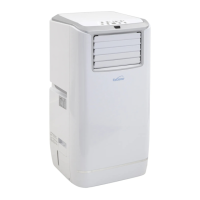
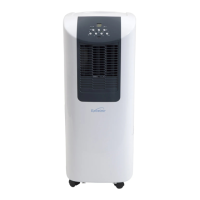
This document describes the Excelair Portable Air Conditioner, model EPA20A, manufactured by Excelsior. It serves as an instruction manual, providing details on the unit's specifications, installation, operation, maintenance, and troubleshooting.
Function Description
The Excelair Portable Air Conditioner is designed for indoor use to provide cooling, ventilation, and dehumidification. It is a mobile unit that can be moved from room to room. The unit is equipped with an "energy efficiency boosting" function, which involves adding water to cool the condenser, thereby reducing power consumption. It also features a self-diagnosis function to indicate potential issues. The appliance is not intended for use by persons with reduced physical, sensory, or mental capabilities, or lack of experience and knowledge, unless supervised.
Important Technical Specifications
- Model No.: EPA20A
- Power Supply: 220-240V~, 50Hz
- Cooling Capacity: 5.3kW
- Power/Ampere Consumption: 1900W/8.5A
- Air Volume: 675m³/hr
- Moisture Removal: 51 ltr/day
- Compressor Type: Rotary
- Refrigerant: R-410A
- Fan Speed Settings: 3
- Timer: 1-24 hours
- Working Temperature Range: 18-32°C
- Exhaust Pipe Dimensions: Ø 165 x 1500 mm
- Net Weight: 42.5 kg
- Dimensions (WxDxH): 453 x 427 x 806 mm
- Measuring Condition (EN 14511): DB=35°C, WB=24°C (DB = dry bulb temperature/room temperature, WB = wet bulb temperature/relative humidity)
- Current & Fuse: F2L250V or T2L250V
Usage Features
- Installation: The unit must be used in an upright position on a flat, level surface, at least 50cm from any objects. It requires a window spacer and an exhaust hose for proper ventilation. The exhaust hose can be extended from 300mm to 1500mm, but the shortest length is recommended for maximum efficiency. The length of the exhaust pipe is specifically designed for this product and should not be replaced or prolonged with a private hose to avoid malfunction.
- Control Panel: Features a soft-touch control panel with buttons for ON/OFF, Temperature UP/DOWN, MODE (cooling, fan, dehumidify), TIMER, SLEEP, SPEED (ventilation), and IONIZER/TiO2 (optional). Indicators show compressor operation, water full, heat mode, dehumidify mode, auto mode, display window, fan speed (medium, high, low), WiFi (optional), ionizer/TiO2 (optional), cool mode, fan mode, timer, and sleep mode.
- Air Vent Adjustment: The horizontal louver should be opened before use and adjusted to the desired direction.
- Operating Modes:
- ON/OFF: Pressing the ON/OFF button starts the unit in AUTO (automatic) mode.
- Automatic Mode: The unit automatically switches between cooling, ventilation, and heating based on ambient temperature and setpoint.
- Ambient > 23°C: Automatic cooling mode (default 24°C). AUTO and COOL indicators light up.
- 20°C < Ambient < 24°C: Ventilation mode. AUTO and FAN indicators light up.
- Ambient < 20°C: Heating mode. AUTO and HEAT indicators light up.
- Setpoint Setting (Automatic Cooling Mode): If the setpoint is 24°C, the unit cools at 27°C (Setpoint + 3°C) down to 25°C (Setpoint + 1°C), then switches to ventilation.
- Setting Temperature: Use 'Temperature up' or 'Temperature down' buttons. The display shows the set temperature; otherwise, it shows ambient temperature. Pre-setting temperature for cooling is 24°C.
- Setting Ventilation Speed: Press the SPEED button to choose high, medium, or low speed.
- Setting Timer: Press the TIMER button to set operating hours (1-24 hours). The unit turns off automatically after the set time. It can also be pre-set to start after a certain number of hours.
- Sleep Function: Available only in cooling mode. The set temperature increases by 1°C at the 1st hour and another 1°C at the 2nd hour, then maintains that temperature. Ventilation runs at low speed. The unit shuts down automatically after 12 hours in sleep mode.
- Dehumidify (DRY) Mode: Temperature cannot be adjusted, and ventilation is fixed at low speed. Humidity is collected in an internal tank. When full, the compressor and motor cut out, the "Water Full" indicator comes on, and an alarm sounds. Continuous drainage is an option.
- Carbon Filter: The unit includes an active carbon filter to remove unwanted odors. It is not washable and should be checked periodically (normally every 6 months) and replaced. Installation involves separating the filter frame, taking out the carbon filter from its bag, applying it to the unit, and fixing the filter frame back.
- Efficiency Boosting: Water (max. 3L) can be added to a water gate on the side of the unit after one hour of operation. This cools the condenser, reducing power consumption. If more than 3L is added, the "water full" indicator will light up, and the unit will stop.
- Remote Control: All functions can be performed with the supplied remote control, which requires 2 AAA batteries (not included).
- Drainage: When the internal tank is full (in Cooling or Dehumidify mode), the unit stops, the "Water Full" indicator lights up, and an alarm sounds. To drain, turn off the unit, place a container under the drain hole, remove the drain knob and rubber plug, allow water to drain, replace the plug, empty the container, repeat until empty, then replace the plug and knob firmly. For continuous drainage, remove the drain knob and rubber plug, connect the supplied drain tube to the water outlet, and lead the other end to a drain. An extension tube (OD: 18mm) can be used (not supplied).
Maintenance Features
- General Cleaning: Always unplug the unit before cleaning. Use a soft, damp cloth to wipe the body. Avoid aggressive chemicals, gasoline, detergents, or chemically treated cloths.
- Filter Cleaning: Use a vacuum cleaner or tap the filter lightly to remove dust, then rinse thoroughly under running water (max 40°C). Dry completely before replacing. Do not operate the unit without filters.
- End of Season Storage:
- Drain all water from the unit.
- Operate the unit in ventilation-only mode for a few hours to thoroughly dry the inside.
- Clean or change the filter.
- Unplug and store the power cord on the cord hanger.
- Replace the unit in its original carton or cover for storage.
Safety and Troubleshooting
- Before Use: Do not use extension cords. If the supply cord is damaged, it must be replaced by a qualified electrician. The mains supply must conform to the rating plate. Install according to national wiring regulations. Do not exceed recommended room size. Close doors and windows when in use. Keep curtains/blinds closed during sunny periods. Keep filters clean. Reduce temperature and ventilation settings once desired conditions are reached. Only a licensed professional can dismantle or modify the appliance. Use only for its prescribed purpose. Never store the unit on its side or upside down.
- Self-Diagnosis: The unit displays "E1" if the room temperature sensor wire is not connected well, or "E2" if the anti-frost sensor wire is not connected well (for cool & heat models only). In such cases, contact the retailer; do not dismantle the machine.
- Compressor Protection: To prolong compressor life, wait at least 3 minutes after switching off before restarting. The cooling system will switch off if the ambient temperature is lower than the set temperature, but ventilation continues. Cooling resumes when the ambient temperature rises.
- Anti-Frost Function: During heating in low temperatures, the unit may temporarily stop to melt frost. Wait for heating to resume.
- Fault Check List: Provides guidance for common issues such as the unit not running (plugged in, power failure, 'full water' indicator flashing, room temperature below setpoint), poor performance (direct sunshine, open windows/doors, too many people, heat sources), unit doing nothing (dusty filter, blocked air intake/output, room temperature below selected), being too noisy (uneven positioning, uneven floor), or the compressor not running (overheat protection activated).
- Warranty: For all warranty claims, return to the place of purchase. If deemed faulty, the unit will be replaced during the 24-month warranty period. Never attempt to repair or dismantle the unit yourself.

 Need help?
 General

 To Next Page