EasyManua.ls Logo

Excera EM8100 - User Manual

Excera EM8100
52 pages
Print Icon
To Next Page IconTo Next Page
Loading...
M
M

Table of Contents

Question and Answer IconNeed help?

Do you have a question about the Excera EM8100 and is the answer not in the manual?

Overview

The Excera EM8100 is a digital mobile radio designed for professional use, offering a range of features for communication and management. It supports both conventional (digital and analog), DMR Trunking, and MPT Trunking modes, making it versatile for various radio systems.
Technical Specifications:

  • Call Log Capacity: Up to 200 call entries, with older entries overwritten automatically when full.
  • Message Capacity: Inbox can save up to 100 received messages. Drafts can save up to 100 draft messages.
  • Contact Capacity (DMR Trunking): Up to 256 entries for private call contacts and group call contacts.
  • Zone Capacity: Supports up to 2048 channels and 32 zones, with a maximum of 64 channels per zone.
  • Rx Group List Capacity: A maximum of 64 group calls, with up to 32 Rx group lists using the CPS.
  • Channel Information: Displays channel ID, time slot, RSSI, and system code.
  • Power Output: Medium Power and Low Power settings available.
  • Antenna Gain: Should not exceed 3.5 dBi as declared by the manufacturer.
  • Total Radio Use Time: Should not transmit for more than 50% of total radio use time, more than 50% of the time can cause RF exposure compliance requirements to be exceeded.
  • Separation Distance: During operation, the separation distance between user and antenna shall be at least 50 cm.
  • Frequency Range: The manual mentions the device operates in parts of the FCC Rules, implying specific frequency bands.
  • Battery: Low battery indication.

Usage Features:

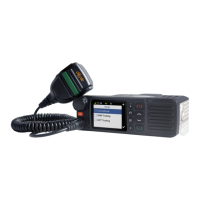
  • Installation: The radio comes with a mounting bracket, locking knob, screws, RF antenna, power inlet, GPS antenna, power supply, microphone jack, and fuse. Installation involves securing the radio to the bracket, connecting the palm microphone, RF antenna, GPS antenna, and power cord.
  • Radio Controls: Includes a microphone jack, TK (Top Key), volume control/channel selector/group call selector knob, LCD display, P3/Answer/Call Key, Menu/OK Key, P2 Key, P1 Key, Setting Key, P4/End/Home Key, Up/Down Key, LED indicator, speaker, locking knob, RF antenna connector, power inlet, accessory jack, and GPS antenna connector.
  • Palm Microphone: Features a microphone hanger, microphone fixing button, PTT key, and microphone.
  • LED Indicator: Displays radio status:
    • Green (slowly): None
    • Green (rapidly): Upgrading or powering on
    • Green (glows): Receiving
    • Red (rapidly): None
    • Red (glows): Transmitting
    • Orange (slowly): Scanning
    • Orange (rapidly): None
  • LCD Icon: Displays received signal strength indicator (RSSI), new message icon/full inbox, scanning, scan paused (conventional), and high power. Other icons include Medium Power, Low Power, Roam, GPS, Glonass, Missed Call, Bluetooth, Wireless PTT Connected, Bluetooth Headset Connected, Wireless PTT and Bluetooth Headset Connected, Emergency Alarm, Encrypt, Full Duplex, Squelch, and VOX.
  • Menu Navigation:
    • Mode: Operates in Conventional (digital and analog), DMR Trunking, and MPT Trunking modes.
    • Device Information: Displays basic information such as radio alias, radio ID, serial number, model name, model number, frequency range, firmware version, front board version, data version, vocoder version, and last programmed date.
    • Date and Time: Allows setting date and time.
    • Tone: Enables setting various tones for keypad, talk permit, incoming call, function, warning, low battery, emergency alarm, and message tones.
    • LED: Configures LED indicators for Tx LED, Rx LED, Scan LED, Low Battery LED, Incoming Call LED, and Call Hold LED.
    • Display: Sets display parameters including backlight off time, display off mode, and brightness.
    • Menu Reset: Resets the radio to a predefined time period.
    • Programmable Buttons: P1, P2, P3, P4, Up, Down, and TK can be set as shortcuts to radio functions.
    • Bluetooth: Connects to Bluetooth headsets and Wireless PTT devices. Supports pairing mode and searching for devices.
    • GPS: Displays GPS information, including radio position.
  • Digital Conventional Functions and Operations:
    • Call: Supports Private Call (individual radio to another individual radio) and Group Call (group of radios). Includes Late Entry for both.
    • Scan: Allows scanning for channels. Features Scan Start Condition and Scan List management (add, delete, set priority). Scan Tx Mode allows transmitting on a scanned channel.
    • Priority Channel: Supports Priority Channel 1 and 2 for scanning.
    • Talkback: Enables transmitting on the current channel during scan stop.
    • Scan Delay: Resumes scanning after a valid channel activity.
    • Emergency: Supports Emergency Call and Emergency Alarm.
    • Message: Allows sending and receiving text messages. Features Inbox, Outbox, Drafts, New Msg, Preset Msg, and Status Msg.
    • Color Code: Identifies a system, allowing communication with other radios assigned the same color code.
    • Call Log: Stores missed, received, and outgoing calls.
    • Zone: Manages channels within zones.
  • Analog Conventional Functions and Operations:
    • DMO and RMO: Supports both Direct Mode Operation (DMO) and Repeater Mode Operation (RMO).
    • CTCSS/CDCSS Type: Configures current channel with specific Rx CTCSS/CDCSS type. Supports CTCSS, CDCSS, and CDCSS Invert.
    • CTCSS: Checks for CTCSS match when receiving a signal.
    • CDCSS: Checks for CDCSS match when receiving a signal.
    • CDCSS Invert: Checks for an invert CDCSS match when receiving a signal.
    • Squelch Level: Adjusts background noise by setting squelch level to Tight, Normal, or Open.
  • DMR Trunking Functions and Operations:
    • Registering: Registers the radio with a proper base station. Requires a license.
    • Making a Registration/Deregisration: Procedures for registering and deregistering the radio.
    • Call: Supports Private Call (FOACSU or OACSU via base station) and Group Call. Includes Receiving a Private Call, Voice Communication, Conversation Limit, Ending a Call, Late Entry, Group Call Combination.
    • Emergency Call/Priority Call/Forced Group Call/Broadcast Call: Specific call types with procedures for initiation.
    • Contact: Manages Private Call Contact and Group Call Contact lists. Supports adding new contacts, viewing, editing, and deleting.
    • Message: Supports Inbox, Outbox, Drafts, New Msg, Preset Msg, and Status Msg.
    • Call Log: Stores missed, received, and outgoing calls.
    • Redial or Backdial List: Saves all outgoing calls in the Redial List and all incoming calls in the Backdial List.
    • Hunt: Registers the terminal with a base station for normal work. Supports Short Hunt, Comprehensive Hunt, Team Hunt, Background Hunt, Fixed TSCC List, and TSCC Hunt.
    • Subgroup: Manages groups of call contacts.
    • Authentication: Ensures validity of user accounts in the network.
    • Emergency: Supports Emergency Call and Emergency Alarm.
  • MPT Trunking Functions and Operations:
    • Registering: Registers the radio with a proper base station. Requires a license.
    • Making a Registration/Deregisration: Procedures for registering and deregistering the radio.
    • Call: Supports Private Call (FOACSU or OACSU via base station) and Group Call. Includes Receiving a Private Call, Voice Communication, Conversation Limit, Ending a Call, Late Entry, Group Call Combination, Join a Group Call via Manual Dial, Number Prefix Ignored During Group Call.
    • All Call: Available in the MPT system.
    • Emergency Call/Broadcast Call/Priority Call: Specific call types with procedures for initiation.
    • Call Log: Stores missed, received, and outgoing calls.

Maintenance Features:

  • Troubleshooting: Provides a table of phenomena, analysis, and solutions for common issues such as the radio not being powered on, not registering successfully, registers repeatedly, cannot establish a call, no voice heard after a call is established, called party disconnects repeatedly, receiving voice is weak/discontinuous/totally inactive, cannot communicate with other members, voice is unclear, and noise is too loud.
  • Limited Warranty: Covers EM8100 Digital Mobile Radios for two years and accessories for six months. The warranty does not cover defects from misuse, unauthorized disassembly, damage due to force majeure, products without a valid warranty certificate, products with altered serial numbers, normal wear and tear, rechargeable batteries, or damage to the battery enclosure or battery itself.
  • Warranty Card: Includes fields for customer name, phone, address, purchase date, model number, and serial number. Notes that the warranty applies to after-sale and maintenance services for the product and accessories, requires a purchase invoice, and the company is not liable for damages caused by human factors.

Excera EM8100 Specifications

General IconGeneral
BrandExcera
ModelEM8100
CategoryRadio
LanguageEnglish

Related product manuals