■
Installation
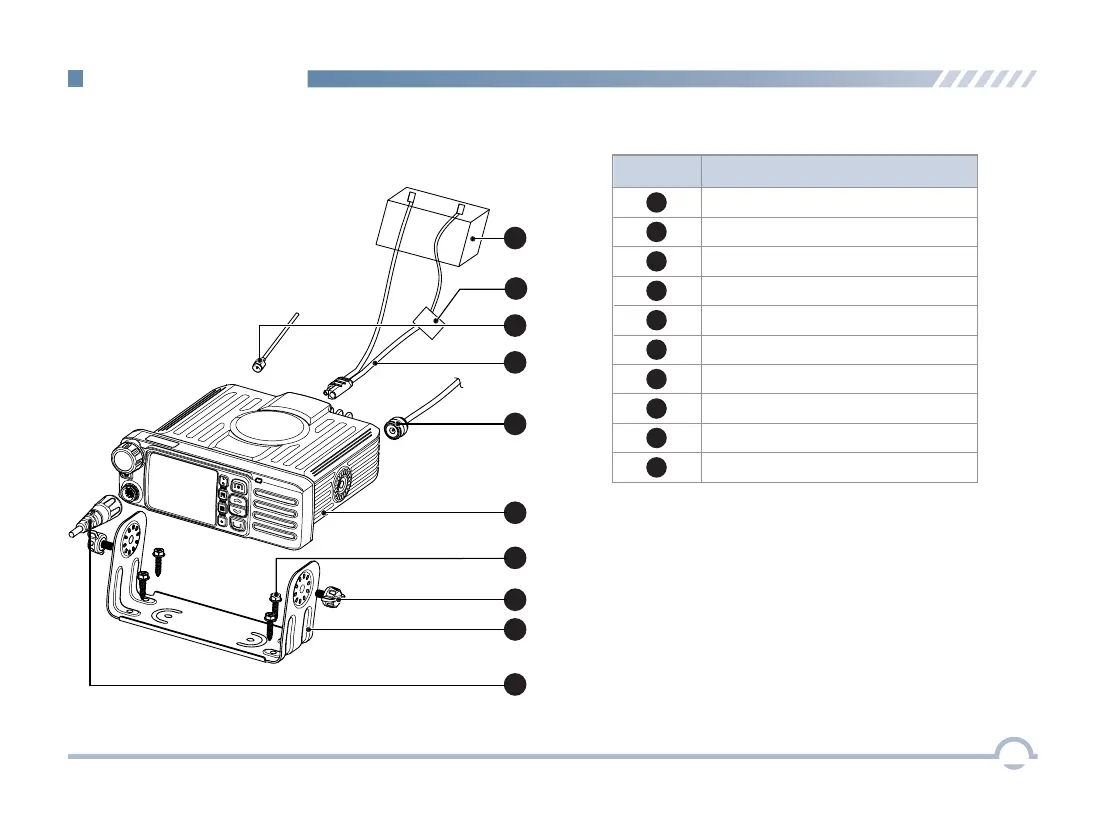
Installation Diagram
No.
Part Name
1
2
3
4
5
Power Supply
Microphone Jack
GPS Antenna
6
7
8
9
10
Fuse
Locking Knob
Bracket
Screws
Radio
RF Antenna
Power Inlet
9
1
2
3
4
5
7
6
10
8
1. Slide the radio into the mounting bracket and
secure it using the locking knobs.
2. Connect the palm microphone to the radio.
3. Connect the RF antenna to the radio.
4. Connect the GPS antenna to the radio.
5. Connect the power cord to the radio.
Getting Started
3


 To Next Page