3
EXCURSION
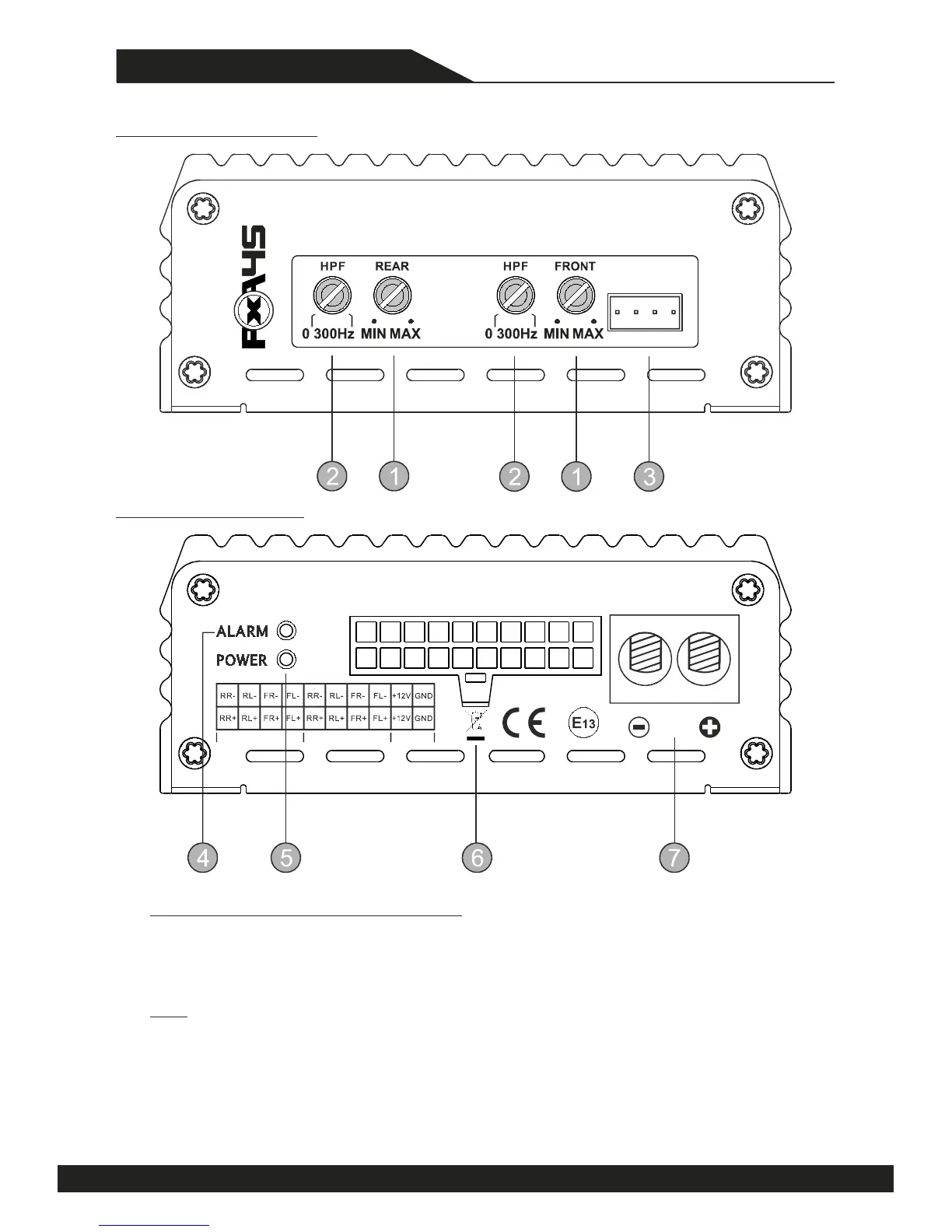
FRONT PANEL LAYOUT
REAR PANEL LAYOUT
PLUG & PLAY CONNECTION POWER CAP
SPEAKER OUT HIGH LEVEL IN POWER
LOW LEVEL
& REM OUT
- -
50RMS x 4CH HIGH POWER PLUG & PLAY CAR AMP
(OPTIONAL)
1. Level Controls for Input Sensivity (GAIN)
The amplifier can receive High Level Audio Signal Input Range from 0.5V to 10V from the Audio
Source unit. Please adjust the GAIN Level of Front and Rear Channels separately to ensure they
match the Audio Source Output Level.
GAIN control is not to compare with the Volume control of the Audio Source Unit. The Note:
appropriate INPUT Signal Level to the PXA 45 amplifier is the guarantee of perfect audio quality.
A proper guide to adjust GAIN is to turn off the GAINs first step. Next turn up the Volume control
of the Audio Source aprox to 90%. Finally turn up the GAINs to your maximum choice of output
Level without distoraon. Asure mind damage of your Loudspeakers and your listening abilies.
Cauon: Excessive output Level can damage Loudspeaker and result in distorted sound.



 To Next Page