EasyManua.ls Logo

Explore Scientific BCC1001 - Lcd Display

Explore Scientific BCC1001
32 pages
Print Icon
To Next Page IconTo Next Page
To Previous Page IconTo Previous Page
Loading...
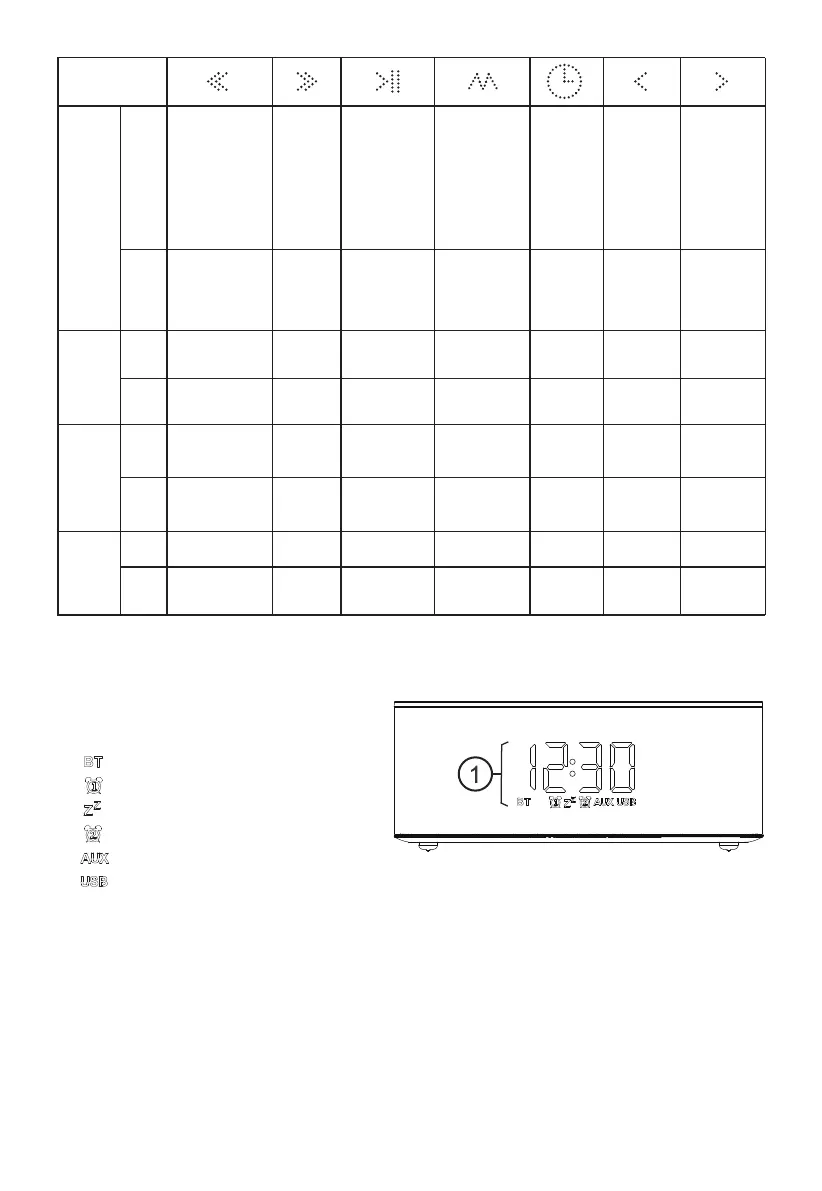
LCD DISPLAY
1.
4
BUTTON
MODE
Standard
mode
PRESS
Decrease
volume
HOLD
Time
setting
mode
PRESS _______
HOLD _______ _______
Alarm
setting
mode
PRESS _______ _______
HOLD _______ _______
Previous
track
Increase
volume
_______
Next track
_______
_______
_______
_______
_______
_______
_______
_______
Play or pause
Answer or
end call
Redial
(Press twice)
Reject call
Disconnect
Bluetooth
connection
Switch between
AUX and
Bluetooth mode
Stop the alarm
Enter or exit
the standby
status
Switch
setting
between
screen
brightness,
clock,
alarm 1 and
alarm 2
Go to next
parameter
Decrease
_______
_______
_______
_______
_______
_______
Go to next
parameter
_______
_______
Brightness
setting
mode
PRESS
HOLD
_______
_______
_______
_______
_______
_______
_______
_______
_______
_______ _______ _______
Decrease
_______
Decrease
Increase
Increase
Increase
_______
_______
Time / alarm time display
[ ] Bluetooth signal
[ ] Alarm 1 ON
[ ] Snooze activated
[ ] Alarm 2 ON
[ ] AUX mode ON
[ ] USB

Related product manuals