EasyManua.ls Logo

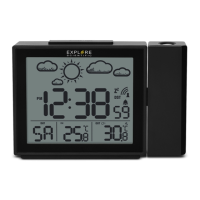
Explore Scientific RPW3009 - User Manual

Explore Scientific RPW3009
68 pages
Print Icon
To Next Page IconTo Next Page
Loading...
EN
INSTRUCTION MANUAL ...................... 2
IT
ISTRUZIONI PER L’USO ..................... 14
DE
BEDIENUNGSANLEITUNG .................. 26
FR
MODE D‘EMPLOI ............................... 38
ES
MANUAL DE INSTRUCCIONES ............ 50
*Radio-controlled clock function not available in all territories. / Funzione di orologio radiocontrollati non disponibile in ogni territorio. / Funkuhrfunktion nicht in
jedem Gebiet verfügbar. / La fonction d‘horloge radio-piloté n‘est pas disponible dans tous les territoires. / La función de reloj radiocontrolado no está disponible
en todos los territorios.
WEATHER PROJECTION CLOCK
OROLOGIO CON PREVISIONI METEO E PROIETTORE
WETTER-PROJEKTIONSUHR
RÉVEIL À PROJECTION AVEC STATION MÉTÉO
RELOJ PROYECTOR DEL TIEMPO
Art.No.: RPW3009
Question and Answer IconNeed help?

Do you have a question about the Explore Scientific RPW3009 and is the answer not in the manual?

Summary

About This Instruction Manual

General Safety Warnings

Covers risks like electric shock, choking, chemical burns, fire, and explosion. Emphasizes adult supervision and proper handling.

Product Overview

Getting Started

Insert Batteries

Instructions for inserting batteries into the main unit, ensuring correct polarity and reattaching the battery door.

Outdoor Sensor Setup

Steps for inserting batteries into the outdoor sensor, selecting channels, and placing the sensor.

Clock Reception

Details on how the clock receives RCC signals, including manual initiation, automatic reception times, and troubleshooting.

Set the Clock Manually

Alarm Functions

Setting Dual Alarm Time

Guide to setting weekday and weekend alarm times, including hour, minute, and confirmation steps.

Weather Forecast

Operation

Projection Features

Warranty and Service

Summary

About This Instruction Manual

General Safety Warnings

Covers risks like electric shock, choking, chemical burns, fire, and explosion. Emphasizes adult supervision and proper handling.

Product Overview

Getting Started

Insert Batteries

Instructions for inserting batteries into the main unit, ensuring correct polarity and reattaching the battery door.

Outdoor Sensor Setup

Steps for inserting batteries into the outdoor sensor, selecting channels, and placing the sensor.

Clock Reception

Details on how the clock receives RCC signals, including manual initiation, automatic reception times, and troubleshooting.

Set the Clock Manually

Alarm Functions

Setting Dual Alarm Time

Guide to setting weekday and weekend alarm times, including hour, minute, and confirmation steps.

Weather Forecast

Operation

Projection Features

Warranty and Service

Explore Scientific RPW3009 Specifications

General IconGeneral
BrandExplore Scientific
ModelRPW3009
CategoryClock
LanguageEnglish

Related product manuals