Introduction
Thank you for selecting the Extech Model 407736. This device is shipped fully tested and calibrated
and, with proper use, will provide years of reliable service. Please visit the Extech Instruments website
(www.extech.com
) to check for the latest version of this User Manual.
Meter Description
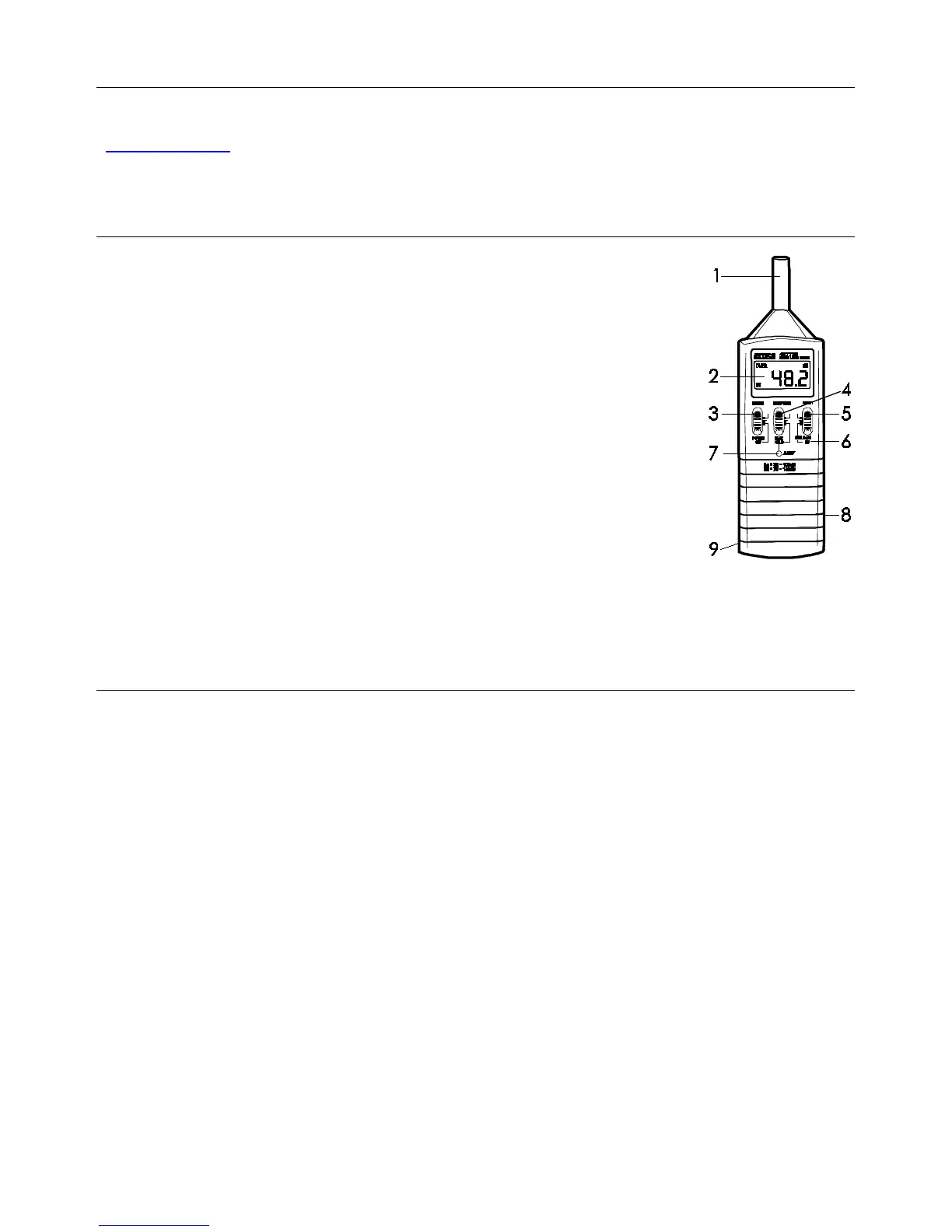
1. Microphone
2. LCD display
3. POWER OFF & RANGE select switch
4. RESPONSE & HOLD select switch
5. A/C weighting and Calibration switch
6. Calibration adjust screw for 94dB
7. Reset key (resets max hold reading)
8. AC/DC analog output 3.5mm phone jack
9. Battery compartment and Tripod mount are located on the
back of meter
Measurement Considerations
1. Wind blowing across the microphone adds extraneous noise to the measurement. Use the
supplied windscreen to cover the microphone when applicable.
2. Calibrate the instrument before each use if possible. Especially if the meter has not been used
for a long period of time.
3. Do not store or operate the instrument in areas of high temperature or humidity.
4. Keep meter and microphone dry.
5. Avoid severe vibration when using the meter.
6. Remove the battery when the meter is to be stored for long periods of time.





 To Next Page