EasyManua.ls Logo

Extech Instruments 461750 - User Manual

Extech Instruments 461750
7 pages
Print Icon
To Next Page IconTo Next Page
Loading...
User Manual
Mini Contact Tachometer
Model 461750
Question and Answer IconNeed help?

Do you have a question about the Extech Instruments 461750 and is the answer not in the manual?

Summary

Introduction

Meter Description

Key Components

Lists and describes main parts like adaptors, shaft, socket, and guard.

Control Buttons

Details the Power/Hold and Unit selection buttons.

LCD Display

Describes the screen interface and its elements.

Display Indicators

Low Battery and Data Hold

Indicators for battery status and frozen readings on the LCD.

Measurement Units Display

Displays for RPM, m/min, ft/min, and yds/min.

Safety Precautions

Handling Moving Objects Safely

Guidelines for safe operation when touching moving parts.

Maintaining Visual Attention

Emphasizes keeping eyes on the measurement process at all times.

Using Data Hold for Recording

Advice on using Data Hold to freeze readings for accurate recording.

Meter Power

Power ON;OFF Operation

Instructions for turning the device on and off using available buttons.

Auto Power OFF Feature

Details on the automatic shutdown feature and how to disable it.

Measurements

RPM Measurements

Steps to measure rotational speed using the tachometer and attachments.

Surface Speed Measurements

Linear Speed Measurement

Steps to measure linear speed using the device's wheel.

Data Hold Feature

Maintenance

Battery Replacement

Procedure for replacing the device's 9V battery when indicated.

Meter Cleaning

Instructions for cleaning the instrument housing with a damp cloth.

Specifications

General Specifications

Details on display, power, operating conditions, and physical dimensions.

Range Specifications

Measurement ranges and accuracy for rotation and surface speed.

Two-year Warranty

Calibration and Repair Services

Contact Customer Support

Overview

The Extech Model 461750 Mini Contact Tachometer is a versatile instrument designed for measuring rotational speed (RPM) and linear surface speed. It utilizes convex and concave attachments for RPM measurements and a built-in wheel for linear surface speed measurements, making it suitable for applications involving moving devices such as conveyors and treadmills.

Function Description:

The tachometer measures RPM by contacting a rotating object with either a convex (cone) or concave (funnel) attachment. For linear surface speed, a wheel attachment is used to contact the moving surface. The device displays measurements on a 5-digit LCD. It features an automatic range selection for ease of use.

Important Technical Specifications:

  • Display: 5-digit LCD Display
  • Range Selection: Automatic
  • Time Base: 4MHz Quartz Crystal
  • Sampling Time: 1 second (>60 rpm); >1 second (10 to 60 rpm)
  • Operating Temperature: 32 to 122°F (0 to 50°C)
  • Operating Humidity: 80% RH Max.
  • Power Supply: 9V Battery
  • Battery Life: Approximately 40 hours
  • Dimensions: 5.9 x 2.0 x 1.3" (150 x 51 x 33mm)
  • Weight: 5.0 oz. (142g)
  • Applicable Standards: EN 50081-1/1992 (EN 55022), EN 50082-1/1997 (EN 55024)

Range Specifications:

  • Rotation (RPM):
    • Range: 10.000 to 9999 rpm
    • Accuracy: ± (0.1% reading + 2 digits)
  • Surface Speed (ft/min):
    • Range: 3.0000 to 6560.0 ft/min
    • Accuracy: ± (1.5% reading + 2 digits)
  • Surface Speed (m/min):
    • Range: 1.0000 to 1999.9 m/min
    • Accuracy: ± (1.5% reading + 2 digits)
  • Surface Speed (yds/min):
    • Range: 1.0000 to 5000.0 yds/min
    • Accuracy: ± (1.5% reading + 2 digits)

Usage Features:

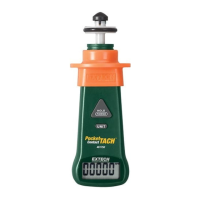
  • Meter Description:
    1. RPM adaptor
    2. Wheel for linear surface measurements
    3. Adaptor shaft
    4. Adapter socket
    5. Hand Guard
    6. Power ON/OFF and HOLD button (triangular)
    7. Unit of measure selection button
    8. LCD Display
    9. Alternate Power ON/OFF button (at the bottom of the meter)
  • Display Description:
    1. Low Battery indicator
    2. Data Hold indicator
    3. Rotations per minute (RPM)
    4. Meters per minute (m/min), Feet per minute (ft/min), Yards per minute (yds/min)
  • Power ON/OFF: The device can be turned ON by pressing either the triangular POWER HOLD button or the alternate power button at the bottom. To turn OFF, press and hold either power button for approximately 5 seconds.
  • Auto Power OFF: The meter automatically turns off after 20 minutes of inactivity to conserve battery life. This feature can be disabled by turning the meter off, then pressing and holding the POWER and UNITS buttons simultaneously until the meter turns on, then releasing the POWER button first. The 'n' icon will appear on the display, indicating that auto power off is disabled.
  • RPM Measurements:
    1. Attach the appropriate convex or concave attachment to the meter shaft.
    2. Turn the meter ON.
    3. Use the UNITS button to select RPM.
    4. Touch the attachment to the moving object to take a reading.
  • Surface Speed Measurements:
    1. Turn the meter ON.
    2. Touch the wheel to the moving object.
    3. Use the UNITS button to select the desired unit of measure: ft/min, m/min, or yds/min.
  • Data Hold Feature: Pressing and releasing the POWER-HOLD button activates Data Hold, freezing the displayed reading. The "HOLD" icon will appear on the LCD. Press the POWER-HOLD button again to exit this mode.
  • Safety Precautions: The device incorporates a finger guard for protection. Users are advised to hold the meter firmly, keep fingers behind the guard, and maintain focus on the measurement activity. The Data Hold feature should be used to record measurements rather than attempting to write down readings while holding the meter to a moving object.

Maintenance Features:

  • Battery Replacement: A low battery indicator appears on the LCD when the 9V battery weakens. To replace, open the rear compartment, exchange the battery, and securely close the cover.
  • Meter Cleaning: The meter housing should be wiped with a damp cloth only. Abrasives or solvents should not be used.
  • Disposal: Used batteries and the instrument itself should not be disposed of in household waste. Users are legally required to take them to appropriate collection sites or retail stores for proper disposal of electrical and electronic equipment.

Warranty and Support:

Teledyne FLIR LLC provides a two-year warranty on the Extech brand instrument for defects in parts and workmanship from the date of shipment (sensors and cables have a six-month limited warranty). Calibration and repair services are offered, including NIST traceable calibration. Annual calibrations are recommended to verify performance and accuracy. Customer support is available via telephone, email for calibration/repair, and technical support.

Extech Instruments 461750 Specifications

General IconGeneral
BrandExtech Instruments
Model461750
CategoryMeasuring Instruments
LanguageEnglish

Related product manuals