The ezcap215 Bluetooth Cassette Player is a portable device designed to transmit cassette tape music wirelessly to Bluetooth earphones or speakers. It eliminates the need for wired connections to audio output devices, offering a more convenient listening experience.
Function Description:
The primary function of the ezcap215 is to convert analog audio from cassette tapes into a Bluetooth signal, allowing it to be streamed to compatible Bluetooth receivers. It also functions as a standard cassette player with an AUX output for wired earphones or speakers, catering to both wireless and traditional audio setups. The device supports auto-reverse functionality, which automatically plays the other side of a tape once one side finishes, ensuring uninterrupted listening.
Important Technical Specifications:
- Bluetooth Version: 4.2
- Effective Distance: Approximately 10 meters
- Supported Bluetooth Agreements: A2DP, AVRCP, AVCTP, AVDTP, HFP, SPP, SMP, ATT, GAP, GATT, RFCOMM, SDP, I2CAP
- Signal-to-Noise Ratio: >90dB
- Frequency Range: 2.402GHz – 2.480GHz
- Audio Channel: Stereo L/R
- Audio Input: Cassette tape
- Audio Output: 2.5mm earphone jack, Bluetooth transmitter
- Power Supply Options:
- 2 x AA batteries
- USB power supply (5V DC adapter, USB port from computer, etc.)
- Dimensions: 113mm (L) x 85mm (W) x 32mm (H)
- Weight: 180g (without battery)
Usage Features:
- Lid Switcher (1): Slides down to open the cassette compartment for tape insertion.
- AUX Port (2): An audio line-out for connecting wired earphones or speakers.
- Volume Control (3): Adjusts the audio output level.
- Bluetooth LED Indicator (4):
- Flashes quickly (1 time per second) when searching for a Bluetooth receiver device.
- Flashes slowly (1 time per two seconds) when successfully paired with a Bluetooth receiver device.
- See-through Window (5): Allows users to visually check if the cassette is running.
- Cassette Operate Buttons (6):
- PLAY: Press to start tape playback.
- DIR: Changes the direction of cassette playing.
- Auto Reverse Switch: Slides to engage Auto Reverse mode, enabling automatic playback of the other side of the tape.
- F.F (Fast Forward): Advances the tape quickly.
- REW (Rewind): Rewinds the tape quickly.
- STOP: Press to stop tape playback.
- DC Port (7): 5V DC input for power, compatible with USB power cables (USB power adapter not included).
Preparation for Use:
The device offers three power supply options:
- Insert 2 AA batteries: Open the lid to access the battery compartment and insert batteries according to the polarity illustrations (+ or -).
- Powered by computer USB port: Connect the included USB power cable to a computer's USB port and the cassette player's DC port.
- Powered by 5V/1A USB power adapter: Connect the included USB power cable to a USB power adapter (not included) and the cassette player's DC port.
Cassette Operation and Bluetooth Pairing:
- Insert a tape and connect a power supply. The blue LED will flash quickly (about one time per second), indicating it's searching for Bluetooth receivers.
- Turn on your Bluetooth headphone or speaker. If Bluetooth functionality is not desired, connect a wired speaker or earphone to the "AUX" port.
- Press the "PLAY" button on the top of the device.
- The device and your Bluetooth receiver should automatically pair within a few seconds. Once pairing is successful, the blue LED will flash slowly (about one time per two seconds), and you should hear the sound from your Bluetooth device.
Important Pairing Notes:
- Avoid turning on multiple Bluetooth receiver devices simultaneously to prevent pairing issues.
- Before pairing the ezcap215 with a Bluetooth speaker, ensure that the Bluetooth function of any previously connected devices (e.g., smartphones, tablets) is turned off. This prevents the speaker from defaulting to an older connection.
- If pairing is unsuccessful, verify the status of your Bluetooth speaker. If it's in a connected state, disable Bluetooth on the connected device and restart the speaker to put it back into search/pairing mode. Then, retry pairing with the ezcap215.
- The Bluetooth searching function will automatically turn off after approximately 3 minutes if no pairing occurs, and the blue LED will turn off. In this case, turn off both devices and attempt pairing again.
Maintenance Features:
The manual does not explicitly detail maintenance features beyond basic operation and power supply. However, the transparent window allows for visual inspection of the tape mechanism, which can aid in identifying potential issues like tape jams. The device's portable and straightforward design suggests user-level maintenance would primarily involve proper handling, battery replacement, and keeping the device clean.
FCC Warning:
The device complies with Part 15 of the FCC Rules, ensuring it does not cause harmful interference and accepts any received interference. Users are advised that any unauthorized changes or modifications to the unit could void their authority to operate the equipment. In case of interference, users are encouraged to reorient the receiving antenna, increase separation between equipment and receiver, connect to a different circuit outlet, or consult a dealer/experienced radio/TV technician.

 Need help?
 General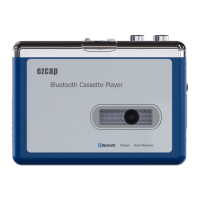

 To Next Page