4
2� Install Micro SD Card (Optional)
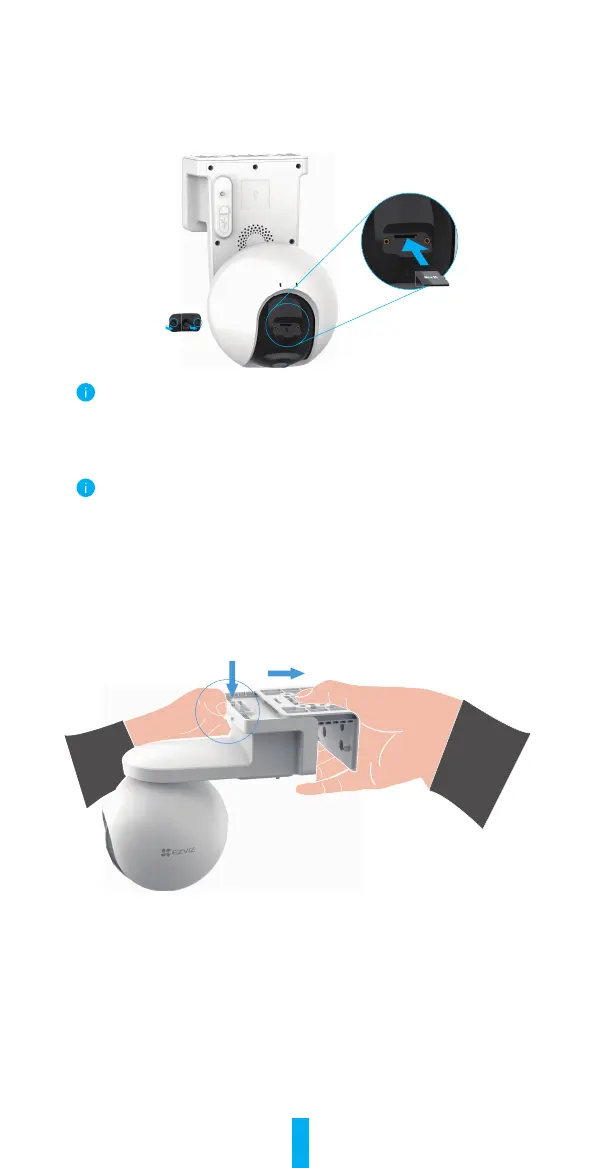
- Remove the cover on the camera.
- InsertaMicroSDcard(soldseparately)intothecardslotasshowninthegure
below.
- Place the cover back on.
After installing the Micro SD card, you should initialize the card in the EZVIZ app
before using it.
- In the EZVIZ app, tap the Record List in the Device Settings interface to check
the SD card status.
- If the memory card status displays as Uninitialized, tap to initialize it.
The status will then change to Normal and it can store videos.
3� Installation Steps
The camera can be wall mounted and ceiling mounted.
Ceiling/Wall Mount
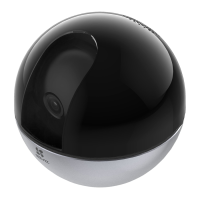
1.Pleaseseparatethemountingbaseandthecamerarst.
2.Removetheprotectivelmfromthelens.
3. Drill template onto a clean and flat surface.
4. (For cement wall only) Drill screw holes according to the template, and insert
the anchors.
5.Usescrewstoxthemountingbaseaccordingtothetemplate.
6. Mount the camera to the mounting base.


 To Next Page