6
View Your Device
The app interface may be different due to version update, and the interface of the app
you installed on your phone shall prevail.
1� Live View
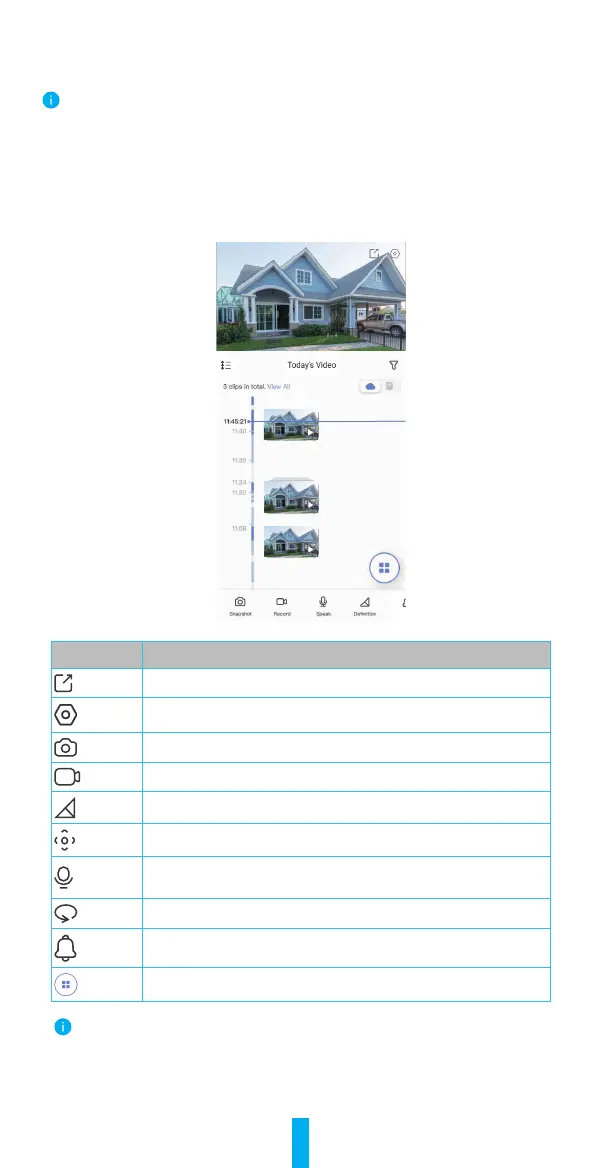
When you launch the EZVIZ app, the device page displays are shown below.
You can view and listen to a live feed, take snapshots, record videos, and choose
videodenitionasneeded.
Ala
Icon Description
Share. Share your device.
Settings. View or change the device settings.
Snapshot. Take a snapshot.
Record. Manually start/stop recording.
Definition. Select video resolution from Full HD, Ultra HD or Hi-Def.
Pan/Tilt/Zoom
. Rotate the camera to get broader field of view.
Talk. Tap the icon, and then follow the on-screen instructions to
talk to or listen to people in front of the camera.
360° Picture. Tap to generate a 360 degree view picture.
Alarm. Sound or flash to deter intruders.
Multi-screen Live. Tap to select window layouts.
Swipe left and right across the screen to see more icons.


 To Next Page