2
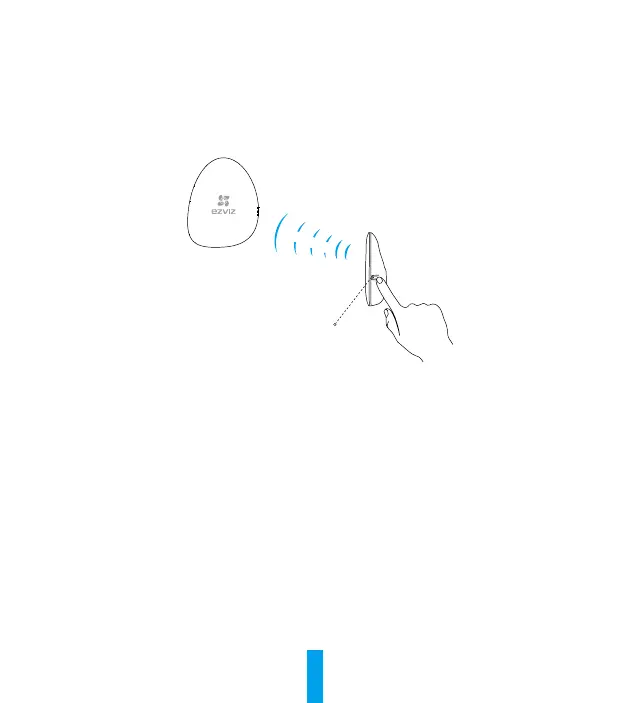
• Option 2 Add by Operating the Home Sense Alarm Hub
1
Enable the “Adding Detectors Mode” of your Home Sense Alarm Hub. Refer to Quick Start Guide of your
Home Sense Alarm Hub for details.
2
Bring the siren close to the Alarm Hub (within 2in.) and press the button on siren, the status indicator will
flash a red light once indicating the adding signal is sent.
3
The Alarm Hub announces the device type and serial number being added.
4
Test the Siren.
- Press the Emergency button on the remote control of the Alarm Hub to trigger an emergency alarm. If
the siren starts to alarm, it has been added to the Internet Alarm Hub successfully.
- Press the Mute button on the remote control of the Alarm Hub to clear the alarm, and stop the siren
sound.
EXPOSURE TO RADIOFREQUENCY RF
The frequency bands and the nominal limits of transmitted power (radiated and/or conducted) applicable to this
radio device are the following:
Band RF 868MHz
Frequency From 867.981MHz to 868.019MHz
Power transmission (EIRP) 10mW
Alarm Hub
Settings Button
Within 50 cm



 To Next Page
 Loading...