EasyManua.ls Logo

FAAC 531R - User Manual

FAAC 531R
2 pages
Print Icon
To Next Page IconTo Next Page
Loading...
3
J5
F1
J4
LD1
P2
LD3
J8
F2
DS1
P1
LD2
J1
J7
J3
J10
These instructions apply to control unit:
531R
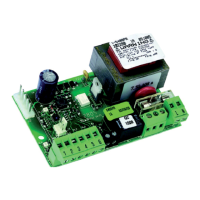
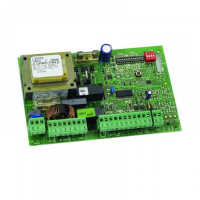
The 531R control unit (Fig. 1), installed on 531R and 531K operators,
has an integrated receiver (433 MHz) to command, by remote
control, the opening and closing of the automated system, and
does not require any outside radio receivers.
Fig. 1
1. 531R CONTROL BOARD
egatlovylppusrewoP
zH05-)%01-%6+(.caV032
seirosseccarofylppusrewoP
.cdV42
seirosseccarofdaolxaM
.Am002
erutarepmetgnitarepO
C°55+C°02-
sesuF
)1elbaT(,2F,1F
scigolnoitcnuF
citamotuaimeS/citamotuA
stupnidraoblanimreT
EFAS-LIAF/SECIVEDYTEFAS/POTS/NEPO
remitthgilysetruoC
.nim2
smetsysycneuqerfoidaR
edocgnippohhtiwzMH334
1F
)noitcetorprotom(.V052/.A01dipar02x5esuF
2F
)seirossecca(esufelbarotseR
1J
seirossecca/stupnirofdraoblanimretegatlovwoL
3J
tupnirewopcaV032rofdraoblanimreT
4J
gnidniwyramirpremrofsnartrofrotcennoC
5J
rotcennocthgilysetruoC
7J
gnidniwyradnocesremrofsnartrofrotcennoC
8J
rotcennoctuptuorotoM
01J
annetnalanretxerofrotcennoC
1P
nottub-hsupNEPO
2P
nottub-hsupPU-TES
1SD
sehctiws-pidgnimmargorP
1DL
DELsutatstupniNEPO
2DL
DELsutatstupniPOTS
3DL
DELsutatstupniWSF
1.1. TECHNICAL SPECIFICATIONS
1.2. PARTS OF 531R BOARD (Table 1)
1.3. DESCRIPTION
1.3.1. Terminal boards and connectors
TERMINAL BOARD J1 (low voltage)
OPEN= Open command (N.O.)
Any device (push-button, etc.) which, by closing a contact,
supplies an opening (or closing) pulse to the door.
To install several Open devices, connect N.O. contacts in parallel.
STOP= Stop command (N.C.)
Any device (e.g. a push-button) which, by opening a contact,
stops movement of the door.
To install several stop devices, connect the N.C. contacts in series.
N.B.: if stop devices are not used, jumper connect STOP
to the inputs common contact.
= Inputs common contact/accessories supply negative
pole.
= Accessories supply positive pole (24Vdc 200mA max)
FSW = Closing safety-devices contact (N.C.)
Safety devices are all devices (photocells, sensitive edges,…) with
N.C. contact, which, if there is an obstacle in the area they protect,
operate to reverse door closing movement.
If the safety devices are activated when the door is locked or
open, they prevent it from closing.
To install several safety devices, connect the N.C. contacts in
series.
N.B.: if no safety devices are connected, jumper
connect FSW to the -TX FSW terminal
-TX FSW= Terminal for connection of the negative pole (-) of the
photocells transmitter (TX).
J3 TERMINAL BOARD (high voltage)
Terminal board for connecting 230Vac 50Hz power supply.
J10 TERMINAL BOARD (external antenna)
A terminal board for connecting an external antenna (Optional
item) instead of the supplied standard conductor.
terminal for connecting the shielding of any external antenna.
1.3.2. Programming dip-switches (DS1)
Failsafe
If activated, it enables the photocell operating test before every
movement.
Anti-crushing sensitivity
For doors with an irregular movement, it reduces the sensitivity of
the anti-crushing device to prevent unwanted action by it.
Radio codes programming
If activated, it enables the 531R board to save the radio codes
of the remote controls. (see chapter 4.1).
Speed adjustment
If door movement is too quick or irregular, you can select low
carriage speed.
531R CONTROL UNIT
.oNnoitcnuFFFONO
1efasliaF
evitcAevitcanI
2ytivitisnesgnihsurc-itnA
woLhgiH
3gnimmargorpsedocoidaR
evitcanIevitcA
4deepsegairraC
hgiHwoL
Question and Answer IconNeed help?

Do you have a question about the FAAC 531R and is the answer not in the manual?

Summary

531 R Control Unit Overview

Technical Specifications

Details electrical and operational specifications of the 531R control unit, including power, temperature, and fuses.

Parts of 531 R Board

Identifies physical components, connectors, and switches on the 531R control board, referencing Fig. 1.

Description of Terminals and Switches

Explains the functions of terminal boards J1, J3, J10, and programming dip-switches DS1 on the 531R control board.

Input Status LEDs

Describes the meaning of the status LEDs (LD1, LD2, LD3) indicating input states for the automated system.

Safety Device Connections

Connections of Safety Devices

Refers to main instructions for connecting safety devices, with no changes specified for the 531R operator.

Radio Code Programming

Programming Radio Codes from the Board

Details the procedure for learning up to 10 radio codes using the control board's dip-switches and courtesy light.

Programming Radio Codes from the Remote-Control

Explains how to program new radio codes using the remote control, requiring a previously known remote.

Deleting Radio Codes

Provides instructions for clearing all previously learned radio codes from the 531R control board's memory.

Remote Controls and General Information

Compatible Remote Controls

Specifies that only T4 LC 433 MHz remote controls should be used for operating the 531R.

EC Declaration of Conformity

States the 531R control board's compliance with relevant EEC directives and standards for safety and EMC.

Summary

531 R Control Unit Overview

Technical Specifications

Details electrical and operational specifications of the 531R control unit, including power, temperature, and fuses.

Parts of 531 R Board

Identifies physical components, connectors, and switches on the 531R control board, referencing Fig. 1.

Description of Terminals and Switches

Explains the functions of terminal boards J1, J3, J10, and programming dip-switches DS1 on the 531R control board.

Input Status LEDs

Describes the meaning of the status LEDs (LD1, LD2, LD3) indicating input states for the automated system.

Safety Device Connections

Connections of Safety Devices

Refers to main instructions for connecting safety devices, with no changes specified for the 531R operator.

Radio Code Programming

Programming Radio Codes from the Board

Details the procedure for learning up to 10 radio codes using the control board's dip-switches and courtesy light.

Programming Radio Codes from the Remote-Control

Explains how to program new radio codes using the remote control, requiring a previously known remote.

Deleting Radio Codes

Provides instructions for clearing all previously learned radio codes from the 531R control board's memory.

Remote Controls and General Information

Compatible Remote Controls

Specifies that only T4 LC 433 MHz remote controls should be used for operating the 531R.

EC Declaration of Conformity

States the 531R control board's compliance with relevant EEC directives and standards for safety and EMC.

Overview

The FAAC 531R control unit, designed for 531R and 531K operators, is an integrated system for automated gate control. It features a built-in 433 MHz receiver, enabling remote control of gate opening and closing without the need for external radio receivers.

Technical Specifications:

  • Power Supply Voltage: 230 Vac (+6% -10%) 50 Hz
  • Power Supply for Accessories: 24 Vdc
  • Max Load for Accessories: 200 mA
  • Operating Temperature: -20 °C to +55 °C
  • Fuses: F1, F2 (refer to Table 1 for details)
  • Function Logics: Automatic / Semiautomatic
  • Terminal Board Inputs: OPEN/STOP/SAFETY DEVICES/FAIL-SAFE
  • Courtesy Light Timer: 2 min.
  • Radio Frequency Systems: 433 MHz with hopping code

Parts of the 531R Board (Table 1):

  • F1: Fuse 5x20 rapid 10 A./250 V. (motor protection)
  • F2: Restorable fuse (accessories)
  • J1: Low voltage terminal board for inputs/accessories
  • J3: Terminal board for 230 Vac power input
  • J4: Connector for transformer primary winding
  • J5: Courtesy light connector
  • J7: Connector for transformer secondary winding
  • J8: Motor output connector
  • J10: Connector for external antenna
  • P1: OPEN push-button
  • P2: SET-UP push-button
  • DS1: Programming dip-switches
  • LD1: OPEN input status LED
  • LD2: STOP input status LED
  • LD3: FSW input status LED

Terminal Boards and Connectors:

  • J1 Terminal Board (low voltage):
    • OPEN (Open command N.O.): Connects to any device (e.g., push-button) that, by closing a contact, provides an opening (or closing) pulse to the door. For multiple "Open" devices, connect N.O. contacts in parallel.
    • STOP (Stop command N.C.): Connects to any device (e.g., push-button) that, by opening a contact, stops the door's movement. For multiple "Stop" devices, connect N.C. contacts in series. If no "Stop" devices are used, jumper connect "STOP" to the "Inputs common" contact.
    • Inputs common contact/accessories supply negative pole: This serves as the common ground for inputs and the negative supply for accessories.
    • Accessories supply positive pole (24Vdc 200mA max): Provides positive power for accessories.
    • FSW (Closing safety-devices contact N.C.): Connects to safety devices (photocells, sensitive edges, etc.) with N.C. contacts. If an obstacle is detected, these devices reverse the door's closing movement. If activated when the door is locked or open, they prevent it from closing. For multiple safety devices, connect N.C. contacts in series.
    • N.B.: If no safety devices are connected, jumper connect "FSW" to the "-TX FSW" terminal.
    • -TX FSW: Terminal for connecting the negative pole (-) of the photocells transmitter (TX).
  • J3 Terminal Board (high voltage): Connects to the 230Vac 50Hz power supply.
  • J10 Terminal Board (external antenna): Connects to an optional external antenna instead of the standard conductor. This terminal also serves for connecting the shielding of any external antenna.

Programming Dip-switches (DS1):

The DS1 dip-switches allow configuration of various functions:

  • Failsafe (No. 1):
    • OFF (Active): Enables the photocell operating test before every movement.
    • ON (Inactive): Disables the photocell operating test.
  • Anti-crushing sensitivity (No. 2):
    • OFF (Low): Reduces sensitivity to prevent unwanted action for doors with irregular movement.
    • ON (High): Increases sensitivity.
  • Radio codes programming (No. 3):
    • OFF (Inactive): Disables the ability to save radio codes.
    • ON (Active): Enables the 531R board to save radio codes from remote controls.
  • Carriage speed (No. 4):
    • OFF (High): Sets high carriage speed.
    • ON (Low): Selects low carriage speed if door movement is too quick or irregular.

Input Status LEDs:

The control unit features LEDs to indicate the status of various inputs:

  • LD1 OPEN Input status:
    • Light OFF: Inactive
    • Lighted: Active
  • LD2 STOP input status:
    • Light OFF: Active
    • Lighted: Inactive
  • LD3 FSW input status:
    • Light OFF: Safety devices tripped
    • Lighted: Safety devices disabled

The status when the automated system is stopped and at rest is indicated in bold for each input.

Flashing Light and Pre-flashing:

A flashing light cannot be connected to this operator.

Connections of Safety Devices:

No changes are required for the connection of safety devices. Refer to the main instructions of the 531 EM operator for details.

Radio Codes Programming:

The 531R control board can store up to 10 radio codes. If more remote controls (T4 LC) are added beyond this limit, the oldest radio codes will be overwritten.

Programming Radio Codes from the Board:

  1. Turn DS1 dip-switch No. 3 to the ON position.
  2. The courtesy light will flash rapidly, indicating learning status.
  3. Press the desired key on the remote control for at least 1 second.
  4. The courtesy light will illuminate steadily for 2 seconds, confirming successful code learning.
  5. Repeat step 3 for additional remote controls.
  6. Once learning is complete, turn DS1 dip-switch No. 3 to the OFF position and verify the courtesy light is off.

Programming Radio Codes from the Remote Control:

This procedure can only be activated with remote controls already known to the 531R board.

  1. Press and hold down push-buttons P1 and P2 on the remote control.
  2. The courtesy light will illuminate steadily.
  3. The courtesy light will turn off after 5 seconds.
  4. Release P1 and P2.
  5. Within 10 seconds after the courtesy light turns off, press the desired push-button on the remote control for at least 1 second. This remote control must have been previously programmed and recognized by the 531R board.
  6. The courtesy light will flash rapidly, and the 531R board will enter learning status for 10 seconds. Another radio code must be taught within this time by pressing its key for at least 1 second.
  7. Transmitting a radio code will restart the 10-second countdown, during which the board remains in programming status.
  8. After 10 seconds, the courtesy light will turn off. Restart from step 1.

Deleting Radio Codes:

This procedure deletes all radio codes stored in the memory.

  1. Turn DS1 dip-switch No. 3 to the ON position.
  2. Press and hold down the SET-UP push-button, then press the OPEN push-button for at least 1 second.
  3. Release both push-buttons.
  4. The board will delete all radio codes and automatically return to programming status.
  5. Proceed as from step 1 of chapter 4.1, or turn DS1 dip-switch No. 3 to the OFF position to end the procedure.

Remote Controls T4 LC 433 MHz:

For remote control of the 531R operator, only T4 LC remote controls should be used.

General Instructions:

For any aspects not explicitly specified in these instructions, consult the instructions of the 531 EM operator.

FAAC 531R Specifications

General IconGeneral
BrandFAAC
Model531R
CategoryControl Unit
LanguageEnglish

Related product manuals