17
Measuring Continuity and Resistance (Ohmmeter)
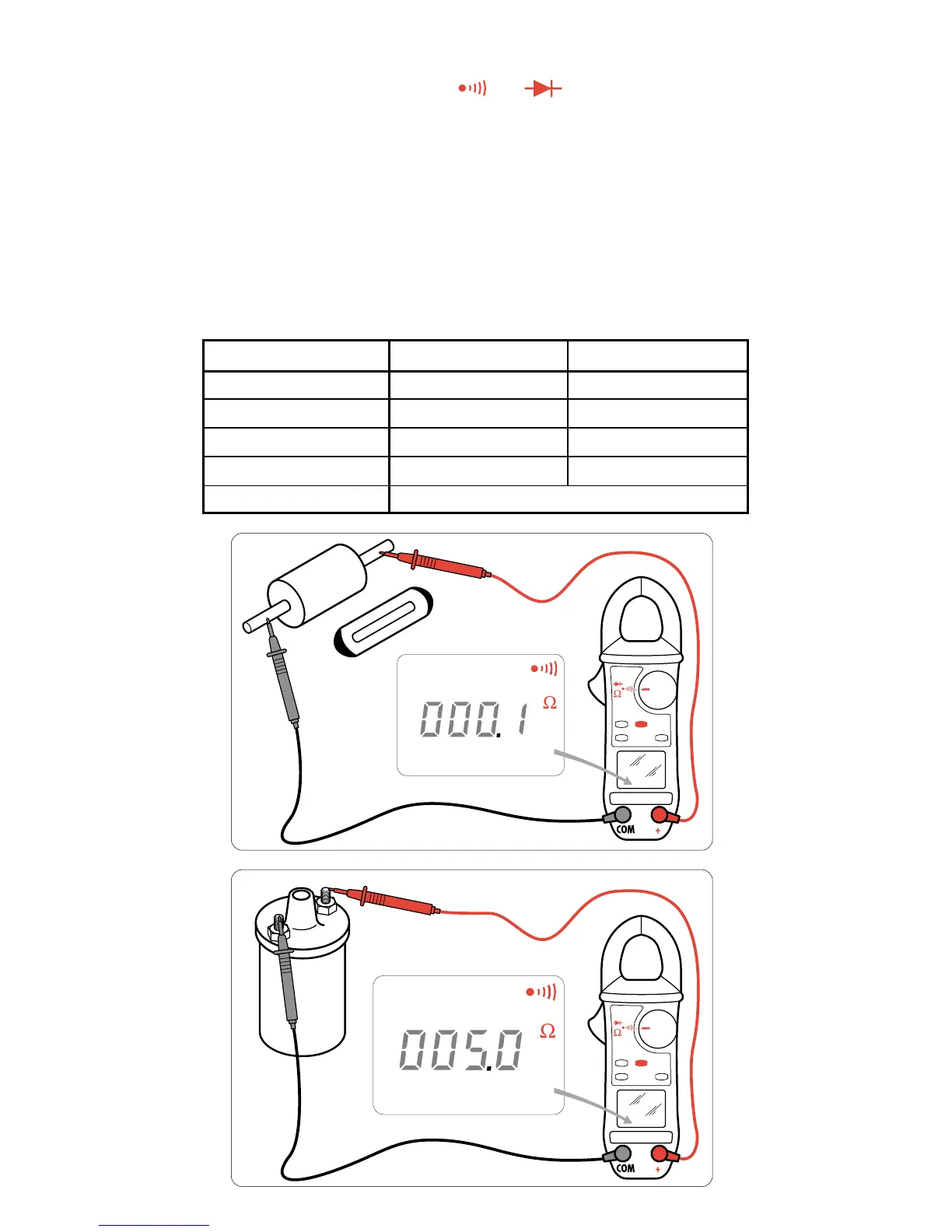
CONTINUITY
Set the selector switch to the position
Ω
Check the circuit to be measured with the contact tips. Audible continuity beeping will
be active for a resistance
≤
threshold selected by programming (40 Ω by default).
RESISTANCE
Starting from the Continuity position, press the yellow button (secondary functions)
to select the Resistance function.
Check the circuit to be measured with the contact tips.
Range switching is automatic.
Calibrated range overloading is indicated on the display by OL.
Possibility of compensating for the resistance of the power cables by a long press
on the HOLD button and a shorting of the cables.
Display Range 400 Ω 4,000 Ω
Measurement Range 0,0 - 399,9 Ω 400 - 3,999 Ω
Precision 1,5 % ± 2 points 1.5 % ± 2 points
Resolution 0,1 Ω 1 Ω
Voltage in Open Circuit 3,2 V 3,2 V
Protection 500 V AC or 750 V (DC or Peak)


 To Next Page