BEFORE PROGRAMMING, CHECK...
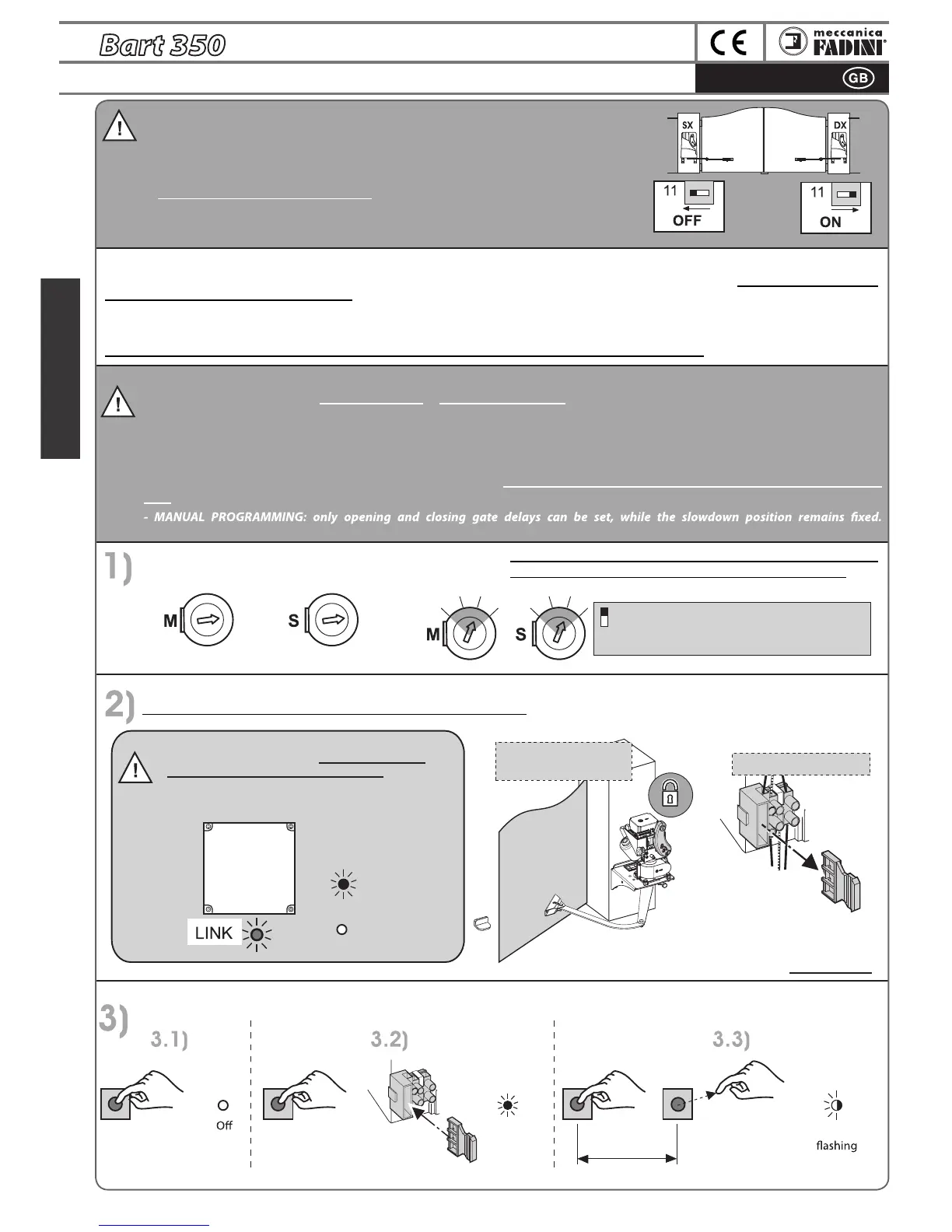
1) Correctly select Dip 11 on Elpro 35M for Bart 350 Master installation on the Right
(DX) or on the Left (Sx), as seen from inside.
2) Adjust the opening gate stops (pg.10) or enable limit switches (pg.11).
3) All GREEN LEDs MUST ALWAYS BE ON, otherwise check all NC safety contacts.
4) Check if the LINK LEDS in Elpro 35M and Elpro 35S are on, otherwise verify connection
to terminals 15-16-17-18.
IMPORTANT:
ELPRO 35M has the function of self-programming or manual programming:
- SELF-PROGRAMMING:
Recommended for systems with single gates (in this case, bridge terminals A-C and B-D), or for gates without gate overlap. The entire
opening and closing of one or both one gates, including slowdown before limit switch end stops, is left to the electronic board. This
operation is performed only with one pulse, and the programmer manages all gate movements.
Please note: Self-programming is recommended for gates which do not require an opening delay or are not equipped with an electric
lock.
Recommended for gates which overlap or have an electric lock on Bart 350 Master.
NOTE:
When mains power is present, all green LEDs on the
Elpro 35M and Elpro 35S must always be on.
If the green LEDs are not all on, check each electrical
connection before continuing with programming.
General information on programming:
- Any time a change is made to the gate stop position,limit switch cam, control board or to any of its component, you must reprogram gate
opening and closing with the same procedure.
- Even in the absence of mains power, programming is always stored. During the rst cycle after a black-out, the Bart will automatically search
for the rst end stop or limit switch at slow speed.
- During all programming phases, all control and safety accessories are deactivated. The utmost care is therefore recommended.
ONLY STOP CONTACTS 3-6 AND RADIO CONTACT 3-7 ARE ENABLED ONLY FOR MANUAL PROGRAMMING PULSES
IMPORTANT: adjust the torque trimmer according to th
e
type of material and inertia of the gate...
Lock the gate: pg.38 “Operations for restoring gate locking”.
Remove the power fuse on Bart 350 Master and power the system...
...low torque (maximum position three) is recommended for
light or deformable gates (in aluminium, wood, PVC, etc.)
ON: Decreases sensitivity on closing gate stop, to
prevent the gate travel from being reversed too
easily in case of incorrect installations.
min
LP LP
LP
min
min
GREEN LEDs
on
Bart 350 MASTER
Bart 350 SLAVE
Bart 350 MASTER
RED LEDs
o
min
max
On
slow
4-5 sec
max
maxmax
6
MASTER
SLAVE
Bart 350 Master locked
Bart 350 Slave locked
Remove the power
fuse present only on
the
Bart 350 Master.
with the programming button pressed, insert the line fuse, after 4/5 seconds, release the programming button: the LP LED will
remain on, conrming that programming is in progress
ELPRO 35M


 To Next Page
 Loading...