- 35 -
InstructionsGENERAL INFORMATION REGARDING ELPRO 35M and ELPRO 35S
English
LP
LP
LP
LP
LP
LP
on
on
The 1
st
gate moves.
Bart 350 Master (pedestrian gate if enabled)
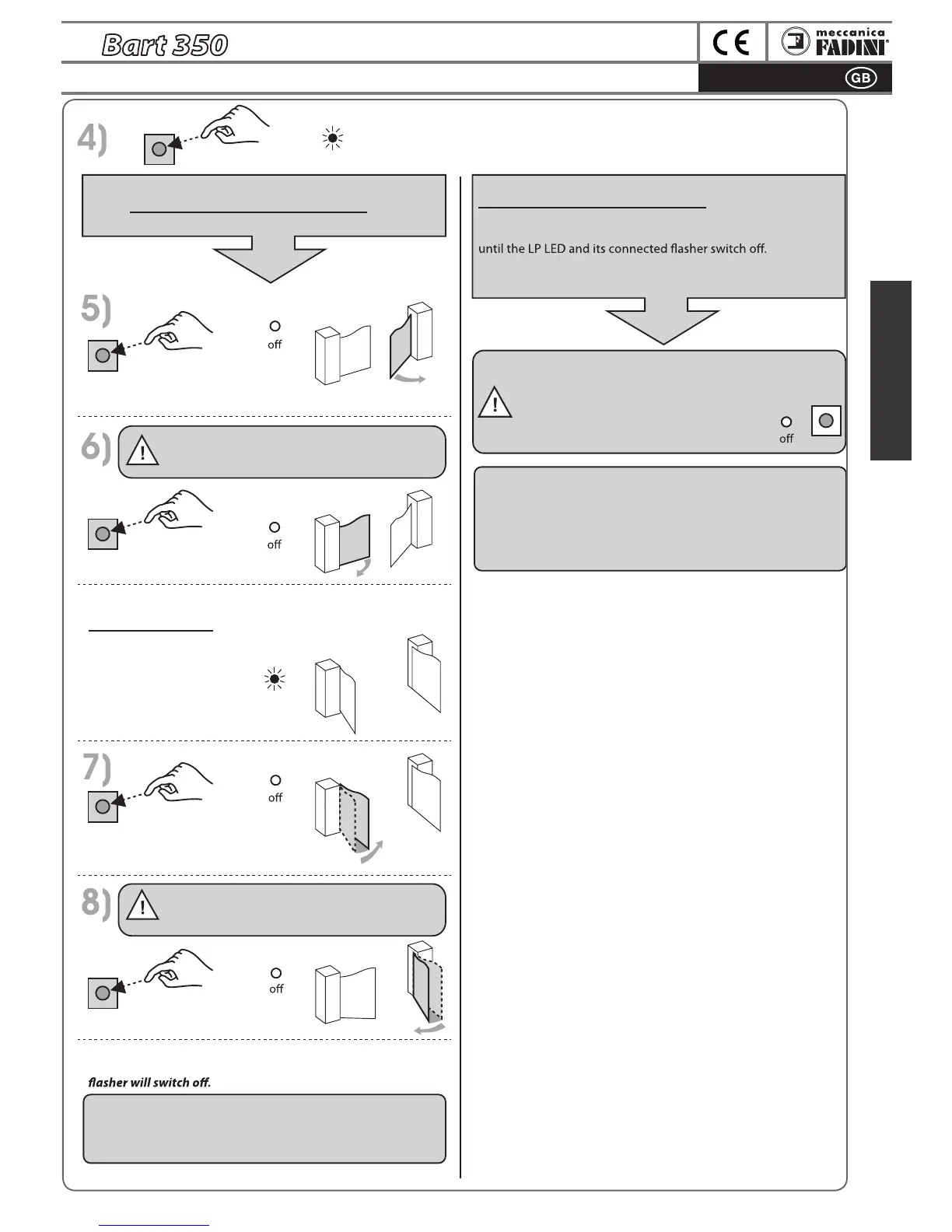
SLAVE GATE OPENING DELAY: the time elapsed from
the movement of the first gate to the pulse given in
this phase 6. If no button is pressed, a pulse is given
automatically.
Wait for both gates to arrive at opening stop or to limit
switch operation. When the LP LED switches on, you will have
5 seconds maximum to perform the gate closing delay,
otherwise the gates will move together.
1 pulse
SLAVE
SLAVE
SLAVE
SLAVE
SLAVE
MASTER
MASTER
MASTERMASTER
MASTER
LP
AUTOMATIC PROGRAMMING
After 5 seconds from the previous pulse , the gates will start to
move to their respective opening stops or up to limit switch
operation. Wait for multiple complete and partial cycles to run
IMPORTANT: WAIT FOR THE LP LED TO
SWITCH OFF AS CONFIRMATION OF
SUCCESSFUL PROGRAMMING.
GATES MUST BE CLOSED AT THE END OF
PROGRAMMING
END OF PROGRAMMING
Note: after programming has been completed, verify the torque
exerted by Bart on the gate and, if necessary, adjust Trimmer torque
and perform programming again.
MANUAL GATE DELAY PROGRAMMING
within 5 seconds from the previous pulse (phase 4)...
1 pulse
1 pulse
The 2
nd
gate moves.
Bart 350 Slave
END OF PROGRAMMING
Note: after programming has been completed, verify the torque
exerted by Bart on the gate and, if necessary, adjust Trimmer torque
and perform programming again.
Wait for the two gates to complete the learning cycle and arrive
at closing stop or to limit switch operation. The connected
1 pulse
MASTER GATE CLOSING DELAY: the time elapsed from
the movement of the Slave gate to the pulse given in
this phase 8. If no button is pressed, a pulse is given
automatically.
1 pulse


 To Next Page