27
EN
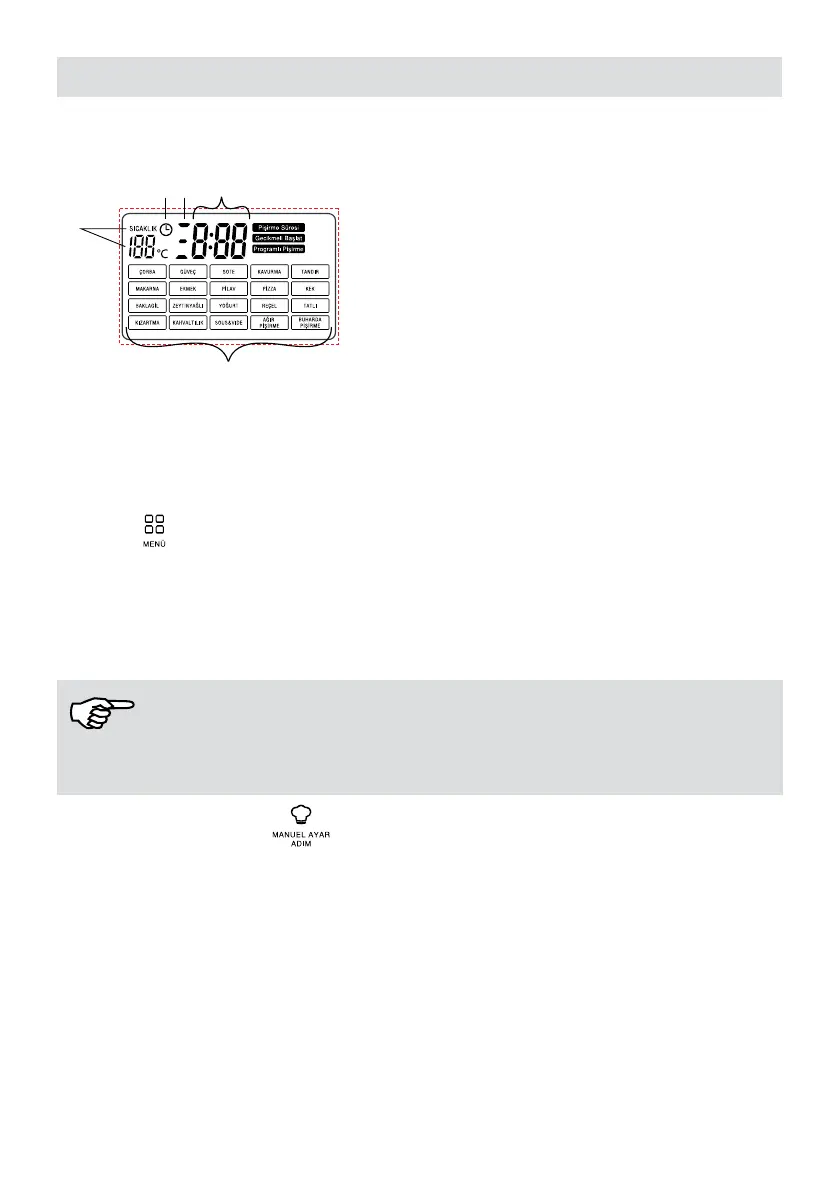
8. LED Display Introduction
2
3
45
1. 20 cooking programs
2. Temperature indicator
3. Delay start indicator
4. Displays the remaining time or the set cooking
time in hours and minutes.
5. Shows the steps in programmed cooking
2. Operating
Plug the appliance.
A beep sound will be heard and the led display will light up.
2.1 Menu
Press the menu button to select the cooking program you will use. Each time you press
the menu button, one of the 20 different food programs will light up respectively. When the
desired program is on, the program is started by holding down the start key for 2 seconds.
At the same time, you can change the time and temperature when the desired food
program is on.
NOTE!
Each food program has its own set time and temperature. The temperature can only be
adjusted manually in frying and roasting programs.
2.2 Manual Setting /Step
This program allows you to create a cooking program manually. Program cooking and rst
step indicator ashes on the display when the button is rst pressed.
To create the rst step; you can adjust the temperature and time with temperature and time
buttons.
When you press the manual setting/step button for the second time, second step indicator
will light up and the desired time and temperature are set.
When it is pressed for the third time, setting is made at the same way and the
cooking program you have set will start by pressing the start button for 2 seconds. When
the appliance starts to operate, it completes all steps at the time and temperature you
adjusted.


 To Next Page