Controller programming – additional functions
Adding remote device to the Z-Wave network - ASSIGN A ROUTE
Function allows for adding already installed Z-Wave
device to SECONDARY controller, permanently
installed (e.g. ZWMP or ZWMA weather module) via
PRIMARY controller (transferring Node INFO). Such
situation occurs when device (SECONDARY controller
and controlled device) are not in direct contact with
each other or time to perform ASSOCIATE procedure is
too short.
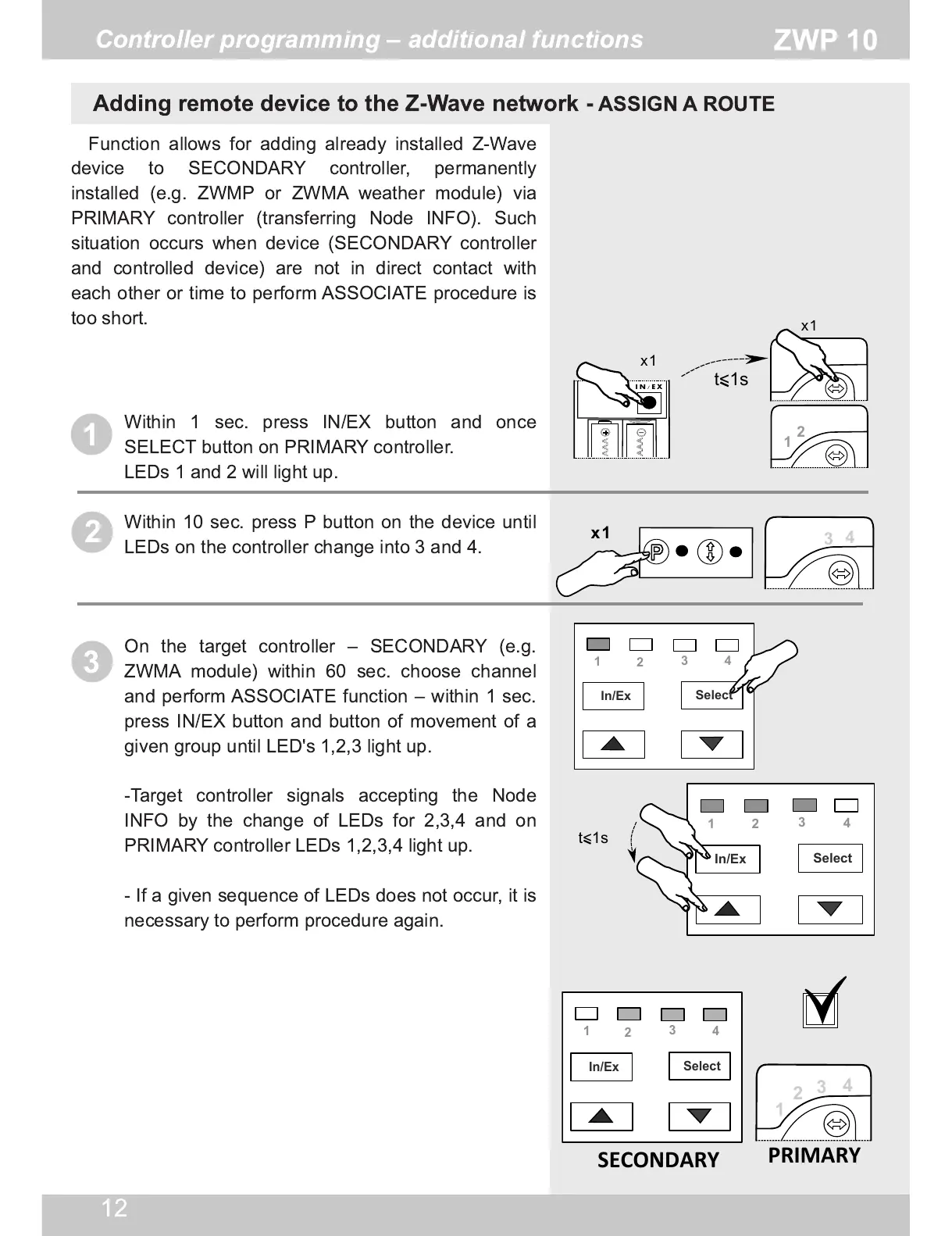
Within 1 sec. press IN/EX button and once
SELECT button on PRIMARY controller.
LEDs 1 and 2 will light up.
Within 1 0 sec. press P button on the device until
LEDs on the controller change into 3 and 4.
On the target controller – SECONDARY (e.g.
ZWMA module) within 60 sec. choose channel
and perform ASSOCIATE function – within 1 sec.
press IN/EX button and button of movement of a
given group until LED's 1 ,2,3 light up.
-Target controller signals accepting the Node
INFO by the change of LEDs for 2,3,4 and on
PRIMARY controller LEDs 1 ,2,3,4 light up.
- If a given sequence of LEDs does not occur, it is
necessary to perform procedure again.


 To Next Page