The FAKRO ZWP10 is a Z-Wave Controller designed for radio control of FAKRO electrical accessories and other compatible Z-Wave system devices. It functions as a remote control, allowing users to operate up to 10 devices, either individually across 5 channels (2 devices per channel) or in 10 independent groups, each capable of controlling multiple devices simultaneously. The controller's memory can store up to 231 devices.
Technical Specifications:
- Power Supply: 3V DC, 2xAAA 1.5V batteries.
- Operation Temperature: +5°C to +40°C.
- Range of Operation (open space): Up to 40 meters.
- Wireless Protocol: Z-Wave.
- Operation Frequency: 868.4 MHz (EU); 921.42 MHz (AS/NZ); 908.4 MHz (US/Canada).
- Sizes (length/width/height): 157 / 38 / 19 mm.
Function Description:
The ZWP10 controller is equipped with a two-way Z-Wave radio communication module. It can serve as a primary (PRIMARY) controller, integrating many devices into one radio network, or as an additional (SECONDARY) controller within an existing network. The controller supports basic operation modes (OPEN, STOP, CLOSE) and a Multilevel Mode for smooth control, such as dimming lights.
Usage Features:
- Channels and Groups: The controller features 5 channels, each capable of controlling two devices or a group of devices. LEDs signal the active channel. Groups of controlled devices are predefined for each channel (e.g., group 1,2 for channel 1).
- Control Modes:
- Basic: A quick press (within 0.5 seconds) of the movement button initiates device movement, and pressing the stop button halts it.
- Multilevel: Pressing and holding a movement button allows the device to reach a desired position, releasing the button stops it.
- Programming Functions:
- Include: Adds a device to the Z-Wave network and the controller's memory. This is the initial step for new devices not bundled with the controller.
- Associate: Adds a device to specific movement buttons (group) on the controller. This is used to assign an already included device to another group or to assign a device that was only included in the network (without being assigned to movement buttons).
- Learn Mode: Copies device information from a primary controller to the ZWP10, making it a secondary controller. This is useful for expanding control within an existing network.
- Exclude: Removes a device completely from the Z-Wave network and the controller's memory, resetting its HomeID. This is necessary before assigning a device to a different controller.
- Delete: Removes a device from specific movement buttons (group) without removing it from the network. This can be done for individual devices or entire groups.
- Assign a Route: Adds an already installed Z-Wave device to a secondary controller via the primary controller, transferring Node INFO. This is useful when direct contact between the secondary controller and the controlled device is difficult or the ASSOCIATE procedure time is too short.
- Associate Device: Configures devices within a Z-Wave network so that one controlled device can launch another, even if not assigned to the controller's movement buttons (e.g., a servo-motor launching another based on a rain sensor).
- Copy Group: Copies a group of devices from a primary controller to a secondary controller, or vice versa, within the same network.
- Default: Restores the controller to factory settings, removing all devices from its memory and changing its unique HomeID network address. This also sets a secondary controller back to primary.
- Listening Mode: For gateway integration (e.g., Vera, Fibaro), holding the select button for over 3 seconds activates Listening Mode, indicated by sequential flashing LEDs. This mode allows remote configuration of the controller by the gateway.
Maintenance Features:
- Battery Replacement: The controller is powered by two AAA 1.5V batteries, which can be easily replaced by opening the back cover.
- Wall Holder: A magnetic wall holder is provided for convenient storage and access to the remote control.
- Programming Button (IN/EX): Located under the back cover, this button is crucial for all programming operations.
- Network Status LED: Devices to be controlled typically have a network status LED that indicates power supply connection and assignment status. For photovoltaic-powered devices, the LED lights up for 5 seconds after pressing the P button, signaling readiness for assignment.
Warranty:
The manufacturer guarantees correct device functioning for 24 months from the purchase date, provided installation was performed by an authorized individual, seals remain intact, no unauthorized structural changes were made, and the device was used according to the user manual. The warranty does not cover damage from improper electrical systems, atmospheric phenomena, or mechanical damage due to improper use. In case of failure, the device must be submitted for repair with a Warranty Card, with repairs completed within 14 days.

 Need help?
 General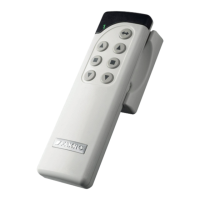

 To Next Page