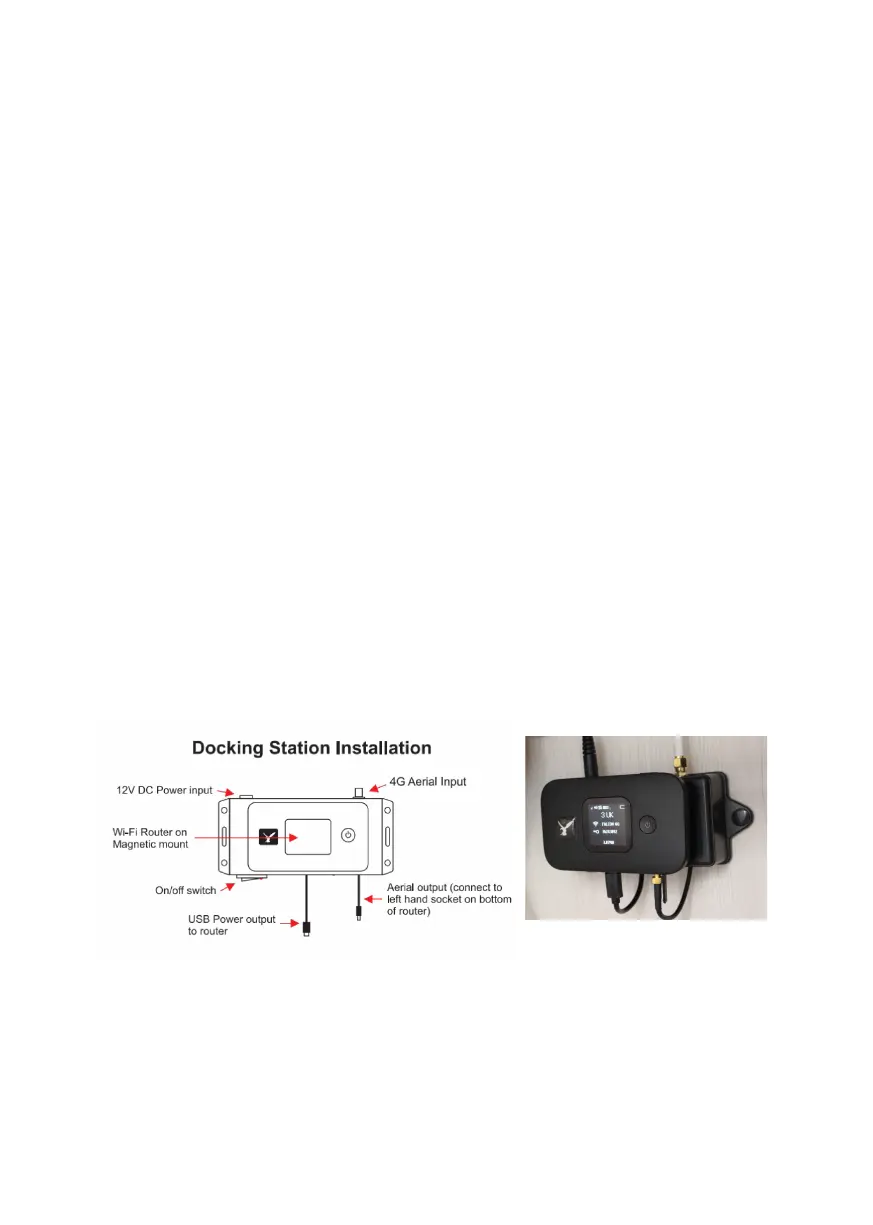
Mounting the 4G docking station
When nding a location for the 4G docking station try to put as much
distance as possible between the 4G docking station and the TV booster
box as possible. The 4G cable from the antenna is 2 meters long allowing
sucient distance. Separating the 4G power box to the TV booster
ensures electromagnetic interference towards the TV reception is
minimalised. Separating the two by around 300 mm is recommended.
Fix the 4G docking station with the 2 small screws.
Use the 2 meter 12 volt power cable that comes with the 4G docking
station to connect to the same power source as the TV booster box. Plug
the power plug into the 4G docking station.
Mount the Falcon 4G router to the docking station
Mount the Falcon 4G router on the Magnet on the 4G docking station.
Plug in the USB power cable from the docking station into the router.
Note if the USB does not t rotate 180 degrees as the plug and the socket
has to be matched the correct way.
Plug the antenna cable to the antenna input on the router user the left
hand side input as indicated in the diagram.
Turn on the power on the 4G docking station, the light on the switch
should illuminate to conrm power on.
Turn on the Falcon 4G router by pressing and holding the power button
the router.


 To Next Page