10
V. COMFORTABLE ADJUSTING
SEAT HEIGHT ADJUSTMENT
• You can choose the different holes to change the seat height.
• Pull back the seat lock lever under the right side of the seat to
unlock the seat.
• Lift the seat up and off the scooter(see fig. 7)
• Hitch the pin loop and pull out the pin(see fig. 5)
• Slide the seat post up or down to change the seat height
as you need.
• Re-insert the pin.
• Re-install the seat.
SEAT ROTATION
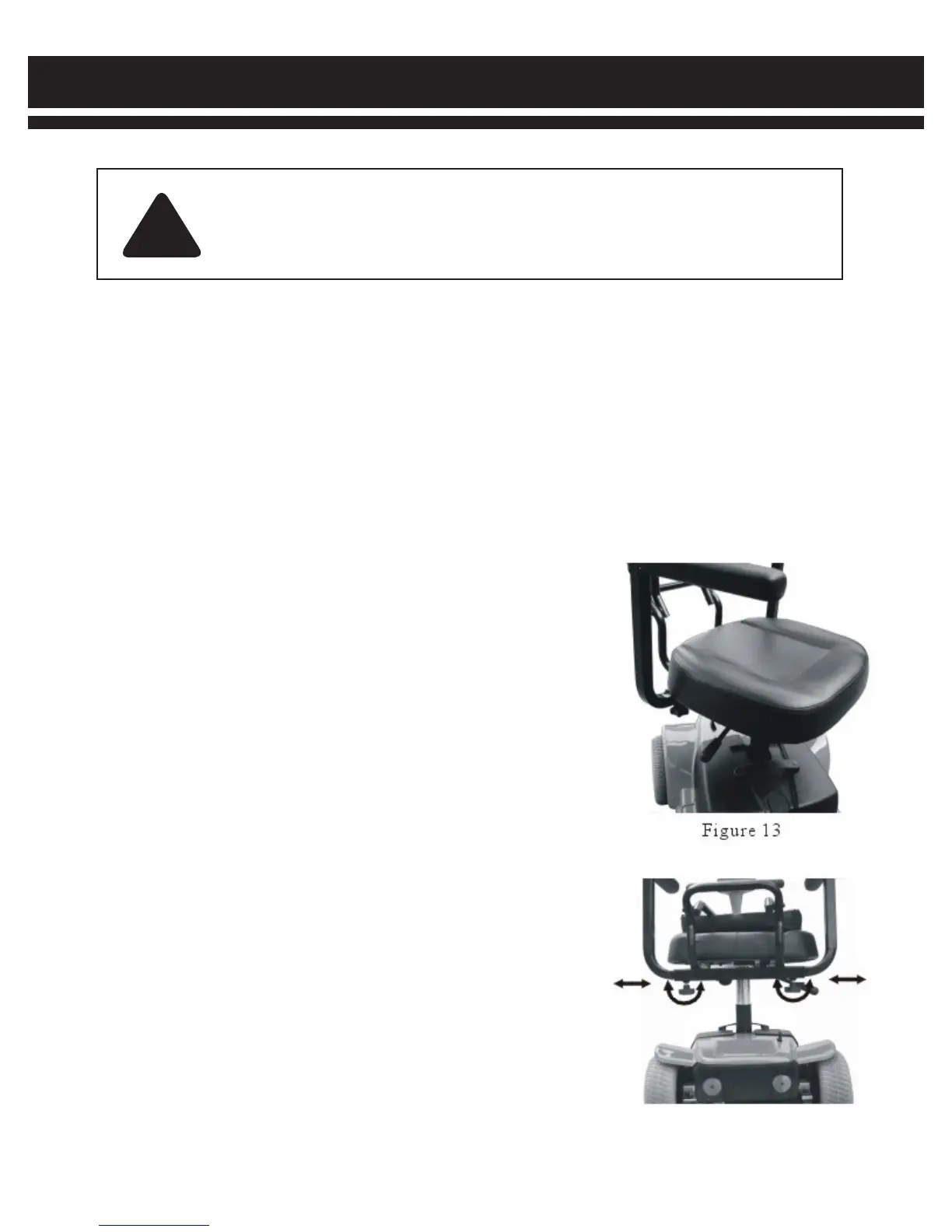
• You can rotate the seat to adjust its direction (see fig. 13)
• Pull up the seat lock lever to unlock the seat.
• Rotate the seat to desired position.
• Release the seat lock lever, it will relock the seat
automatically.
ARMREST WIDTH ADJUSTMENT
You can move the armrests inward or outward to adjust the
seat width(see fig. 14)
• Find the screw on the bottom of the armrest adjustment rack.
• Loosen the screw.
• Move the armrests inward or outward to the desired position.
• Tighten the screw.
WARNING!
Remove the key from the key switch before adjustments. Never attempt to do
adjustments while the scooter is in motion.
!
Before operating the scooter, you may find the need to make some adjustments to increase your comfort, such
as seat height, armrest width, and tiller angle, etc.


 To Next Page