Need help?
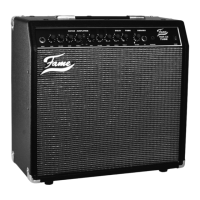
Do you have a question about the FAME T64RS and is the answer not in the manual?
Connects the amplifier to a grounded power outlet for operation.
Connects the electric guitar to the amplifier's input jack using a mono cable.
Protects speakers from damage caused by heavy feedbacks.
Advice for using the amplifier in different countries with varying voltages.
Details about the main fuse, its location, and required replacement value.
Instructions regarding authorized service personnel for checkups and repairs.
Describes the mono style input jack for connecting an electric guitar.
Jack for connecting CD/MP3 players to receive external audio signals.
Information on using headphones for quiet practicing at home.
Connects external effects units between the preamp and power amp sections.
Connects an optional footswitch for controlling channel switching.
Connects the amplifier head to the speaker cabinet.
Jack used to connect the T64RS to a grounded power outlet.
Describes the clean and brilliant sound produced by Channel 1.
Describes the versatile sound options from Blues to Metal on Channel 2.
Explains the use of built-in spring reverb for creating room sound.
Controls for Channel 1: Gain, Volume, Bass & Treble.
Switch labeled 'I & II' for changing between Channel 1 and Channel 2.
Controls for Channel 2: Gain, Volume, Bass, Middle, Treble.
Controls the intensity of the reverb effect in the overall sound.
The power switch to turn the T64RS amplifier on or off.
Advice on using external effects devices to enhance sounds.
Guidance on selecting high-quality effects processors and units.
Specifies the amplifier's power output rating.
Details the type and quantity of speakers used in the cabinet.
Lists the available switches for channels and power.
Details the EQ controls for each channel.
Lists the built-in effects available on the amplifier.
Lists all available input and output connection jacks.
Provides the physical dimensions for the head and cabinet.
States the total weight of the amplifier.
Lists included accessories such as manuals and cables.
Lists optional accessories that can be purchased separately.
 General
| Effects | Reverb |
|---|---|
| Effects Loop | Yes |
| Channels | 2 |
| Impedance | 4/8/16 Ohms |
| Controls | Bass, Middle, Treble |
| Footswitch | Yes (Channel Switch) |


 To Next Page