Need help?
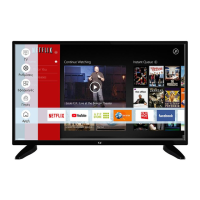
Do you have a question about the F&U FLS32229 and is the answer not in the manual?
Describes product safety symbols and their meanings.
Covers essential safety guidelines for TV usage and environment.
Details precautions regarding power cords, plugs, and avoiding electric shock.
Explains how to adjust settings to reduce energy consumption.
Highlights digital terrestrial, cable, and satellite TV integration.
Mentions HDMI and USB inputs for external devices.
Describes using the TV as a digital picture frame.
Explains automatic standby activation and notifications.
Provides crucial advice for secure wall installation.
Details how to operate TV functions using a single physical button.
Explains navigation and selection using the remote control.
Describes switching between different connected devices.
Covers basic audio-visual controls via remote.
Explains standby, restart, and forced power-off functions.
How to edit and add items to the Home menu.
Using search to find channels, apps, and web content.
Introduces sub-menus like Guide, Channels, Timers, Recordings, Apps, and Market.
Steps to open the battery compartment.
Instructions for inserting new batteries.
How to connect the TV to a power source.
Guide for aerial and satellite dish connections.
Accessing the TV's accessibility settings.
Managing privacy privileges for smart TV applications.
Managing various TV settings and customizations.
Managing input source preferences and settings.
Details on trademark and licensing agreements for technologies.
Information on intellectual property rights for software.
Instructions for recycling electronics and batteries in the EU.
Guidelines for business users and countries outside the EU.
Covers TV broadcasting standards, channels, digital reception, and audio.
Includes dimensions, display size, and operating conditions.
Technical details for Wi-Fi frequencies and power output.
Notes on regional limitations for wireless LAN usage.
Explains the purpose of each button on the remote control.
Details on Standby, My Button 1, and their specific uses.
Describes buttons for play, pause, stop, rewind, and fast forward.
Buttons for quick access to applications like Netflix and YouTube.
Details on connecting via HDMI and SPDIF ports.
Explains connections for audio/video, headphones, and USB devices.
Describes Ethernet and Common Interface connections.
Important safety note before connecting any device.
Methods to turn the TV on from standby mode.
How to put the TV into standby mode.
Steps for initial language and region configuration.
Choosing the appropriate operating mode for your environment.
Initial configuration of picture display and privacy preferences.
Connecting to networks and searching for channels.
How to connect HDDs and memory sticks.
Steps and compatibility for recording programs.
Using timeshift for live TV pausing and recording.
How to start recording a program immediately.
Using fast forward for slower playback speeds.
Setting up recording timers and options.
Viewing disk details and formatting for FAT32.
Accessing and playing media files from USB.
Options for controlling media playback order.
Personalizing the TV's startup image.
Streaming TV content to mobile devices.
Using the TV remote to control connected CEC devices.
Connecting TV audio to external systems via HDMI ARC.
Using HDMI ARC for external audio system control.
How to find and use the built-in electronic manual.
Options for Virtual Remote, Audio Video Sharing, Timer, CEC.
Controls for picture modes, contrast, brightness, colour, energy saving.
Fine-tuning picture quality with dynamic contrast, colour temp, etc.
Configuring sound output, Dolby Audio, Surround Sound, AVL.
Equalizer, Dynamic Bass, Digital Out, and Headphone settings.
Settings for network type, scanning, and connection.
Configuring automatic and manual channel scans, satellite settings.
High Contrast, Hard of Hearing, Audio Description, Spoken Subtitles.
Managing privacy settings, cookies, and tracking preferences.
Menu Lock, Maturity Lock, Child Lock, PIN settings.
Setup for Alexa and Google Assistant features.
Settings for auto standby and subtitle display.
Configuration for store display and startup logo.
Viewing model details and software upgrade checks.
Detailed guide to parental control options.
Browsing TV schedules and event information.
How to use Teletext and Digital Teletext.
Steps for updating the TV's firmware.
Solutions for TV not turning on or poor picture quality.
Troubleshooting no sound or unresponsive remote.
Diagnosing no signal and USB recording problems.
List of supported video extensions, codecs, and resolutions.
List of supported image extensions and specifications.
List of supported audio extensions and formats.
Supported subtitle file types.
Resolution compatibility when using DVI to HDMI cables.
Steps to connect the TV to a wired network via Ethernet.
Guide for connecting to Wi-Fi networks.
Using the TV as a wireless display for mobile devices.
Solutions for wireless network and connection issues.
Launching installed apps and accessing the app market.
Navigating websites, using speed dial, and browser features.
Explanation of Hybrid Broadcast Broadband TV services.
Using the app for streaming, remote control, and media sharing.
Streaming TV content to mobile devices and managing channel lists.
Using the mobile app as a remote and for voice commands.
Steps to set up the TV as an Alexa device.
Customizing the ambient display for Alexa.
Connecting and setting up Alexa for TV control.
Guide to connect and use Google Assistant with the TV.
Common commands for controlling TV functions with Alexa.
Common commands for controlling TV functions with Google Assistant.
Notes on DVB receiver usage and potential future compatibility.
 General
| Screen Size | 32 inches |
|---|---|
| Smart TV | Yes |
| Display Technology | LED |
| Operating System | Android |
| HDMI Ports | 2 |
| USB Ports | 2 |
| Built-in Wi-Fi | Yes |
| Bluetooth | Yes |
| Resolution | 1366 x 768 |
| Sound Output | 2 x 8W |

 To Next Page