English - 7 -
3.7. Accessibility
You can access the accessibility settings menu directly
using this option.
3.8. Privacy Settings
You can access the privacy settings menu directly
using this option. This option may not be available
depending on the model of your TV and the selected
country during the first time installation process.
4. Settings
You can manage the settings of your TV using the
options of this menu. Refer to Settings Menu Content
section for more information.
You can reset your customisations on the Home menu
to defaults using the Reset Apps option (availability
depends on TV model and its features). Highlight and
press OK. A confirmation message will be displayed.
Highlight Yes and press OK to proceed. Note that you
will not be able to perform this operation again within
the next few minutes.
5. Sources
You can manage your input source preferences using
the options of this menu. To change the current source
highlight one of the options and press OK.
5.1. Source Settings
You can access the source settings menu directly using
this option.
Inserting the Batteries into the Remote
The remote may have a screw that secures the battery
compartment cover onto the remote control (or this may
be in a separate bag). Remove the screw, if the cover
is screwed on previously. Then remove the battery
compartment cover to reveal the battery compartment.
Insert two 1.5V - size AAA batteries. Make sure the (+)
and (-) signs match (observing correct polarity). Do not
mix old and new batteries. Replace only with same or
equivalent type. Place the cover back on. Secure the
cover again with the screw, if any.
A message will be displayed on the screen when the
batteries are low and must be replaced. Note that when
the batteries are low, the performance of the remote
control may be impaired.
Batteries should not be exposed to excessive heat
such as sunshine, fire or the like.
Power Connection
IMPORTANT: The TV set is designed to operate on a
220-240V AC, 50 Hz supply. After unpacking, allow the
TV set to reach the ambient room temperature before
you connect the set to the mains.
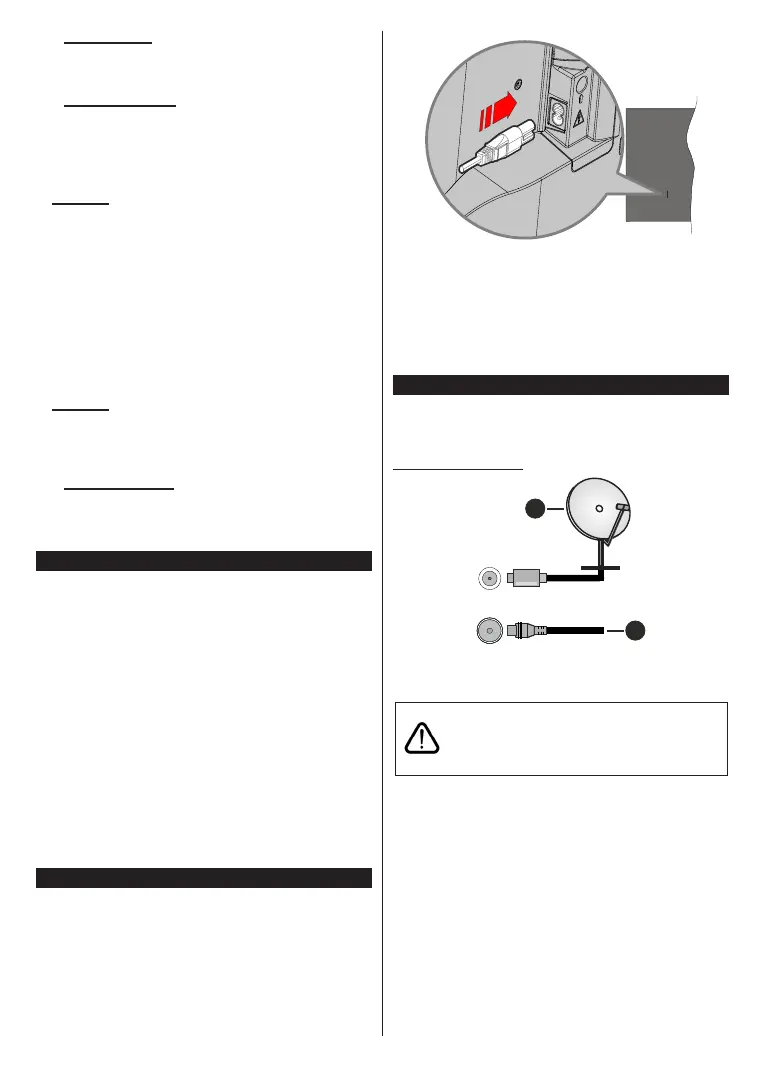
Plug one end (the two-hole plug) of the supplied
detachable power cord into the power cord inlet on
the rear side of the TV as shown above. Then plug
the other end of the power cord into the mains socket
outlet.
Note: The position of the power cord inlet may differ depending
on the model.
Antenna Connection
Connect the aerial or cable TV plug to the aerial input
(ANT) socket or satellite plug to the satellite input (LNB)
socket located on the rear side of the TV.
Rear side of the TV
1
2
LNB
ANT
1. Satellite
2. Aerial or cable
If you want to connect a device to the TV, make
sure that both the TV and the device are turned off
before making any connection. After the connection
is done, you can turn on the units and use them.


 To Next Page