Lock a TV or Radio channel:
1.Select the preferred channel then press the YELLOW bu on. A lock-shaped symbol is displayed.
The channel is now marked as locked.
2.Repeat the previous step to select more channels.
3.To confirm your se
ngs and exit the menu, press the EXIT bu on.
4.Press the YELLOW bu
on to disable the locked channels func on.
5.To view the locked channels, you will be required to enter either the default password ‘000000’ or
your last set
password. The master unlock password is ‘888888’.
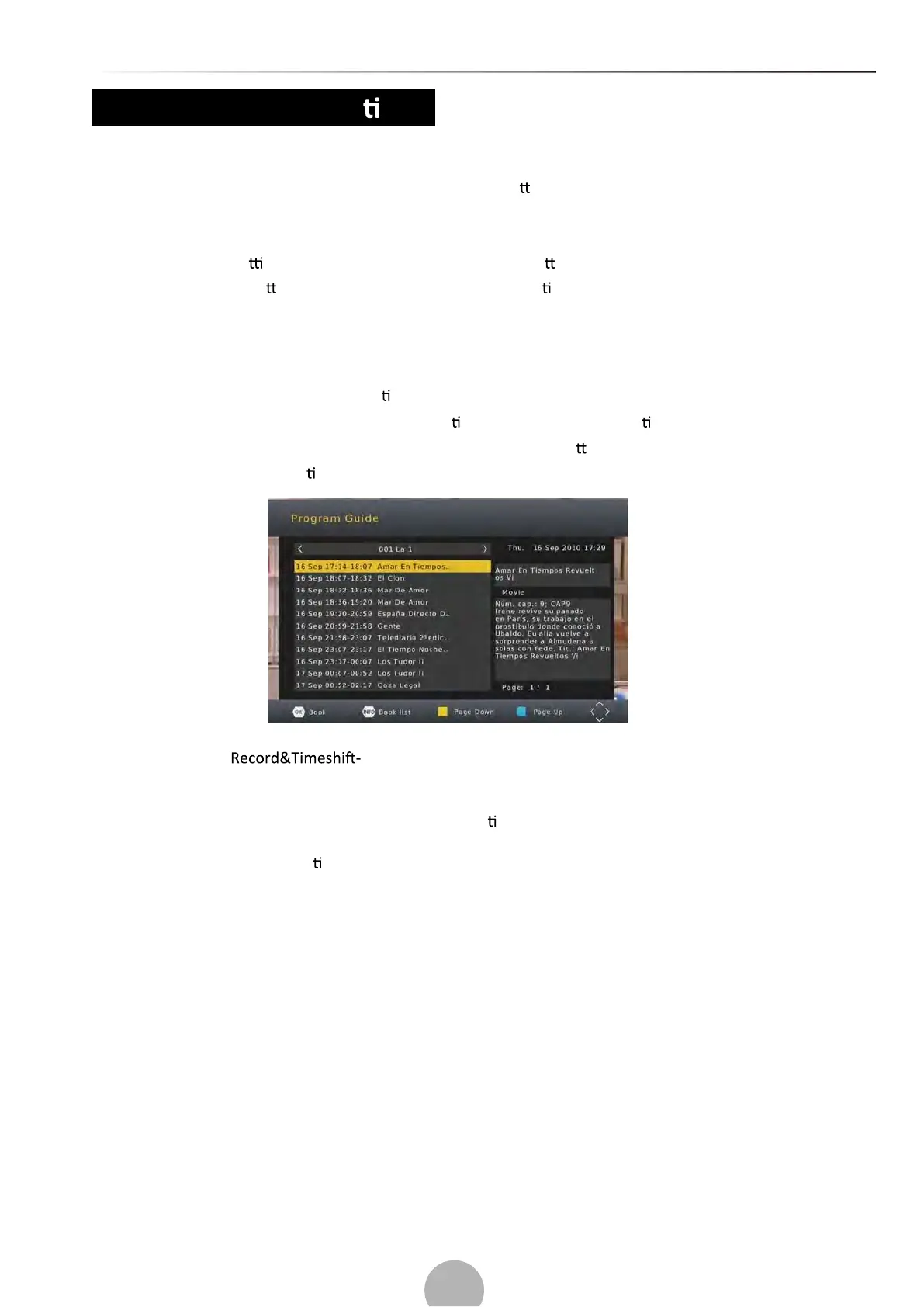
(b) EPG (Electronic Programming Guide)
This feature shows the TV program lis ngs for each channel for the following 7 days. By default,
when the EPG is opened, the current channel’s lis
ngs are shown. To view lis ngs for other channels,
press the LEFT and RIGHT arrow keys. The display shows the bu
ons to press to go forward or
backward in the programs lis
ng.
Note: Please see
(a)Record to learn how to schedule program recordings and
channel preview.
To set the receiver to change to channel at a specific
me (e.g. at the start of your favorite
program) while you are watching another channel, please follow these steps:
•Press EPG to open the full lis
ngs.
•Select the TV channel using the LEFT/RIGHT arrow keys.
•Select the TV program you want to watch later.
• TIXE sserP
11


 To Next Page