17
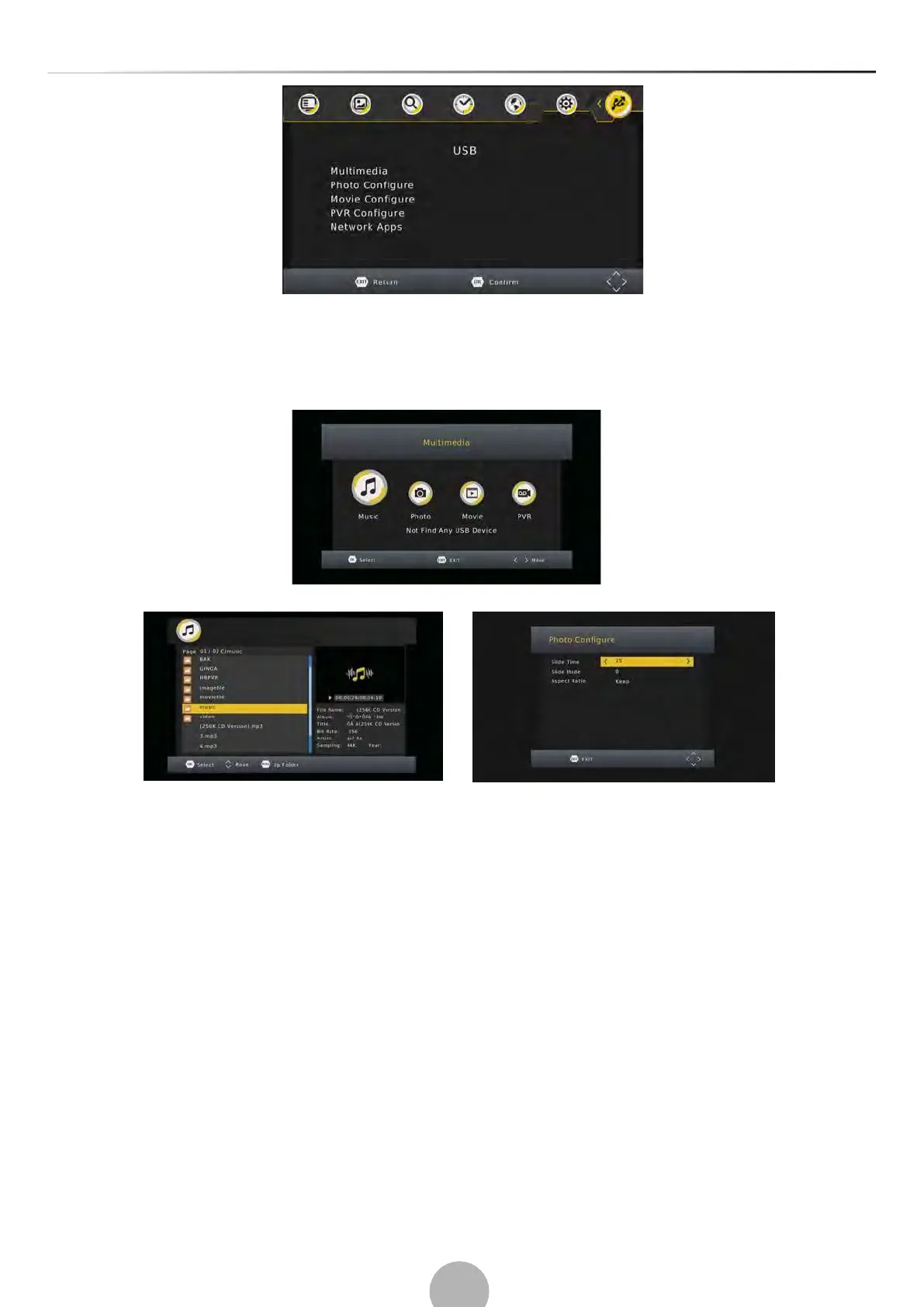
(a) Mulmedia:
When a USB device is aached you can select from the Music, Photo, Movie or REC opitons in this
menu using the RIGHT/LEFT keys and OK to select. If a USB device is not connected, the warning
message “No USB device is Found” will appear.
(b) Photo Configure:
-Slide Time: adjust slide show interval to 1-8 seconds.
-Slide Mode: adjust slide show effect as mode 0-59 or random.
-Aspect Rao:
[Keep]: Play picture in its original aspect.
[D
iscard]: Play picture in full screen mode.
(c) Movie Configure:
-Subtle Specific:
[Small]: Displays the subtle as small mode.
[Normal]: Displays the subtle as normal mode.
[Big]: Displays the subtle as big mode.
-Subtle BG:
[White]: Displays the subtle in white background.
[Transparent]: Displays the subtle in transparent background.
[Grey]: Displays the subtle in grey background.
[Yellow green]: Displays the subtle in yellow green background
.


 To Next Page