8. TROUBLESHOOTING - CONTINUED
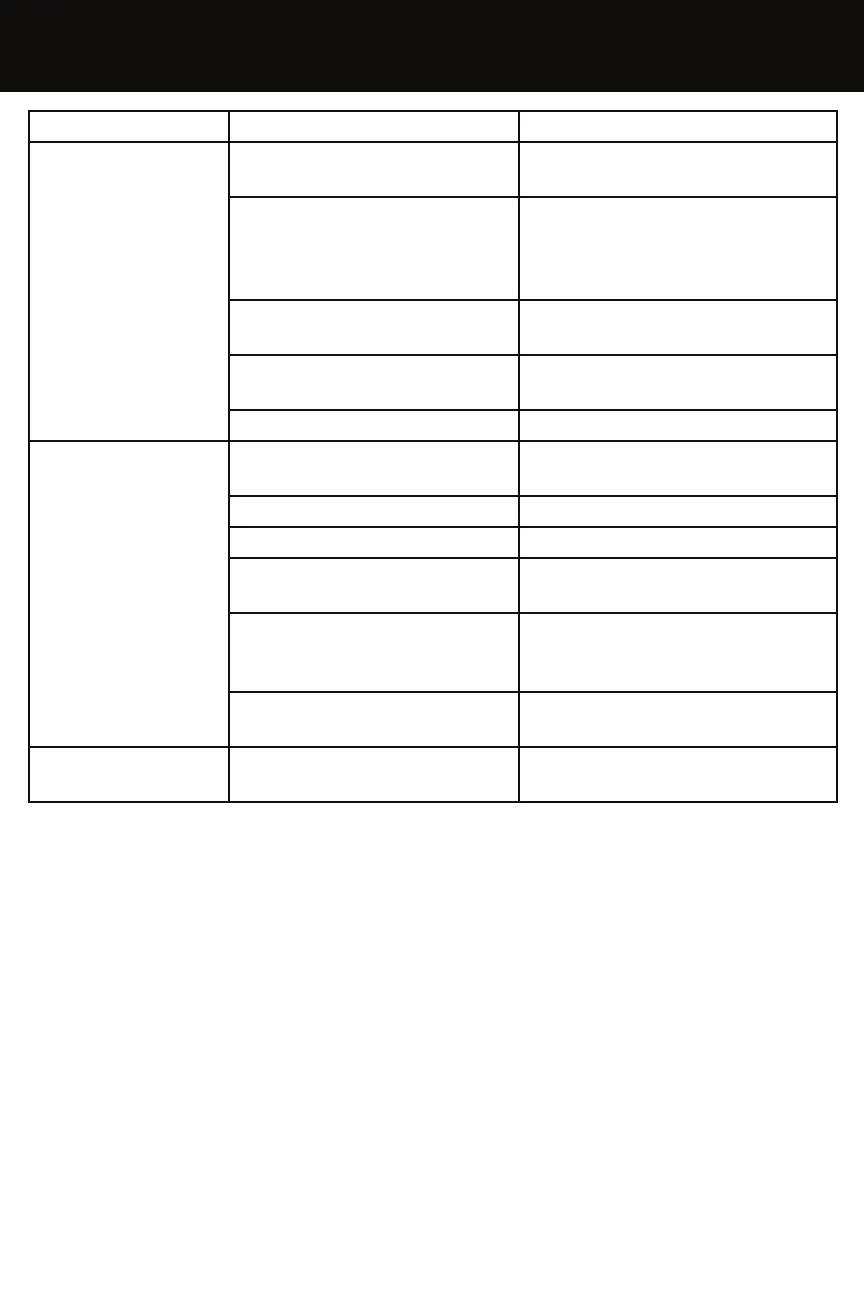
PROBLEM CAUSE SOLUTION
Heater does not
run
The switch is in the “O” OFF
postion
Turn the switch to “I” ON
No power
Check the plug is properly
connected to the power
source. Check the power
supply
Thermostat setting
Adjust the thermostat higher
than the ambient temperature
Temperature sensor
override
Wait for 10 minutes & try to
start the heater again
Fuse damaged Replace fuse
Motor/Pump runs
but no ame
No Fuel
Turn the switch to ”O” OFF, reill
the fuel tank.
Ignition device is dirty Check & clean electrodes
Fuel Filter is dirty or blocked Clean fuel lter with clean fuel
Fuel Nozzle is dirty or
blocked
Clean fuel nozzle with clean
fuel or replace
Photocell is dirty, damaged
or installed incorrectly
Clean photocell with a soft
cloth or tissue. Replace if
needed
Dirty fuel
Empty & rell the tank with
clean fuel & empty again
Fan blocked or
spins to slowly
Fan is damaged Check & replace fan assembly


 To Next Page