8. TROUBLESHOOTING7. PARTS BREAKDOWN
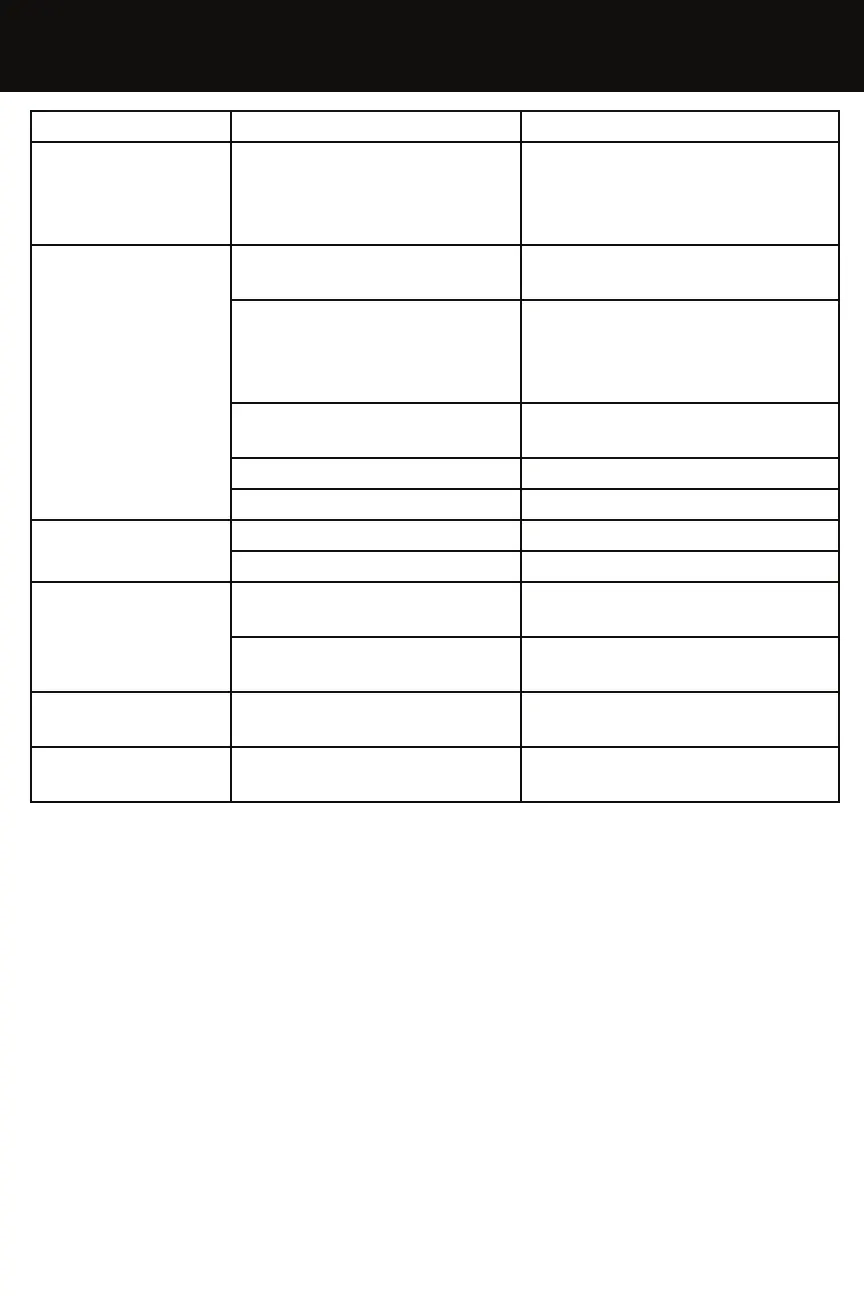
PROBLEM CAUSE SOLUTION
FO
The ON/OFF switch is on the
turned ON position when
plugged in
Disconnect the plug, turn the
switch to “O” OFF position.
Reconnect the plug & switch
heater to “I” ON position.
F1
No Fuel
Turn the switch to ”O” OFF, reill
the fuel tank.
Fuel is contaminated
Turn the switch to “O” OFF,
empty & rell the fuel tank.
Clean the lter using clean
fuel.
Photocell is dirty or
damaged
Clean photocell with a soft
cloth or tissue
Fuel Filter is dirty or blocked Clean fuel lter with clean fuel
Ignition error Contact Fanmaster
F2
Damaged cable Replace or contact Fanmaster
Sensor is damaged Replace or contact Fanmaster
F3
Internals overheating
Turn the heater off & wait until
the heater has cooled down
Tilting sensor intervened
Ensure heater is on at level
ground
LO
External Temperature is
below -9’C
CH
Continuous operation
(55’C)


 To Next Page