Click “ ” plan:
Right pop-up the additional disks ( :)' menus, choose “
”.
Click “ ”, followed by a clew to operate.
Disks Management
H Delete disk
segmentation
Segmentation additional disks
7
Click “ ” plan:
Right pop-up The additional disks (H :) and the additional disks (I :)' menus,
choose “ ”.
Click “ ”, followed by a clew to operate.
The two drives were connected to the products HDD1 and HDD2 Connector.
USB&Power Cable were connected;
Opening the power switch, pulling MODE switch to and press switch,
after a few seconds, the computer will automatically capture USB devices.
Click “ ”, right-clicking pop-up menu, click Options “ ”, pop-
up computer management plan was pop-up as follow:
Disks Management
Delete disk segmentation
Segmentation additional disks
2.1.2 BIG MODE
BIG START
My Computer manage
It is also possible to create a BIG volume using only a single hard disk drive
connected to Port 0, and then increase the storage capacity of the volume later by
adding another hard disk drive to Port 1 and pressing the Mode Change push-
button. The new disk blocks of Port 1 will be concatenated to the end of the disk
blocks of Port 0, and any data that is stored on the existing BIG volume will be
preserved. However, it is not possible to expand an existing BIG volume by
adding another hard disk drive to Port 0 and still preserve any existing data on
that volume.
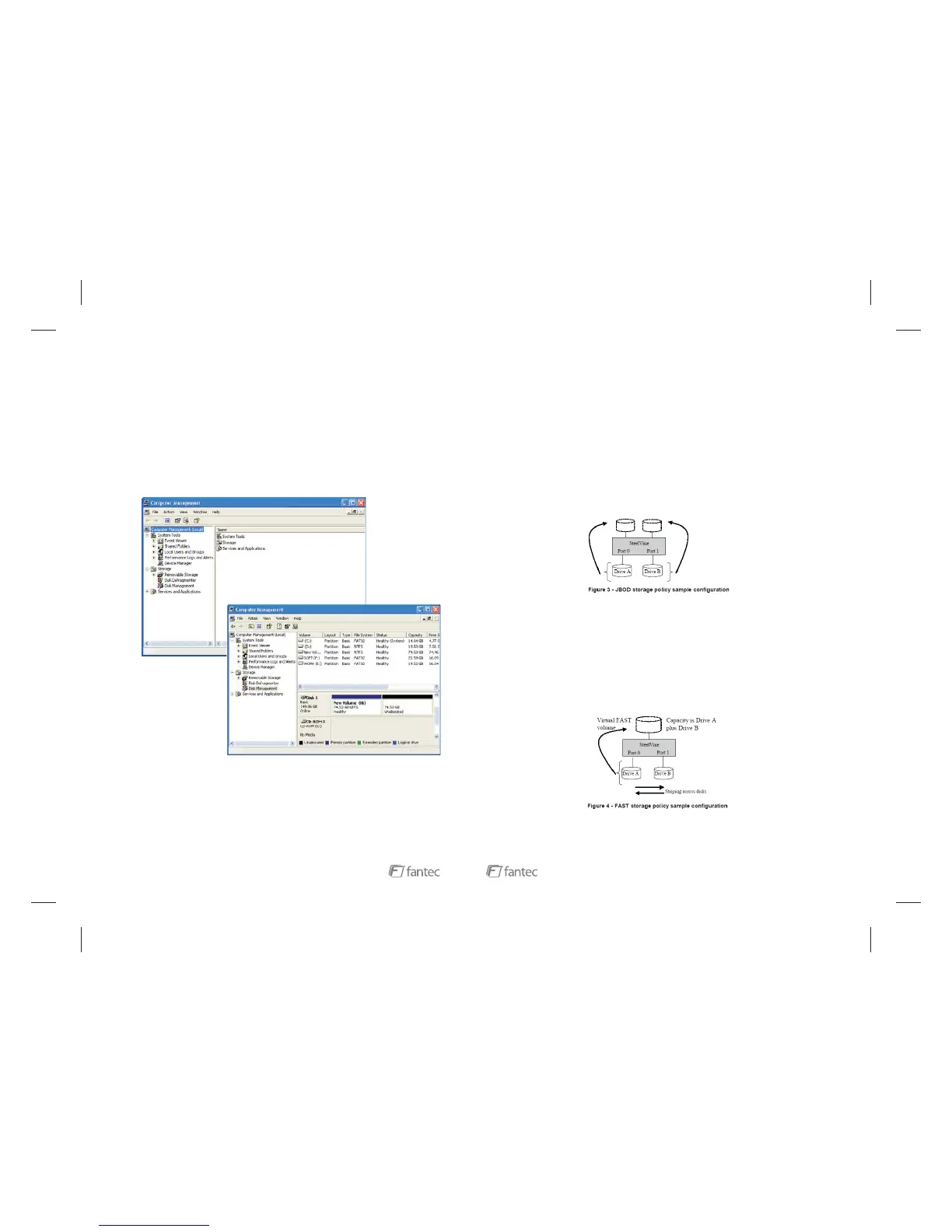
The JBOD (Just a Bunch of Disks) storage policy enables each hard drive to be
seen separately as one drive. They will get a single driver letter if each is used
with one partition.
JBOD
FAST(RAID0)
The FAST storage policy distributes access across all hard disks, also called
striping (equivalent to RAID 0). FAST presents the best data speed but no data
redundancy. FAST storage policy accelerates hard disk operating speed by using
many disks in parallel. Hard drive data segments are written to different disks
simultaneously which increases performance while sacrificing data redundancy.
To implement the FAST storage policy, the unit creates a single virtual volume
that is striped across both hard drives, with a storage capacity that is equal to the
sum of both hard disk drives.
16


 To Next Page
 Loading...