26 27
FANTEC QB-X2US3R 2-BAY 3.5" RAID FANTEC QB-X2US3R 2-BAY 3.5" RAID
3) packagE contEntS
• FANTECQB-X2US3R
• USB3.0Cable
• PowerAdapter
• UserManual
• ScrewsforHDDfixation
• HDDHandle
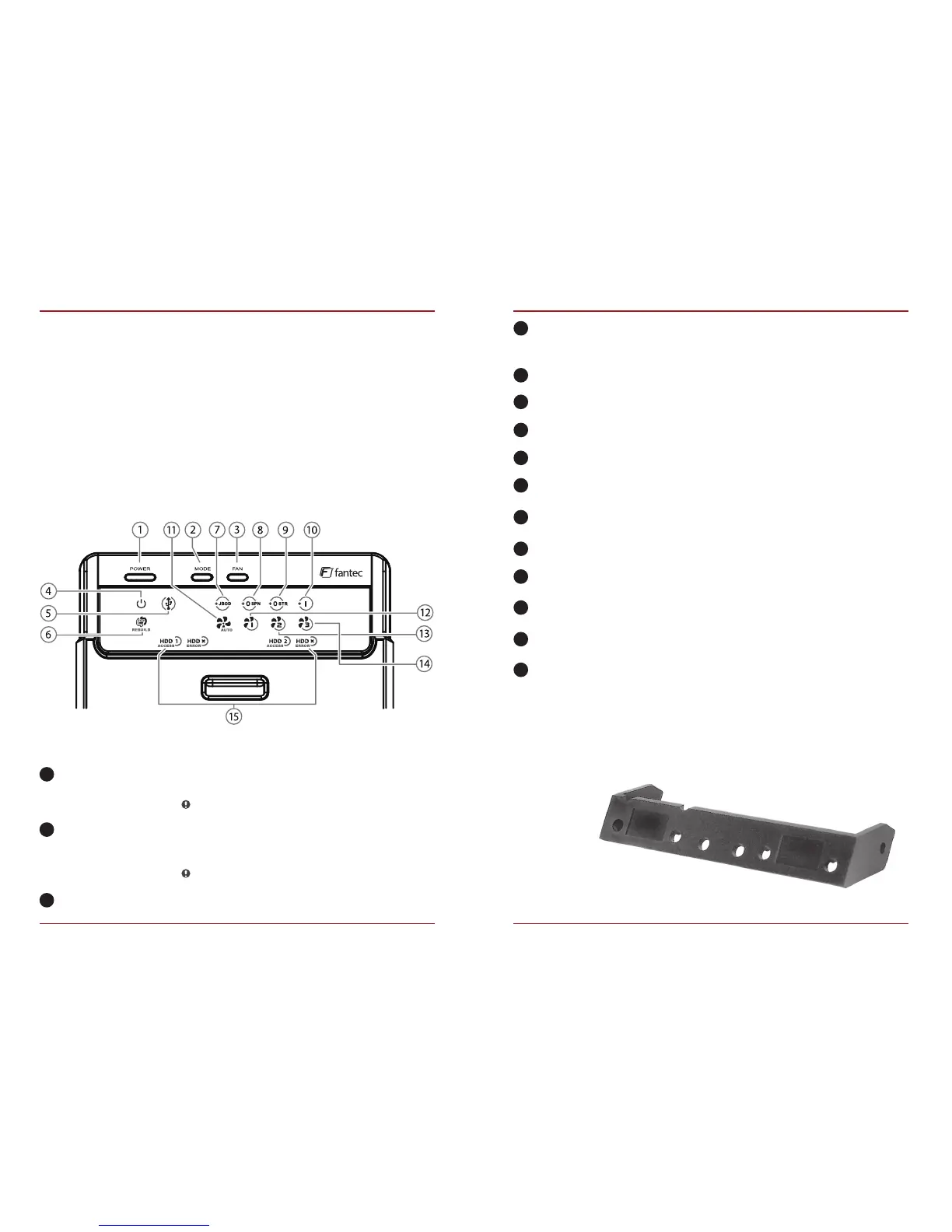
4) ovErvIEW lED InDIcatIon / buttonS
Power LED
USB link
Rebuild
JBOD Mode
BIG Mode
Raid 0 Mode
Raid 1 Mode
AUTO
FAN 1
FAN 2
FAN 3
HDD1 / HDD2
6
9
7
10
8
11
12
13
14
15
Description
Power button
Mode button
Smart fan button
HDD Handle
It needs to be pressed and held for
3 seconds to power off.
This design prevents accidental power off.
RAID Mode button needs to be pressed and
held for 3 seconds to switch the device’s
RAID mode.
This design will prevent accidental execution of this function.
Auto, manual and fan speed from level 1 to 3.
Blue - Power on
Orange - Sleep mode on
USB port is in use
Restoring the HDD in running operation
Smart Fan on
FAN speed out level 1 (low)
FAN speed out level 2 (middle)
FAN speed out level 3 (high)
Blue - HDD connected
Purple - HDD access
Red - HDD error
1
2
3
4
5


 To Next Page