28 29
FANTEC QB-X2US3R 2-BAY 3.5" RAID FANTEC QB-X2US3R 2-BAY 3.5" RAID
6) rEmInDErS
•Followallinstructions.
•Donotplacethisdevicenearwater.
•Cleanonlywithdrycloth.
•Donotblockanyventilationopenings.
•Installinaccordancewiththemanufacturer’sinstructions.
•Donotplacenearanyheatsourcessuchasradiators,heatregisters,
stoves, or the devices (including amplifiers) that produce heat.
•Protectthepowercordfrombeingwalkedonorpinchedparticularly
at plugs, convenience receptacles, and the point where they exit
from the devices.
•Powersupplycordsshouldberoutedsothattheyarenotlikelytobe
walked on or pinched by items placed upon them or against them.
•Onlyuseattachments/accessoriesspecifiedbythemanufacturer.
•Unplugthisduringlightningstormsorwhenunusedforlong
periods of time.
•Referallservicingtoqualifiedservicepersonnel.Servicingis
requiredwhenthedeviceshasbeendamagedinanyway,suchas
power-supplycordorplugisdamaged,liquidhasbeenspilledor
objects have fallen into the devices, the devices has been exposed to
rain or moisture, does not operate normally, or has been dropped.
•CarefullyreadandfollowtheQuickInstallGuideandUserManual.
•Donotdroporshakethedevice.
•Donotmovethedevicewhenitispoweredon.
•Donotoverloadwalloutlets.
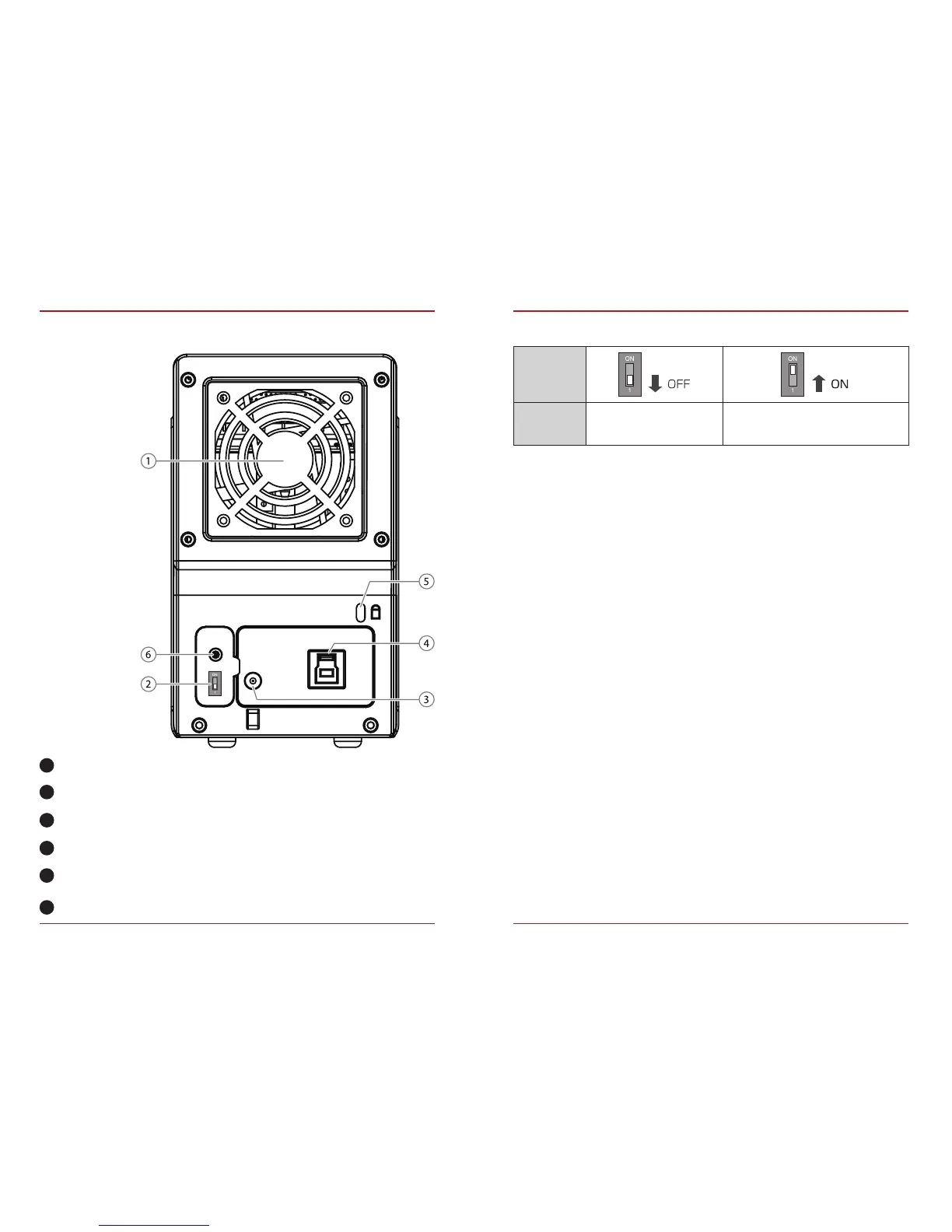
5) ovErvIEW rEar panEl
Smart Power SYNC switch
Fan
Smart Power SYNC switch
DC jack
USB port
Security lock
RAID mode confirm button
2
5
3
6
4
1
SYNC switch
Synchronization is off.
When the PC is off,
the device goes to sleep mode.
Description


 To Next Page