06
Ed. 1 - 03/2019Ed. 1 - 03/2019
T5
T1
T3
T4
T2
ENGLISH
EN_24
Using power assisted pedalling
supply, after two hours, the battery charger
re-checks the state of the battery and, if neces-
sary, starts to recharge it again.
- The LEDs on the battery charger indicate its
current state.
4. MOUNTING THE BATTERY
PACK ON ITS SUPPORT
- Insert the battery pack in its specic support
on the chassis by placing the rubber rod (1) on
the fork support (2) (g. “60“).
- Delicately push the battery pack downwards to
lay it in its specic support. (g. “61“).
- Connect the connector to the battery pack (g.
“62“).
- Completely screw the xing screw to lock the
battery (g. “63“ y “64“).
1- Displaying the pedalling assistance level
2- Speed
3- Battery charge level.
4- “Triangle” symbol: push help function ac-
tive.
“Light” symbol: lights condition (if
present).
- The other pages show the following informa-
tion:
1- Page icon.
2- Horizontal browsing position.
3- Page content.
4- Vertical browsing position (it refers to oth-
er pages and shows the current position).
LED
Stand-by green
Charging
red
Battery charged
green
Error
blinking red
5. DISPLAY - INSTRUMENT “A”
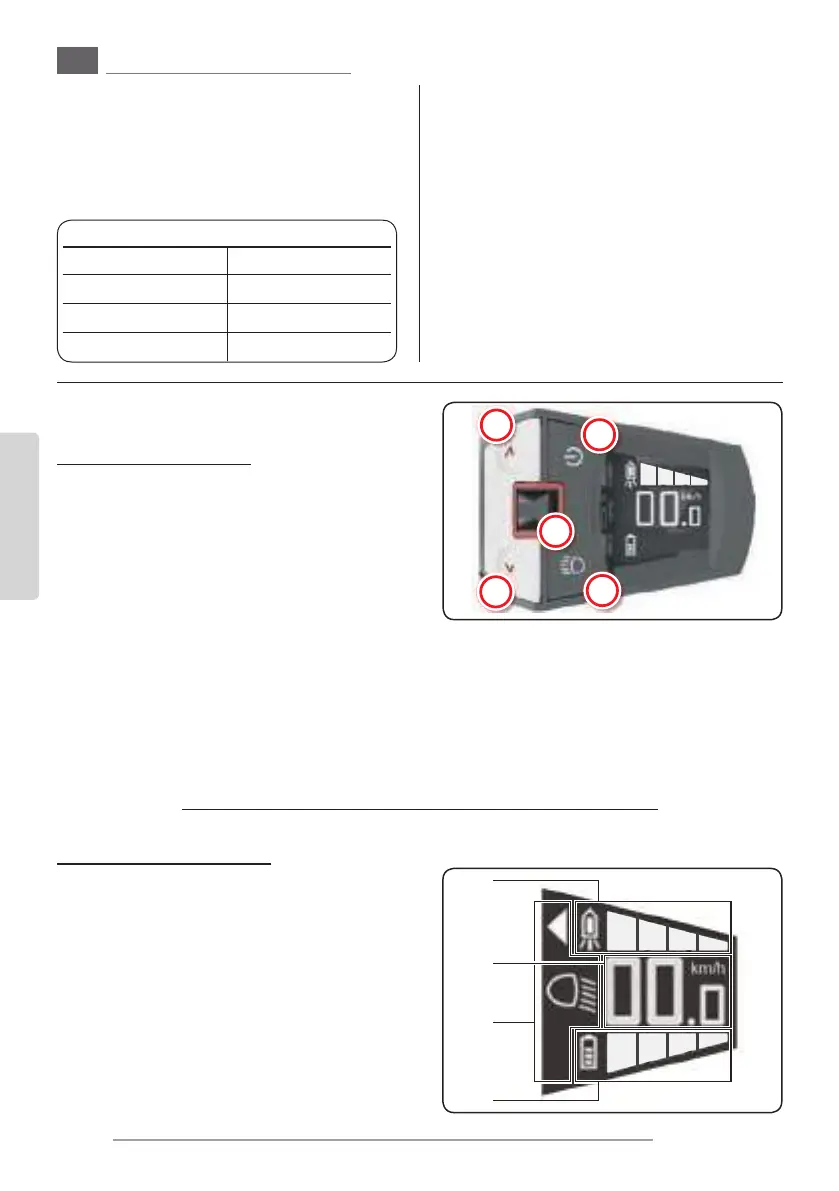
5.a - Function buttons
T1. Display switching on/o (assisted pedalling
system ON/OFF)
T2. Lights switching on/o(if present and
connected)
- Short pressing: the light turns on.
- Longer pressing (more than 2 seconds):
the light turns o.
- In automatic mode: the light turns on and
o depending on the surrounding level of
light. It is possible to turn the light on or
o whenever it is desired by pressing this
button.
T3. Joystick
T4. Decreases the pedalling assistance level
T5. Increases the pedalling assistance level
Keep this button pressed for more than 3 sec-
onds to activate the push help function (max.
6km/h) until the button is released.
5.b - Display description
- The display oers a variety of information on
dierent pages.
Move the joystick laterally to pass from one
page to another.
Some pages oer additional pages to which
it is possible to access by moving the joystick
“T3” vertically.
- The main page oers the following
information:
3
4
2
1
Push power
- Shows the power (in
watts) generated by
the cyclist for the as-
sisted pedalling acti-
vation.
Residual range
- Shows the residual
range with the assist-
ed pedalling support.



 To Next Page
 Loading...

