06
Ed. 1 - 03/2019Ed. 1 - 03/2019
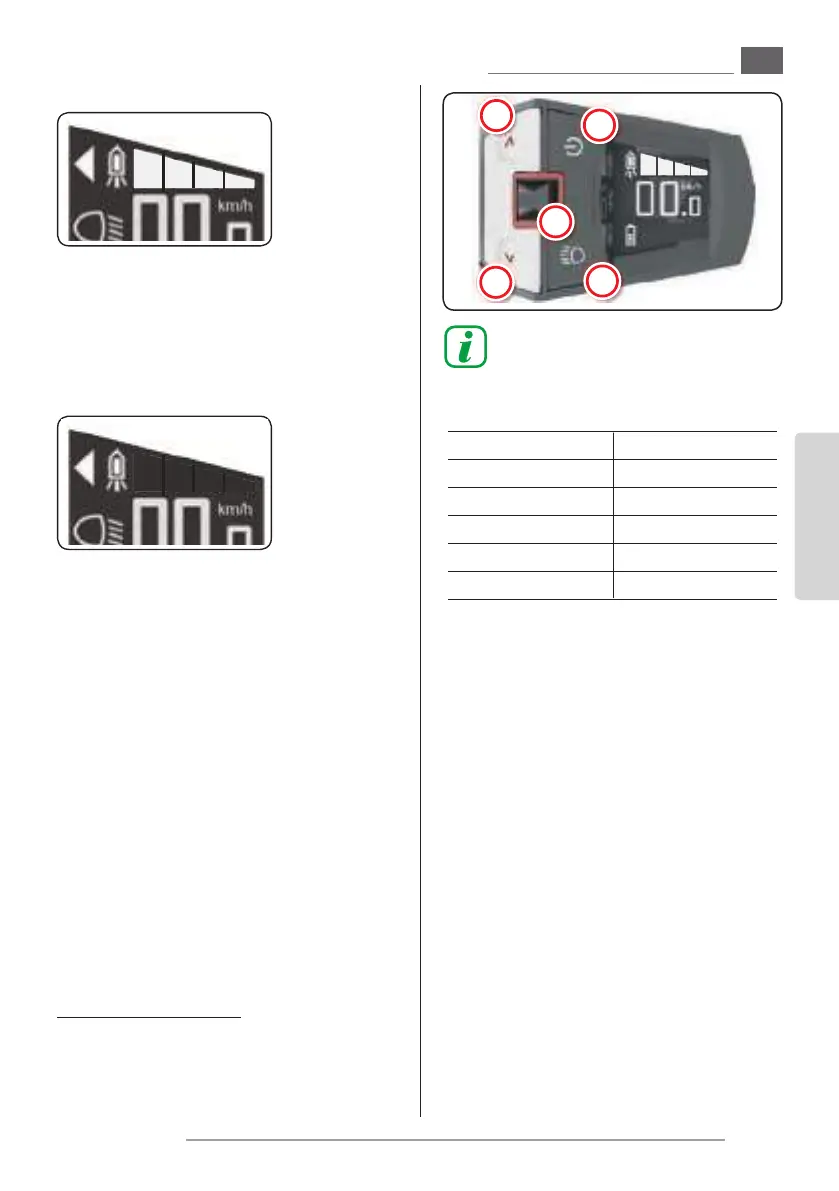
T5
T1
T3
T4
T2
ENGLISH
EN_27
Using power assisted pedalling
5.c - Pedalling assistance activation
and level
- The assisted pedalling power level depends on
a number of factors.
The table on the right provides an indication of
the maximum assistance level depending on
the selected function.
- The values may be aected by various factors,
such as:
- selected gear ratio
- riding style
- tyre type and pressure
- rider’s age
- type of terrain
- total weight of the bicycle
- condition of the battery pack
- etc.
- To activate the assisted pedalling:
- Turn on the tool by keeping the button “T1”
pressed for more than 2 seconds.
- Press the button “T5” once or more times
to select the pedalling assistance level; the
function activates immediately.
“minimum” pedalling assistance level
“medium” pedalling assistance level
“medium” pedalling assistance level
“maximum” pedalling assistance level
- To shut o the pedalling assistance function
it is enough to press the button “T4” once or
more times until all the marks on the display
are turned o; the function immediately de-
activates.
pedalling assistance “deactivated”
In the event of a prolonged use in severe con-
ditions, the motor will be powered in progres-
sively reduced way in order to not exceed the
safety temperature.
Setting Assistance %
OFF 0
I 40
II 150
III 320
IV 40
5.c.a - “Push help” function
- This function allows to help the bicycle push in
particular situations (for example: at the start
of a slope, or on an uneven terrain, etc.).
The function can be used both while walking
alongside the bicycle and when riding.
- To activate the function it is necessary to keep
the button “T5” pressed for more than three
seconds; the function deactivates when the
button is released.
- When the function is active, the “triangle” sym-
bol is shown on the main page.
5.d - USB connection
- The tool is equipped with an Usb port protect-
ed by a rubber cover.
- It is possible to connect an external device
(mobile, smartphone, mp3 player etc.) to the
Usb port.
Once the link has been performed, the new
connection is shown on the device.
Fantic Motor takes no responsibility for
eventual damages caused to the exter-
nal device connected to the Usb port.
- To correctly disconnect the device, please refer
to the instructions supplied together with the
device itself.
- Correctly reposition the rubber cover on the
Usb port.
The tool is protected against water and
dirt ONLY when the rubber cover is cor-
rectly positioned.


 To Next Page
 Loading...


