06
Ed. 1 - 03/2019Ed. 1 - 03/2019
1
T1
T2
T4
T3
T6
T5
T4
T3
T5
a b
d
f
c
e
g
ENGLISH
EN_28
Using power assisted pedalling
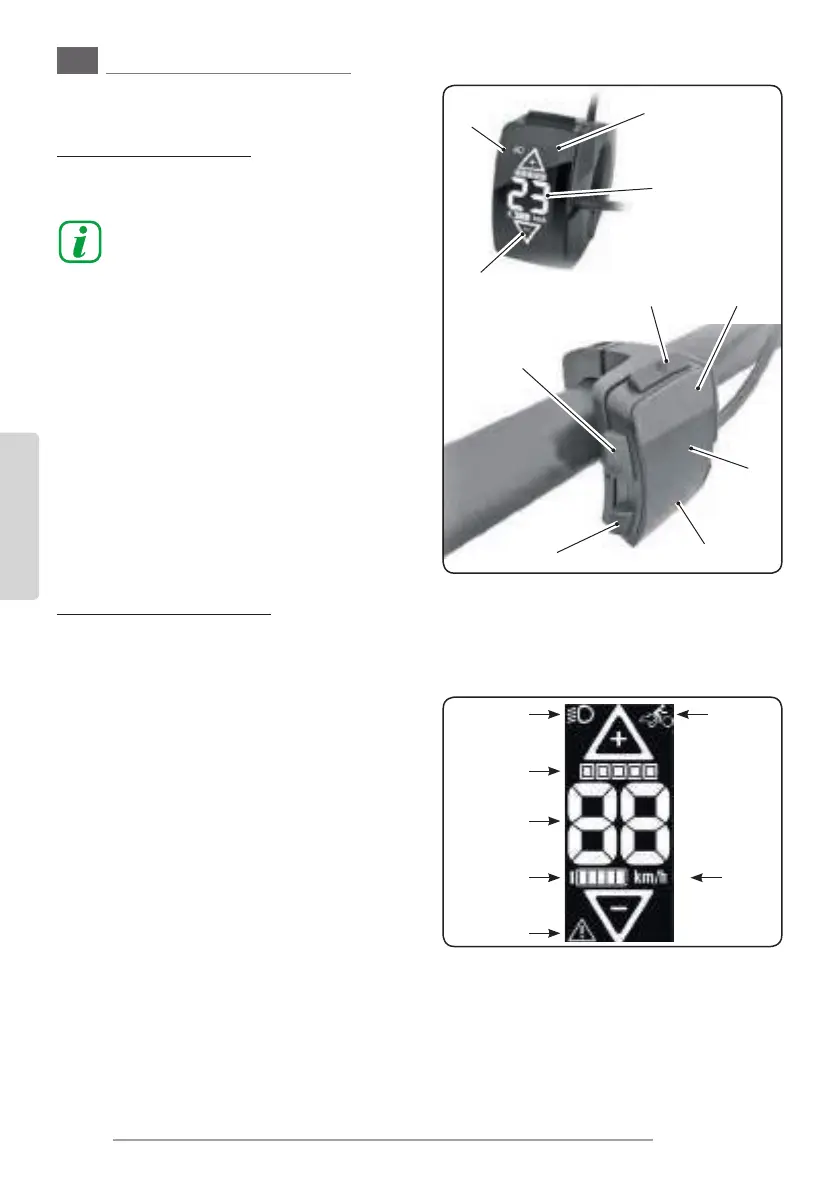
6. DISPLAY - INSTRUMENT “B”
6.a - Function buttons
T1. Display switching ON/OFF.
See paragraph “1” for how to turn the assist-
ed pedalling system on.
Briey press the button to put the tool in
stand-by mode.
Briey press it again to turn it back on.
T2. Lights switching on/o(if present and
connected)
- Short pressing: the light turns on.
- Short pressing: the light turns o.
T3. Display
T4. Increases the pedalling assistance level
.
T5. Decreases the pedalling assistance level.
T6. Keep this button pressed for more than 3 sec-
onds to activate the push help function (max.
6km/h) until the button is released.
6.b - Display description
- The display shows various information de-
scribed in the next page.
- To set the unit of measurement of speed from
km/h to miles/h:
• Press button “T2” for three seconds.
• Press one of the buttons “+” (T4) or “-” (T5) to
select the unit of measurement.
• Press button “T2” for three seconds to con-
rm your choice.
- The main page oers the following
information:
a. “Light” symbol:
lights condition (if present).
b. Mode change
c. Displaying the pedalling assistance level
d. Speed
e. Battery charge level.
f. Unit of measurement (km/h > m/h)
g. System anomaly signal
6.c - Display icons description
- During battery charging (if switched on) the
display shows the charge status, according to
the layout represented in gure “A“.
- During use of the bicycle, with the pedalling
assistance system on, the display shows the re-
sidual charging status of the battery according
to the layout represented in gure “B“.
6.d - Pedalling assistance activation
and level
- The assisted pedalling power level depends on
a number of factors.
The table on the right provides an indication of
the maximum assistance level depending on
the selected function.
- The values may be aected by various factors,
such as:
- selected gear ratio
- riding style
- tyre type and pressure
- rider’s age
- type of terrain
- total weight of the bicycle
- condition of the battery pack
- etc.
- To activate the assisted pedalling:
- Turn the assisted pedalling system on, keep-
ing the button on the battery pack pressed
for three seconds (see paragraph “1b”).



 To Next Page
 Loading...

