EasyManua.ls Logo

FARFISA INTERCOMS 1PXFED - User Manual

FARFISA INTERCOMS 1PXFED
2 pages
Print Icon
To Next Page IconTo Next Page
Loading...
- 1 -
Mounting modules.
Fix lower part to the frame to the
rain shelter and make the elec-
trical connections.
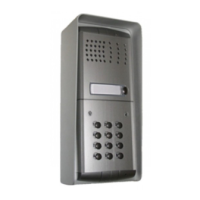
Installation of the push-button panel
Fixing of frame to rain shel-
ter. Align the frame before
tightening the screws.
ONE-WAY AUDIO KIT
Fixing of the module frames on the
upper side by the 2 small screws
included in the rain shelter.
ADJUSTMENTS
Dispose of the device in accordance
with environmental regulations.
ACI Farfisa Intercoms reserves the right to modify the products illustrated at any time.
ACI srl Farfisa Intercoms
Via E. Vanoni, 3 • 60027 Osimo (AN) • Italy
Tel: +39 071 7202038 (r.a.) • Fax: +39 071 7202037
e-mail: info@acifarfisa.it • www.acifarfisa.it
1
2
3
4
- 4 -
Tone table
Acknowledge
Dissuasion
012345
012345
- press key A (red LED flashes)
- enter 90
- press key A (red LED on)
- enter a 3-digit number “nxx”; n indicates the
relay associated with the code to be deleted
(1 or 2); xx indicates the code to be deleted
(from 01 to 12)
- press key A (red LED flashes)
- enter 55
- press key A (red LED off).
Changing the relay activation time and mode
To change the relay activation time and mode:
- enter the programming code
- press key A (red LED flashes)
- enter 03
- press key A (red LED on)
- enter a number from 00 to 99 to programme
activation time of relay 1 (enter 00 to deac-
tivate the relay)
- press key A
- enter a number from 00 to 99 to programme
activation time of relay 2 (enter 00 to deac-
tivate the relay)
- press key A
- enter a number from 00 to 03 to programme
activation mode of relay 1 (for code selec-
tion refer to
“operating modes and program-
ming codes”)
- press key A
- enter a number from 00 to 03 to programme
activation mode of relay 2 (for code selec-
tion refer to
“operating modes and program-
ming codes”)
- press key A (red LED flashes)
- enter 55
- press key A (red LED off)
Restoring the default programming
To delete all the programmed codes and
restore the keypad default programming (for
the codes refer to
“default programming”
):
- switch off the keypad
- switch on the keypad again holding key B
pressed until you hear the confirmation
tone.
Notes:
- Write down the programming code and the
relay activation codes in the table.
- The relay activation codes can only be
changed by knowing the programming code.
- An acoustic signal indicates key pressing.
- If the entered code is not correct, you hear
a dissuasion tone (keys are deactivated for
2 seconds).
- Press A during programming if you do not
want to change a code. This allows you to
go to the next programming operation with-
out changing the code.
- The programming code and the relay activa-
tion codes must be different.
- Press B to cancel the last number you have
entered.
OPERATION
-Enter the code of the relay to be activated.
-Press key A to confirm the code. If the code
is correct, the relay activates (green LED on)
with the programmed time and operating
mode.
Notes:
-Press key B to delete an incorrect code
before confirming it.
-If you enter an incorrect code and confirm it
with key A you hear a dissuasion tone (keys
are deactivated for approx. 3 seconds). This
time increases up to a max. of 30 seconds
each time an incorrect code is entered.
- The numbers entered and not confirmed with
key A are deleted automatically 25 seconds
after the last key you have pressed.
BISTABLE OPERATION
This function is possible only if the keypad
has been programmed properly. See “
Chang-
ing the relay activation time and mode”
.
To activate the relays for indefinite time:
- enter one of the codes for the relay to be
activated
- press key A (green LED on). The relay
activates for indefinite time.
- enter the code again to deactivate the relay
- press key A (green LED off and relay
deactivation).
DIRECT ACTIVATION
Press key A to activate the relays directly
(this function is possible only if the keypad
has been programmed properly. See
“Chang-
ing the relay activation time and mode”)
. Both
the two relays are activated if both of them are
programmed to be directly activated by key A.
DOOR LOCK RELEASE BUTTONS
Two buttons can be connected between ter-
minals P1, P2 and ground in order to activate
the two relays according to the programmed
activation time and mode.
EMERGENCY
In case of power failure all the data are
recorded in a nonvolatile memory and will not
be lost.
Table of codes
Master pro-
gramming code
1
st
code
2
nd
code
3
rd
code
4
th
code
5
th
code
6
th
code
7
th
code
8
th
code
9
th
code
10
th
code
11
th
code
12
th
code
Activation time
Activation mode
1
st
code
2
nd
code
3
rd
code
4
th
code
5
th
code
6
th
code
7
th
code
8
th
code
9
th
code
10
th
code
11
th
code
12
th
code
Activation time
Activation mode
r
e
l
a
y
1
r
e
l
a
y
2
Red LED.
Indication of program-
ming mode.
Green LED.
Indication of code
accepted.
Key A.
Enter and direct acti-
vation of relays (if pro-
grammed).
Key B.
Clear.
Question and Answer IconNeed help?

Do you have a question about the FARFISA INTERCOMS 1PXFED and is the answer not in the manual?

Summary

System Operation and Configuration

Relay Activation and Timing

Details on changing relay activation time, mode, and bistable operation for relays.

Direct Activation and Door Lock Release

Describes direct relay activation via buttons and the function of door lock release buttons.

Emergency Operation and Notes

Covers emergency procedures and important operational notes for the system.

Installation Procedures

Push-Button Panel Installation

Instructions for installing the push-button panel, including mounting modules.

System Adjustments

Volume and Feedback Control

Guides on adjusting receiver volume, transmitter volume, and anti-feedback settings.

Programming Access Control Keypad

Default Programming and Codes

Details on the default programming and codes for the access control keypad.

Changing Programming Code

Procedure for changing the master programming code of the access control keypad.

Modifying Activation Codes

Instructions for changing individual relay activation codes and deleting them.

Summary

System Operation and Configuration

Relay Activation and Timing

Details on changing relay activation time, mode, and bistable operation for relays.

Direct Activation and Door Lock Release

Describes direct relay activation via buttons and the function of door lock release buttons.

Emergency Operation and Notes

Covers emergency procedures and important operational notes for the system.

Installation Procedures

Push-Button Panel Installation

Instructions for installing the push-button panel, including mounting modules.

System Adjustments

Volume and Feedback Control

Guides on adjusting receiver volume, transmitter volume, and anti-feedback settings.

Programming Access Control Keypad

Default Programming and Codes

Details on the default programming and codes for the access control keypad.

Changing Programming Code

Procedure for changing the master programming code of the access control keypad.

Modifying Activation Codes

Instructions for changing individual relay activation codes and deleting them.

Overview

This document describes the FARFISA ONE-WAY AUDIO KIT, an access control keypad (FC52PL) designed for activating two relays with programmable codes.

Function Description

The FC52PL keypad allows for the activation of two independent relays (RL1 and RL2) using programmable codes. It supports up to 12 codes for each relay, in addition to direct activation. The device can be programmed to operate in various modes, including monostable, bistable, and direct activation via a dedicated key or external push-buttons.

Relay Activation: To activate a relay, the user enters one of the programmed codes followed by pressing key A. If the code is correct, the relay activates, indicated by a green LED, for the programmed time and operating mode.

Bistable Operation: This feature allows relays to be activated for an indefinite time. To activate, the user enters a relay code and presses key A (green LED on). To deactivate, the user enters the same code again and presses key A (green LED off). This function requires proper keypad programming.

Direct Activation: The keypad supports direct activation of relays via key A, provided it has been programmed for this mode. If both relays are programmed for direct activation by key A, both will activate simultaneously.

Door Lock Release Buttons: Two external buttons can be connected to terminals P1, P2, and ground to activate the two relays according to their programmed activation time and mode. P1 activates relay 1, and P2 activates relay 2. If momentarily connected to ground, they will activate for the programmed time.

Programming Features:

  • Default Programming: The device comes with factory default settings, including a programming code (12345678) and an activation code for relay 1 (11). All other activation codes are initially "none."
  • Changing Programming Code: The programming code can be changed by entering the current code, pressing key A, entering "00," pressing key A, entering the new 1 to 8 digit code, pressing key A, entering "55," and pressing key A again.
  • Changing Activation Codes: Activation codes for both relay 1 and relay 2 can be modified. This involves entering the programming code, pressing key A, entering the relay identification code (01 for relay 1, 02 for relay 2), pressing key A, and then following a sequence to enter new codes.
  • Changing One Relay Activation Code: Individual relay activation codes can be changed without affecting others. This involves entering the programming code, pressing key A, entering the relay identification code (01 or 02), pressing key A, navigating to the desired code, entering a new 1 to 8 digit code, and confirming.
  • Deleting One Relay Activation Code: Individual relay activation codes can be deleted by entering the programming code and following a similar procedure to changing a code.
  • Changing Relay Activation Time and Mode: The activation time (from 00 to 99 seconds, where 00 deactivates the relay) and operating mode (monostable, bistable, or direct activation) can be programmed for each relay. This is done by entering the programming code, pressing key A, entering "03," pressing key A, and then entering the desired numbers for activation mode and time for each relay.

Important Technical Specifications

  • Power Supply: 12Vac/dc ±10%
  • Stand-by Current: 0.06A
  • Maximum Current Consumption: 0.15A
  • Contact Ratings: 12Vac - 2A
  • Number of Codes for Relay 1: 12 (+ direct activation)
  • Number of Codes for Relay 2: 12 (+ direct activation)
  • Activation Time for Each Relay: From 1 to 99 sec. (or bistable)
  • Operating Temperature: 0° ÷ +40°C
  • Maximum Allowable Humidity: 85% RH

Terminals:

  • NC2, NA2, C2: Normally closed, normally open, and common contacts for relay 2.
  • NC1, NA1, C1: Normally closed, normally open, and common contacts for relay 1.
  • +,-: Ground or alternate voltage input / positive or alternate voltage input.
  • P1, P2: Inputs for direct activation of relay 1 and relay 2, respectively.

Usage Features

LED Indicators:

  • Red LED: Indicates programming mode.
  • Green LED: Indicates code acceptance.
  • Key A (Red LED flashes): Indicates entry into programming mode or confirmation pending.
  • Key A (Red LED on): Indicates successful code entry or relay activation.
  • Key A (Red LED off): Indicates exit from programming mode or relay deactivation.

Acoustic Signals:

  • Key pressing is indicated by an acoustic signal.
  • An incorrect code entry results in a dissuasion tone, deactivating keys for approximately 3 seconds. This time increases with repeated incorrect entries, up to a maximum of 30 seconds.
  • A confirmation tone is heard when restoring default programming.

Keypad Operation:

  • Key A: Used for confirmation, entering direct activation of relays (if programmed), and acknowledging.
  • Key B: Used to delete an incorrect code before confirmation or to cancel the last number entered during programming. It is also used to restore default programming by holding it down during power-on.

Tone Table:

  • Acknowledge: A short, clear tone.
  • Dissuasion: A longer, continuous tone indicating an error.

Emergency: In case of power failure, all programmed data is recorded in a nonvolatile memory and will not be lost.

Maintenance Features

Restoring Default Programming: To delete all programmed codes and restore the keypad to its default settings, switch off the keypad, then switch it on again while holding key B pressed until a confirmation tone is heard.

Important Notes for Installation and Maintenance:

  • It is crucial to write down the programming code and relay activation codes in the provided table for future reference.
  • Relay activation codes can only be changed if the programming code is known.
  • During programming, if a code is not to be changed, pressing key A allows skipping to the next programming operation.
  • The programming code and relay activation codes must be different.
  • To comply with European Standards on Electromagnetic Compatibility and to increase product reliability, a suppression device (Transil) must be connected across the terminals of inductive loads (e.g., electric releases and locks) as close as possible to the loads.
  • The cables that are heavily outlined in the installation diagrams should have a minimum section of 0.75mm² (AWG 18).
  • The device should be disposed of in accordance with environmental regulations.
  • ACI Farfisa Intercoms reserves the right to modify the products illustrated at any time.

FARFISA INTERCOMS 1PXFED Specifications

General IconGeneral
BrandFARFISA INTERCOMS
Model1PXFED
CategoryIntercom System
LanguageEnglish

Related product manuals