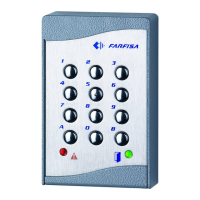
Mi 2260
- 3 -
The keypad allows for the activation of 2
relays with programmable codes.
Technical data
Power supply 12Vac/dc ±10%
Stand-by current 0.02A
Maximum current consumption 0.1A
Contact ratings 12Vac - 2A
Number of codes for relay 1 12 (+ direct
activation)
Number of codes for relay 2 12 (+ direct
activation)
Activation time for each relay from 1 to 99 sec.
(or bistable)
Operating temperature 0° ÷ +40°C
Maximum allowable humidity 85% RH
Degree of protection IP 45
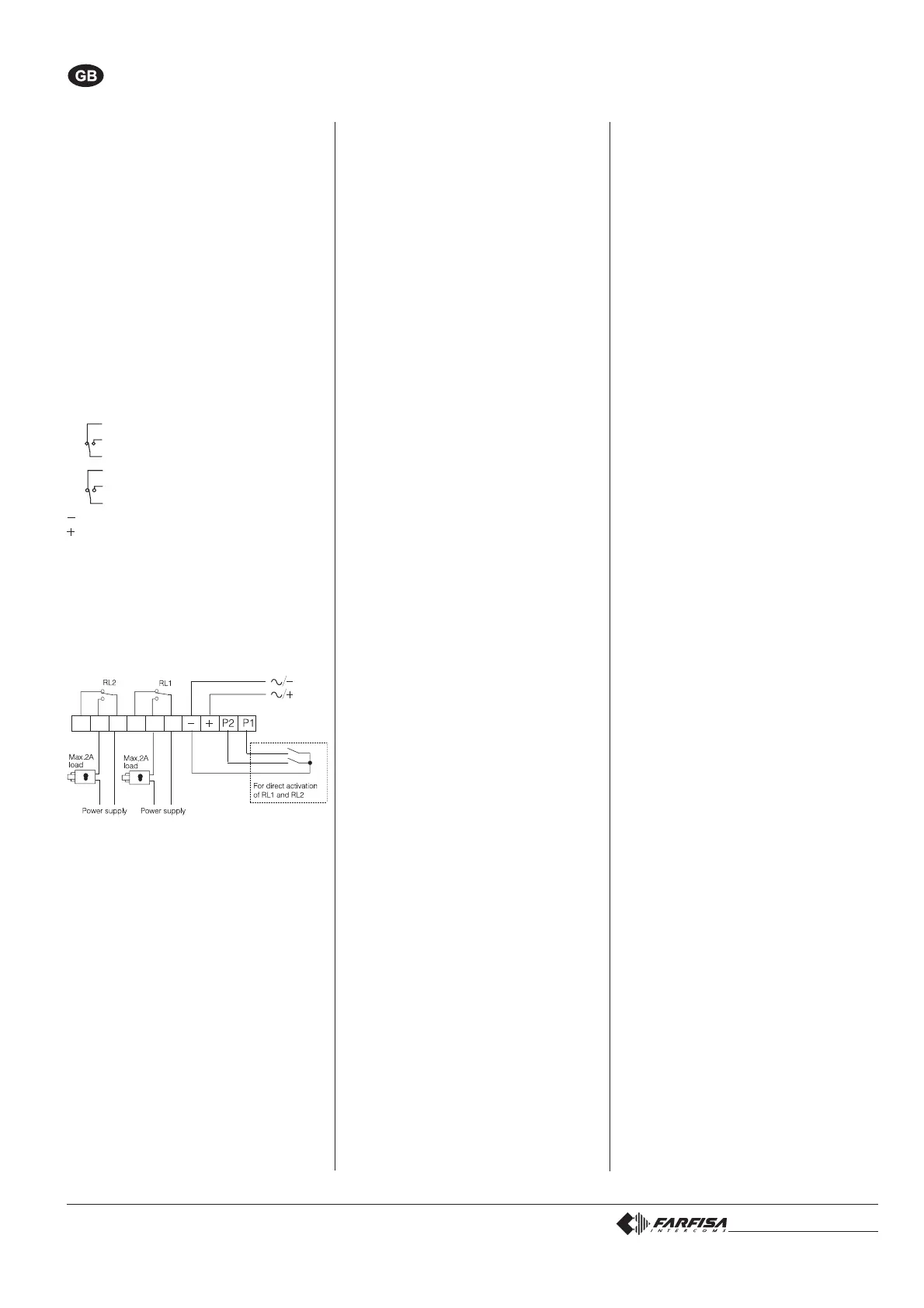
Terminals
normally closed contact of relay 2
2 normally open contact of relay 2
common contact of relay 2
normally closed contact of relay 1
1 normally open contact of relay 1
common contact of relay 1
ground or alternate voltage input
positive or alternate voltage input
P2 activation of the relay 2; if momentarily
connected to ground it allows the activa-
tion for the programmed time
P1 activation of the relay 1; if momentarily
connected to ground it allows the activa-
tion for the programmed time
INSTALLATION DIAGRAM
PROGRAMMING
Default programming
The article is supplied from the factory with
the following codes:
Programming code: 11
Activation code 1 of relay 1: 12345678
Other activation codes of relay 1
(from 2 to 12): none
Activation time code of relay 1: 01 (1 sec.)
Operating mode of relay 1: 00(monostable)
Activation code 1 of relay 2: 90
Other activation codes of relay 2
(from 2 to 12): none
Activation time code of relay 2: 01 (1 sec.)
Operating mode of relay 2: 00 (monostable)
All codes are user-modifiable.
ACCESS CONTROL KEYPAD
English
Operating modes and programming codes
Monostable 00
Bistable 01
Monostable and direct activat. by key A 02
Bistable and direct activation by key A 03
Changing the programming code
To change the programming code:
- enter the actual programming code
- press key A (red LED flashes)
- enter 00
- press key A (red LED on)
- enter the new programming code with 1 to 8
digits (from 0 to 99999999)
- press key A (red LED flashes)
- enter 55
- press key A (red LED off).
Changing the activation codes of relay 1
To change the activation codes of relay 1:
- enter the programming code
- press key A (red LED flashes)
- enter 01 (identification code of relay 1)
- press key A (red LED on)
- enter a number with 1 to 8 digits to pro-
gramme code 1 (from 0 to 99999999)
- press key A
- enter a number with 1 to 8 digits to pro-
gramme code 2 (from 0 to 99999999)
- press key A
- enter a number with 1 to 8 digits to pro-
gramme code 3 (from 0 to 99999999)
- press key A
- repeat the operation to programme all codes
as necessary (max.12). When program-
ming is completed press key A repeatedly
until the red LED starts flashing
- enter 55
- press A (red LED off).
Changing the activation codes of relay 2
To change the activation codes of relay 2
follow the procedure described above, chang-
ing the relay identification code (02instead of
01).
Changing one relay activation code
To change one relay activation code, without
modifying the others:
- enter the programming code
- press key A (red LED flashes)
- enter 01or02(for relay 1 or 2, respectively)
- press key A (red LED on)
- press key Arepeatedly to reach the code to
be changed
- enter a number with 1 to 8 digits (from 0 to
99999999)
- press key A repeatedly until the red LED
starts flashing
- enter 55
- press key A (red LED off).
Example
To change activation code 7 of relay 2:
- enter the programming code
- press key A (red LED flashes)
- enter 02
- press key A (red LED on)
- press key A six times
- enter a number with 1 to 8 digits
- press key A six times (red LED flashes)
- enter 55
- press key A (red LED off).
Deleting one relay activation code
To delete one relay activation code, without
modifying the others:
- enter the programming code
- press key A (red LED flashes)
- enter 90
- press key A (red LED on)
- enter a 3-digit number “nxx”;n indicates the
relay associated with the code to be deleted
(1 or 2); xxindicates the code to be deleted
(from 01 to 12)
- press key A (red LED flashes)
- enter 55
- press key A (red LED off).
Changing the relay activation time and mode
To change the relay activation time and mode:
- enter the programming code
- press key A (red LED flashes)
- enter 03
- press key A (red LED on)
- enter a number from 00 to 99 to programme
activation time of relay 1 (enter 00 to deac-
tivate the relay)
- press key A
- enter a number from 00 to 99 to programme
activation time of relay 2 (enter 00 to deac-
tivate the relay)
- press key A
- enter a number from 00 to 03 to programme
activation mode of relay 1 (for code selec-
tion refer to
“operating modes and program-
ming codes”)
- press key A
- enter a number from 00 to 03 to programme
activation mode of relay 2 (for code selec-
tion refer to
“operating modes and program-
ming codes”)
- press key A (red LED flashes)
- enter 55
- press key A (red LED off)


 To Next Page
 Loading...