Instrument Setup
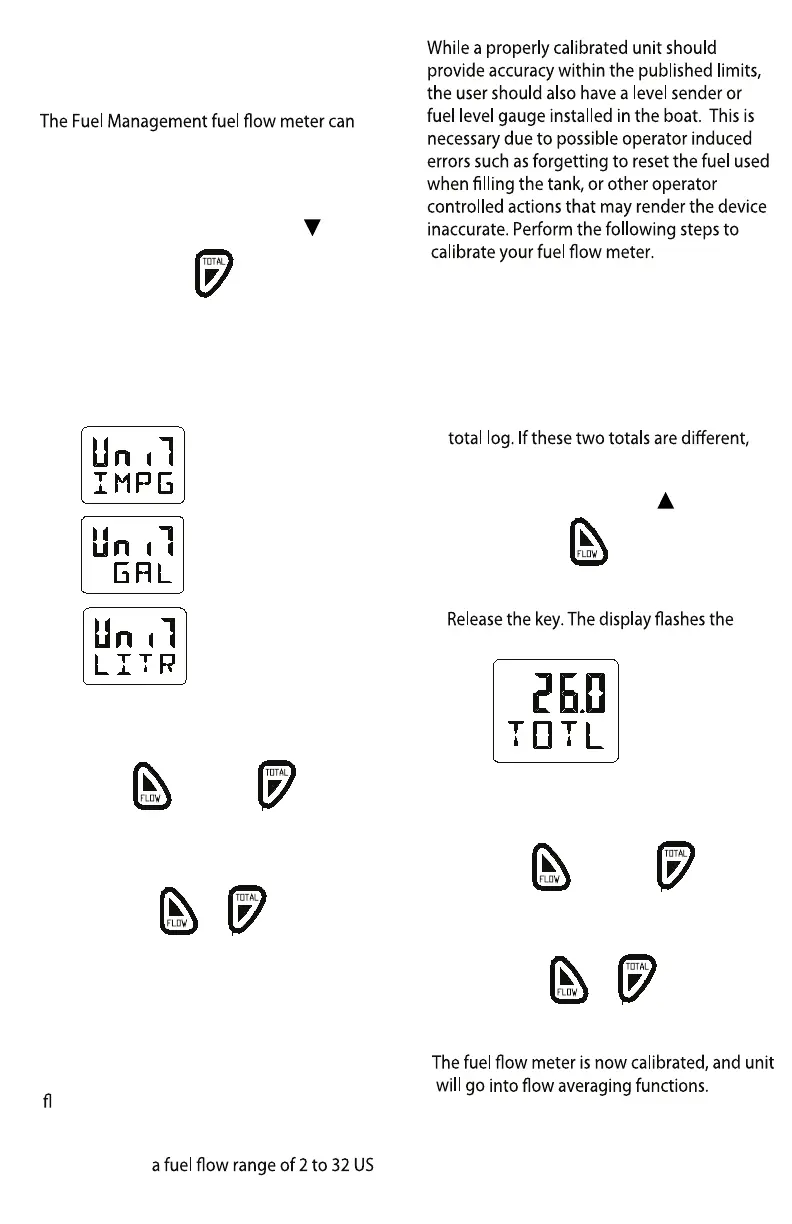
Select units of measure
display fuel values in US gallons, Liters or
Imperial gallons. To change the current
display setting, perform the following steps.
1. Power up the unit while holding
key.
Press and hold during power up
2. Once the unit is on, release the key.
The current display setting is indicated as
pictured below:
3. To select another display setting, use the
up or down keys to change the value.
or
4. To save the change and exit this mode,
press and hold both keys simultaneously
for one second.
Press and hold for one second
The fuel values are now displayed using the
new setting.
Calibration
The fuel transducer supplied with the fuel
ow meter will provide readings at better
than 5% accuracy. Individual calibration
will increase this level of accuracy to better
than 2% over
gallons per hour.
1. Reset the total log value to zero(see pg 9)
2. Use a known amount of fuel. The larger
the amount the more accurate the
calibration will be.
3. Take note of the actual volume of fuel
used and the fuel used indicated by the
the instrument may require calibration.
4. Apply power while holding
key.
Press and hold while applying power
5.
current total log value.
6. Use the up or down key to change the
display and indicate the actual volume of
fuel used.
or
7. Press both keys simultaneously and hold
for 2 seconds to exit.
Press and hold for 2 seconds
AVG is displayed. To skip this function and
return
to normal mode, hold both keys
simultaneously
for another 2 seconds.
7
Imperial Gallons
US Gallons
Liters



 To Next Page