12
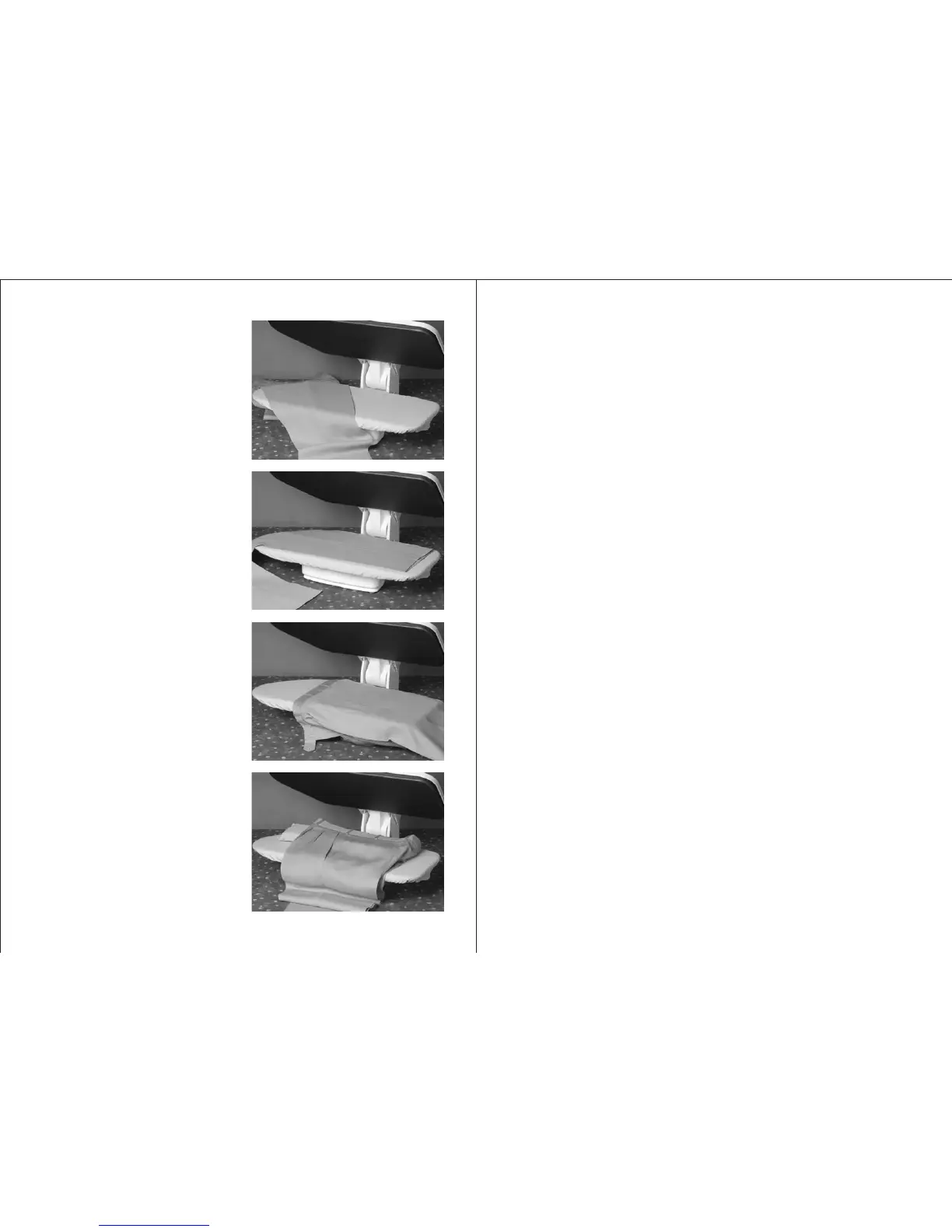
TROUSERS
Place the crotch as shown in the picture
and press.
Then put the lower parts of the trousers
and press.
Press the upper part of the trousers by
slipping it over the ironing board.
It’s recommended to use the long
cushion provided to press the
waistband.
5
OPERATION INSTRUCTIONS
LOCKING KNOB:
After completing the ironing session, leave your press in the open
position to cool down. Then close the press and lock the mechanism
using the locking knob by turning it to the “lock” position. After
locking the mechanism you can carry the appliance safely, easily
and prevent accidents during storing as well.
WARNING
Do not try to open your press when your press is standing in the
vertical position as this may cause accident.
When you wish to move your appliance, first lock the mechanism
using the locking knob; then carry it by holding the handle.
Temperature Control Knob:
This controls the temperature of the pressing plate. Always start
with the fabrics requiring the lowest temperature settings and
progress to those requiring higher temperatures to avoid having
to wait for the press to cool. If you need to reduce the temperature,
wait several minutes for the press to cool down in the open position
until it reaches the desired temperature.
Temperature Control light:
Red light indicates: The pressing plate is being heated.
Green light indicates: The pressing plate has been heated to the
desired temperature.
On/Off Switch:
The On/Off Switch on the press has two positions.
• “0” : Off position.
• “I” : On position.


 To Next Page