EasyManua.ls Logo

FATEK P5043N - Fbs;B1;B1 Z;Hb1 (UDP)

FATEK P5043N
224 pages
Print Icon
To Next Page IconTo Next Page
To Previous Page IconTo Previous Page
Loading...
22
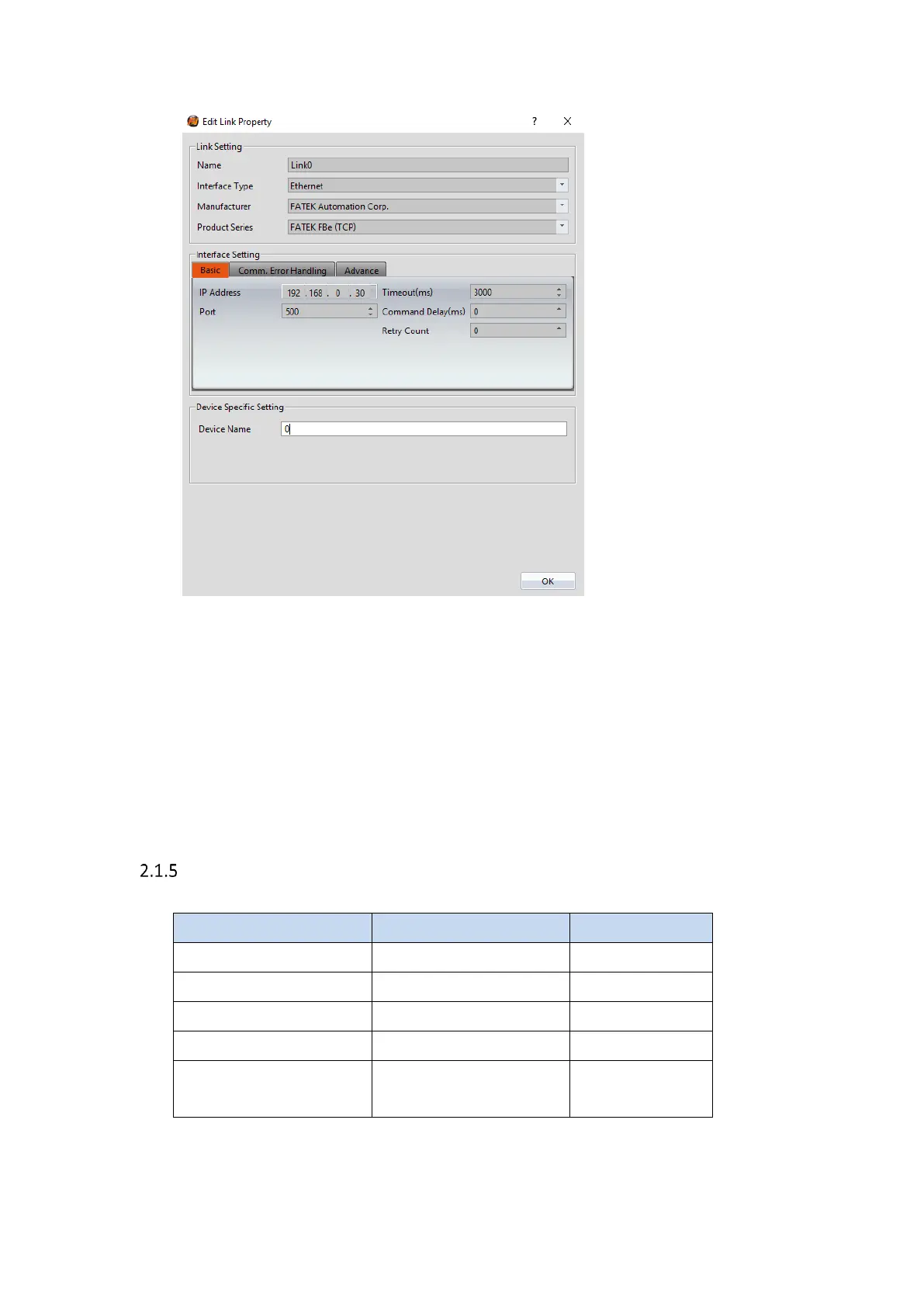
Within the Link configuration window in FvDesigner:
Under Interface Type select Ethernet
Under Manufacturer select FATEK Automation Corp
Under Product Series select FATEK FBe (TCP)
Use the IP address assigned on the PLC
Leave the Port at the default value
FBs/B1/B1z/HB1 (UDP)
2.1.5.1 Communication Setting
Item
Default Settings
Remark
Signal Level
Ethernet
Internet Protocol
192.168.1.100
Port
500
PLC Station No.
0
Communication
Method
UDP
2.1.5.2 Memory Resource Review

Other manuals for FATEK P5043N

Related product manuals